How to Use Tabs in The Archive
Based on Zettelkasten's video on YouTube. If you like this content, support the original creators by watching, liking and subscribing to their content.
Use tabs to separate cognitive tasks: navigation/search, active writing on a canvas, and ongoing drafting for a specific theme like backlinks.
Briefing
Tabs in the Zettelkasten “archive” are used as a practical workflow tool: one tab stays dedicated to navigation, one tab functions as a working canvas for a specific writing task, and a third tab acts as a scratchpad for research and backlink thinking. The core idea is that different kinds of work—finding related notes, building and reshaping a section of text, and drafting new material—benefit from separate, always-available spaces.
The navigation tab is the fast lane for locating context. It’s where the user searches within the title custom system for a note’s title and for related structure notes. A concrete example is searching for “Christ the Master and his emissary” by Stuart McGee, which surfaces related structure notes needed for quick access while reading and synthesizing.
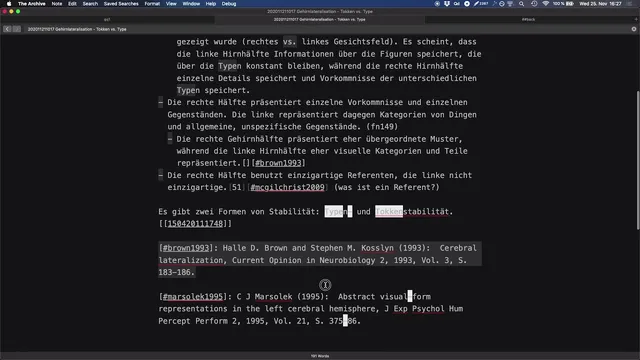
The second tab is the workspace on the canvas. Here, the user breaks apart a subsection from Stuart McGee’s book—specifically “individuals versus categories”—and reconstructs it into a new framing. Instead of keeping the original topic structure, the user transforms the material into a distinction between “type” and “token,” even reversing the usual order as a personal convention: tokens are associated with the right hemisphere, while types are associated with the left hemisphere. The workspace can look “messy” because it’s not meant to be polished; it’s where references are rearranged, ideas are recombined, and the subsection is iteratively turned into something that becomes “their own.”
That transformation is the key intellectual move: the goal isn’t just capturing what the author says, but extracting what matters and reinterpreting it through a different lens. The user connects the type/token distinction to language philosophy and analytic philosophy, and even to metaphysics—areas that align with their own departments in title custom dealing with language and metaphysics.
A third tab supports ongoing drafting and backlink research. It’s used to keep a larger, general draft open—about backlinks in the Zettelkasten system—so new thoughts can be added quickly. The draft is intentionally not shown, with a deliberate “cliffhanger” approach.
The workflow recommendation is straightforward: open as many tabs as you have active working modes, but don’t treat them as interchangeable. Keep the navigation tab for searching and the workspace tab open while developing the type/token rewrite. Leave the backlink draft tab open when backlink thinking is active, so it becomes easy to create new nodes and branch from emerging ideas. In short, tabs are organized around cognitive tasks, not just convenience—separating retrieval, creation, and synthesis into distinct, persistent spaces.
Cornell Notes
Tabs are organized around distinct cognitive tasks in a Zettelkasten workflow. One tab stays as a navigation/search space to pull up related structure notes quickly (e.g., searching within title custom for Stuart McGee’s “Christ the Master and his emissary”). A second tab remains the working canvas where a subsection like “individuals versus categories” is broken apart and rebuilt into a new framing—specifically a type/token distinction with a personal left/right hemisphere convention. A third tab holds a backlink-focused draft so new thoughts can be added and new nodes can branch off quickly. This matters because it turns tab management into a repeatable method for retrieval, transformation, and drafting.
How does the navigation tab function during note-taking and synthesis?
What role does the workspace tab play, and why can it look “messy”?
What intellectual transformation happens to “individuals versus categories”?
How does the third tab support backlink work?
What practical rule guides how many tabs to open?
Review Questions
- When should the navigation tab be used versus the workspace tab, and what specific tasks does each support?
- How does the type/token reframing change the way the original subsection “individuals versus categories” is handled?
- Why does keeping a backlink draft in a dedicated tab make it easier to create new nodes and branches?
Key Points
- 1
Use tabs to separate cognitive tasks: navigation/search, active writing on a canvas, and ongoing drafting for a specific theme like backlinks.
- 2
Keep a dedicated navigation tab for fast retrieval of related structure notes from title custom while working through a source.
- 3
Use a workspace tab to break apart and rebuild sections of text into a new conceptual framing, even if it diverges from the original topic structure.
- 4
Apply personal conventions consistently during transformation—for example, associating tokens with the right hemisphere and types with the left hemisphere, leading to a token/type ordering.
- 5
Leave a backlink-focused draft tab open during backlink research so new ideas can be added immediately and used to spawn new nodes.
- 6
Open as many tabs as there are active working modes, but don’t treat them as interchangeable; each tab should have a clear purpose.