How to Write Your First Draft in Half the Time with Paperpal
Based on Paperpal Official's video on YouTube. If you like this content, support the original creators by watching, liking and subscribing to their content.
Paperpal Copilot accelerates drafting by generating section-specific outlines from minimal user input, especially for original research article introductions.
Briefing
Paperpal Copilot is built to cut the time it takes to move from messy research notes to a usable first draft by generating structured outlines that match the conventions of academic writing. Instead of starting from a blank page, researchers can feed in a few rough sentences (or even a short prompt) and get a section-by-section scaffold—especially for original research articles—so they know what to write next and what information belongs in each part.
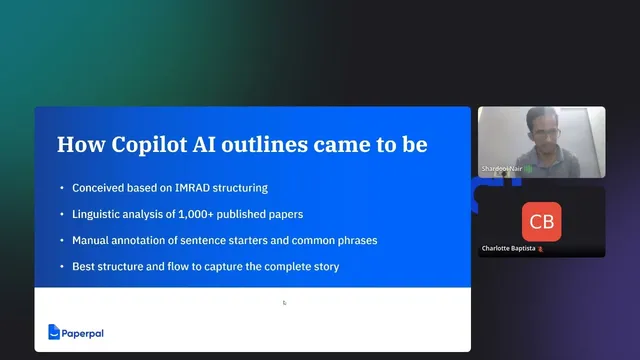
The core workflow centers on “divide and conquer” writing: academic papers follow predictable structures, such as IMRaD (Introduction, Methods, Results, and Discussion). Paperpal’s approach focuses on the introduction first, where narrative flow and literature framing matter most. The product’s outline generator uses linguistic analysis of thousands of published original research papers to identify recurring sentence patterns and section starters—like how objectives, background statements, and knowledge gaps are typically phrased. That learned structure then becomes a template that can be customized with the user’s own topic and notes.
In a live demo, the presenter begins with a bare-bones input about “climate change and its impact on mental health.” Copilot then generates an introduction outline with subheadings such as background, topic importance, existing knowledge, and knowledge gap. The user can select which generated sentences to keep, then add their own notes and references to make the outline accurate and specific. The demo shows how Copilot’s suggestions guide the writing order: background first, then why the topic matters, then what prior studies already show, followed by what remains unknown. It also recommends optional components like a rationale, research question, aim/objective statements, and—when appropriate—a hypothesis.
A key point is control. The outline is not presented as a final manuscript; it’s a starting structure meant to be refined. Users are encouraged to replace generic phrasing, add citations from their own literature, and adjust language to better match their voice. Once the introduction is fleshed out, the same outline-driven method can be used to draft other sections such as methods or results.
The Q&A reinforced practical concerns around academic integrity and usability. Participants asked whether AI-generated text could be considered plagiarism or be flagged by Turnitin; the response emphasized that AI output can increase similarity scores and that institutions and journals often require disclosure. The guidance: check local and journal policies, disclose tool usage when required, and run plagiarism checks. There was also discussion about how Paperpal differs from general-purpose chat tools: the advantage claimed is domain- and section-specific structure derived from analyzing real research papers, plus room for the writer to insert subject context.
Beyond research articles, the demo also showed outline generation for essays using minimal input (as little as a few words), again aiming to provide a fast, structured starting point. The session ended with product updates and roadmap items, including upcoming humanities coverage for outlines, and a planned citations-focused feature to help users manage references without leaving the writing workflow.
Cornell Notes
Paperpal Copilot speeds up first drafts by turning a few rough sentences or notes into a structured academic outline, particularly for original research articles. The system builds section templates (like IMRaD-style introductions) by analyzing patterns from thousands of published papers, then customizing the outline with the user’s topic and brief description. In the demo, a generic prompt about climate change and mental health produces an introduction scaffold with subheadings such as background, topic importance, existing knowledge, and knowledge gap, plus optional rationale, research question, and aims. Users then select suggested sentences, add their own references and specifics, and rewrite to match their voice. The result is a faster path from “blank page” to a draft-ready structure that still requires human refinement and citation work.
Why does Paperpal Copilot focus on outlines instead of generating full text immediately?
How does the outline generator decide what subheadings to include in an introduction?
What does “divide and conquer” mean in the context of drafting a research article?
How should users treat AI-generated outline text to avoid generic or mismatched writing?
What academic-integrity steps were recommended when using AI writing tools?
How does Paperpal’s approach differ from prompting a general chat model for an outline?
Review Questions
- If a researcher has only a few sentences about a topic, what exact output does Paperpal Copilot generate first, and what should the user do next to make it submission-ready?
- Which introduction components did the demo treat as recommended or optional (e.g., background, topic importance, knowledge gap, rationale, research question, hypothesis), and why might some be skipped?
- What integrity and disclosure steps were recommended in Q&A to reduce the risk of policy violations or plagiarism/similarity flags?
Key Points
- 1
Paperpal Copilot accelerates drafting by generating section-specific outlines from minimal user input, especially for original research article introductions.
- 2
The outline structure is derived from linguistic analysis of thousands of published papers, producing common academic section patterns and sentence starters.
- 3
Writers are expected to refine the generated outline by selecting sentences, adding their own notes, and inserting specific references from their literature.
- 4
The recommended drafting strategy follows IMRaD-style “divide and conquer,” with introductions benefiting most from structured scaffolding.
- 5
AI output may sound generic, so rewriting and voice-matching are essential to produce a credible first draft.
- 6
Academic-integrity guidance emphasizes checking journal/university policies, disclosing AI tool usage when required, and running plagiarism/similarity checks.
- 7
Paperpal’s outline coverage currently includes physical sciences/engineering and medical/life sciences, with humanities planned next.