i bet you can't do this (because you still suck at subnetting)
Based on NetworkChuck's video on YouTube. If you like this content, support the original creators by watching, liking and subscribing to their content.
An IPv4 address is 32 bits total, split into four octets of 8 bits each.
Briefing
An IP address is just 32 bits of on/off data, and mastering how to convert between that binary “matrix code” and the familiar decimal form is the foundation for subnetting. The core insight is that each octet in an IPv4 address is eight bits long, and those bits map directly to powers of two—so every 1 and 0 is either contributing a specific value or contributing nothing.
The lesson starts by reframing what an IPv4 address “looks like” to computers. While humans see four decimal numbers separated by dots, computers operate on binary: sequences of 1s and 0s. An IPv4 address contains 32 bits total, grouped into four octets. Each octet is eight bits, and eight bits make one byte—so the “size” of the address is not an abstract idea but a concrete storage unit. From there, the binary digits are treated like switches: 1 means “on,” 0 means “off.” The missing piece is what those switches mean numerically.
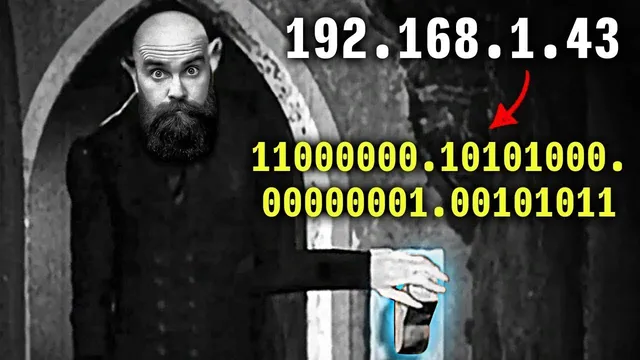
That numerical meaning comes from a powers-of-two chart. The chart lists values for each bit position within an octet: 2^0 through 2^7 (1, 2, 4, 8, 16, 32, 64, 128). Converting binary to decimal becomes a matter of lining up the bits with the chart, marking which positions are “on,” and adding only the corresponding powers of two. The walkthrough demonstrates this with multiple octets: for example, a binary pattern like 11000000 turns into 128 + 64 = 192, and other octets follow the same rule until the full dotted-decimal address emerges.
The reverse conversion—decimal to binary—uses the same chart but flips the process. Starting with a decimal octet value, the method repeatedly asks whether each power of two can be subtracted. If subtraction is possible, that bit becomes 1 and the value is reduced; if not, the bit becomes 0. The example with 172 shows the sequence clearly: 172 − 128 leaves 44, then 44 − 32 leaves 12, then 12 − 8 leaves 4, then 4 − 4 leaves 0, producing the binary octet 10101100. Additional octets (like 16, 34, and 3) are converted the same way, building the full 32-bit binary representation of the IPv4 address.
By the end, the takeaway is practical: this conversion skill is “leg day” for subnetting. Subnetting depends on being able to move confidently between binary and decimal because network boundaries and masks are expressed in bit-level terms. The lesson emphasizes practice—rewatching and doing the conversions repeatedly—so the powers-of-two mapping becomes automatic. (The transcript also includes unrelated sponsor segments, but the technical core remains the binary/decimal conversion workflow for IPv4 octets.)
Cornell Notes
IPv4 addresses are stored and processed as 32 bits, grouped into four octets of 8 bits each. Binary digits act like switches: 1 means “on” and 0 means “off,” but the real meaning comes from a powers-of-two chart (1, 2, 4, 8, 16, 32, 64, 128). To convert binary to decimal, match each bit to its power of two and add only the “on” values. To convert decimal to binary, work top-down through the same powers of two, subtracting when possible (turning that bit on) and leaving bits off when subtraction can’t be done. This conversion fluency is presented as essential groundwork for subnetting.
Why does an IPv4 address become “32 bits” in computer terms?
How does the powers-of-two chart turn binary into decimal for one octet?
What’s the step-by-step method for converting decimal to binary for an octet?
How does the “subtract when possible” approach determine which bits are on?
Why is binary/decimal conversion framed as essential for subnetting?
Review Questions
- Given an 8-bit binary octet, how do you decide which powers of two to add to get the decimal value?
- Convert decimal 34 into binary using the powers-of-two chart method described (show which subtractions are possible).
- If an octet’s binary is 10101100, what decimal value does it represent, and which powers of two are “on”?
Key Points
- 1
An IPv4 address is 32 bits total, split into four octets of 8 bits each.
- 2
Binary digits function as switches: 1 means on, 0 means off.
- 3
Each bit position in an octet corresponds to a power of two: 1, 2, 4, 8, 16, 32, 64, 128.
- 4
Binary-to-decimal conversion adds only the powers of two where the bit is 1.
- 5
Decimal-to-binary conversion works by subtracting powers of two when possible, turning those bits on.
- 6
Subnetting depends on bit-level understanding, so conversion fluency is a prerequisite skill.