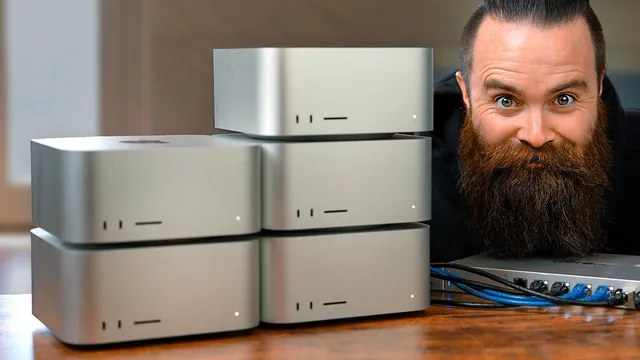
I built an AI supercomputer with 5 Mac Studios
Based on NetworkChuck's video on YouTube. If you like this content, support the original creators by watching, liking and subscribing to their content.
XO Labs can auto-discover multiple Mac Studios and form a local inference cluster with a web GUI and an OpenAI-compatible API.
Briefing
Five Mac Studios can be stitched into a local AI cluster with XO Labs—but the limiting factor isn’t just how much model memory the machines have. Networking bandwidth and overhead quickly cap token throughput, even when the cluster is able to run models that normally require cloud-scale hardware.
The build starts with a clear goal: run Meta’s Llama 3.1405B locally. That model is typically served by large GPU fleets, and the transcript lays out why it’s so hard—model size scales with parameter count, and parameter count drives the amount of GPU memory (VRAM) needed for inference. The creator uses Llama 3.2 as a baseline and then walks up through larger variants, noting practical VRAM requirements (for example, multi‑tens of gigabytes for 70B-class models, and far beyond consumer setups for 405B). To make large models fit on smaller hardware, the transcript emphasizes quantization—reducing precision (FP32/FP16 down to int8 and lower) to shrink memory footprints while accepting some accuracy loss.
The hardware plan hinges on Apple’s M-series “unified memory” architecture. Each Mac Studio used in the cluster has 64GB of unified RAM, which can be shared with the GPU. With five units, that becomes a theoretical 320GB pool for inference, and the creator argues this helps because unified memory reduces the usual system-memory-to-VRAM transfer overhead. The cluster is then assembled using XO Labs, a beta tool aimed at AI clustering across heterogeneous hardware. XO auto-discovers nodes and provides a web GUI and an OpenAI-compatible API, letting the cluster split work across machines.
The first performance test uses 10GbE networking via a 10 gigabit switch. A single Mac Studio running a small model (around 1B parameters) reaches roughly 117 tokens per second. But once all five nodes join the cluster, throughput drops sharply—about 29 tokens per second—signaling that network constraints dominate. The transcript also notes an operational pain point: model downloads and distribution can be slow and sometimes buggy, with the model appearing to download on multiple nodes rather than being perfectly shared.
To reduce the bottleneck, the creator swaps to Thunderbolt networking using a bridge/hub setup to reach higher bandwidth (up to ~40Gbps) and more direct PCIe access. Token rates improve modestly (roughly 50 tokens per second for smaller tests with two nodes), but the five-node cluster still lands in the low double digits for tokens per second. The transcript repeatedly returns to the same conclusion: bandwidth and coordination overhead limit how fast the cluster can generate text, even when RAM capacity is sufficient.
The “biggest model” moment comes with the 405B target. Running it on a single Mac Studio fails due to memory pressure, triggering heavy swap usage and risking timeouts. With five nodes, swap stays inactive and the system eventually begins generating output—around 0.5–0.8 tokens per second—confirming the cluster can run the model locally, just not at interactive speeds.
Finally, the transcript compares XO’s performance on Apple’s MLX inference stack versus local inference workflows like Ollama, and demonstrates integration with Fabric (via OpenAI-compatible APIs) for streaming chat and summarization. The overall takeaway is pragmatic: local AI clustering with Mac Studios is feasible for very large models, but networking remains the main obstacle to making it fast—especially for the largest Llama variants.
Cornell Notes
XO Labs can turn five Mac Studios into a local AI cluster that auto-discovers nodes and runs LLM inference across machines. The cluster’s ability to handle very large models depends heavily on Apple’s unified memory (64GB per Mac Studio) and quantization, which reduces precision to fit models into available memory. In practice, token throughput collapses when moving from one node to five, with 10GbE dropping performance from ~117 tokens/sec to ~29 tokens/sec. Thunderbolt improves results somewhat, but five-node generation still stays in the low double digits. The 405B model becomes runnable only when distributed across all five nodes, producing output at roughly 0.5–0.8 tokens/sec—proof of feasibility, not speed.
Why does model size (parameters) translate into a practical hardware requirement for local LLMs?
What role does quantization play in making large models run on consumer GPUs?
How does Apple unified memory change the feasibility of clustering Mac Studios for LLM inference?
What bottleneck appears when scaling from one Mac Studio to a five-node cluster?
Why does Thunderbolt help, and why doesn’t it fully solve the speed problem?
How does the cluster handle the 405B model, and what does the result imply?
Review Questions
- What specific hardware feature in the Mac Studios is presented as enabling large-model inference without dedicated VRAM, and how is it expected to reduce overhead?
- How do the transcript’s token-per-second results change when moving from one node to five nodes over 10GbE, and what bottleneck is blamed?
- Why does quantization allow larger models to fit, and what trade-offs does the transcript associate with lower-bit quantization (e.g., int4)?
Key Points
- 1
XO Labs can auto-discover multiple Mac Studios and form a local inference cluster with a web GUI and an OpenAI-compatible API.
- 2
Model size scales with parameter count, which drives memory requirements for inference; quantization is used to shrink models to fit available memory.
- 3
Apple’s unified memory architecture is positioned as a key enabler for running large models on Mac Studio GPUs without separate VRAM constraints.
- 4
10GbE networking becomes a major bottleneck when scaling to five nodes, causing a large drop in tokens per second compared with single-node runs.
- 5
Thunderbolt networking improves throughput by increasing bandwidth and reducing overhead, but it still doesn’t eliminate the multi-node speed ceiling.
- 6
The 405B Llama target becomes runnable only when distributed across all five nodes, producing output at roughly 0.5–0.8 tokens/sec—slow but feasible.
- 7
Model download/distribution overhead can dominate setup time and can behave inconsistently across nodes, affecting practical usability.