I Don't Think About Meetings Anymore - Here's the System
Based on Tiago Forte's video on YouTube. If you like this content, support the original creators by watching, liking and subscribing to their content.
Use a transcript-producing trigger (e.g., a new Bubbles recording) to start an automated chain rather than relying on manual meeting notes.
Briefing
A meeting-to-metrics automation built around transcripts can eliminate a large chunk of knowledge-work overhead—turning recorded calls into follow-ups, checklists, CRM updates, and near-real-time reporting without manual copy/paste. The core idea is simple: once a workflow can reliably produce a transcript, it can trigger a chain of AI-assisted steps that analyze the content, extract structured outputs, and push those results into the tools teams already use.
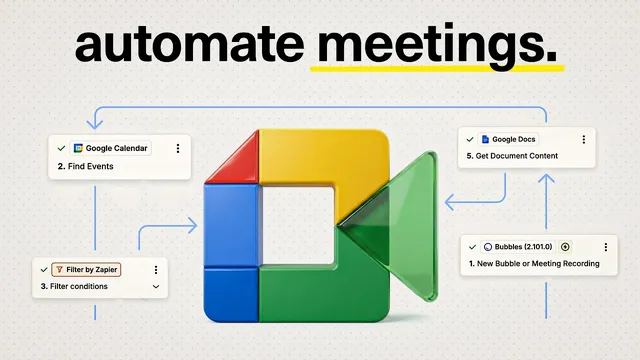
The system starts with a trigger that detects a new recording in Bubbles (a screen recorder). Zapier then uses that recording’s title to find the matching event in Google Calendar for the right meeting. A filter step ensures the automation only runs for the intended call type—for example, an onboarding call tied to a specific product called the accelerator. After the correct event is identified, the workflow creates an audio file in Google Drive, generates a Google Doc containing the transcript, and then runs an AI analysis step.
The key analysis step uses “GPT5 Mini” with a carefully designed prompt. The prompt functions like a checklist: it asks the model to conduct a comprehensive analysis of the transcript and return yes/no values for specific business-process criteria. In the onboarding example, the criteria include whether the participant covered required topics (five items) and whether a scheduled follow-up call was arranged. Zapier’s preview output helps validate the prompt and confirm that the model is extracting the right fields before the automation goes live.
Those yes/no outputs feed into a structured row in a Google Sheet. Each row includes links back to the call and transcript, a summary, and action items—along with the checklist results. If any checklist item comes back “no,” the workflow can flag the issue immediately, such as by notifying the direct manager in Slack or sending an email for faster course correction. The transcript analysis therefore becomes an operational control mechanism, not just documentation.
From there, the automation pushes results into execution and reporting systems. Internally, it updates ClickUp tasks for both the team and the customer, ensuring platform access and customer progress are tracked consistently. Because ClickUp reporting is updated automatically, management no longer waits for weekly lag; reporting can be refreshed daily. In a sales context, the same pattern can extend to Salesforce (or other CRMs), automatically logging follow-ups, updating deal stages, and capturing notes—reducing errors that typically come from manual data entry.
The practical payoff described is time and accuracy. The automation is estimated to remove about 20% of a salesperson’s time spent on follow-ups, notes, and reporting, enabling more calls and more throughput. It also reduces the risk of missed steps by replacing manual checklists with transcript-based validation.
Overall, the workflow is presented as a template for knowledge work: any process that yields a transcript—calls, training sessions, recruiting interviews, even video study materials—can be routed through a trigger, an AI prompt that extracts structured outputs, and downstream updates to spreadsheets, Slack, and task/CRM systems.
Cornell Notes
The system turns recorded meetings into structured business outcomes by chaining transcript generation with AI-driven checklist analysis and automatic updates across tools. A Bubbles recording triggers Zapier, which matches the recording to the correct Google Calendar event, filters for the right call type, stores the transcript in Google Drive/Docs, and sends the transcript to GPT5 Mini with a prompt that returns yes/no criteria. Those results populate a Google Sheet with summaries, action items, and links, and can trigger Slack notifications for immediate course correction when items are missing. Finally, the workflow updates ClickUp (and can extend to CRMs like Salesforce) so reporting and task status stay current without manual data entry or weekly delays.
How does the workflow know which meeting to process and what to do with it?
What role does the AI prompt play, and why is it described as the “key step”?
What structured artifacts does the system produce from a transcript?
How does the automation enable “course correction” after a call?
How are downstream systems updated, and what changes for reporting?
What kinds of knowledge-work scenarios does the template generalize to?
Review Questions
- Which specific steps in the workflow ensure the transcript is matched to the correct calendar event and the correct call type?
- How does returning yes/no checklist outputs change what Zapier can automate downstream compared with free-form summaries?
- What mechanisms in the system reduce reporting lag and manual error, and where do those updates land (e.g., Google Sheets, Slack, ClickUp, CRM)?
Key Points
- 1
Use a transcript-producing trigger (e.g., a new Bubbles recording) to start an automated chain rather than relying on manual meeting notes.
- 2
Match recordings to the correct meeting by using the recording title to find the corresponding Google Calendar event, then filter for the intended call type.
- 3
Design the AI prompt to output structured, machine-checkable results (yes/no checklist items) so downstream tools can act reliably.
- 4
Store transcripts and analysis outputs in a structured place like Google Drive/Google Docs and Google Sheets to create traceable records with links.
- 5
Route “no” outcomes to immediate notifications (Slack/email) so missing steps trigger fast course correction.
- 6
Update execution and reporting systems automatically (ClickUp and optionally CRMs like Salesforce) to eliminate weekly reporting lag and reduce data-entry errors.
- 7
Treat the workflow as a reusable template for any knowledge-work process that can generate a transcript, not just sales calls.