I ranked every vibe coding app
Based on Theo - t3․gg's video on YouTube. If you like this content, support the original creators by watching, liking and subscribing to their content.
Vibe coding rankings prioritize outcome-first workflows that reduce steering, terminal use, and code visibility for non-experts.
Briefing
Vibe coding tools are multiplying fast—but the real differentiator isn’t raw coding power. It’s how well each tool lets non-experts “drive” toward an outcome without getting bogged down in terminals, code navigation, or developer-only workflows. In a tier-list-style ranking, Theo - t3․gg places tools on a “vibe” scale based on how much they hide implementation details, how much steering they require, and whether the experience feels designed for people who want results rather than mastery.
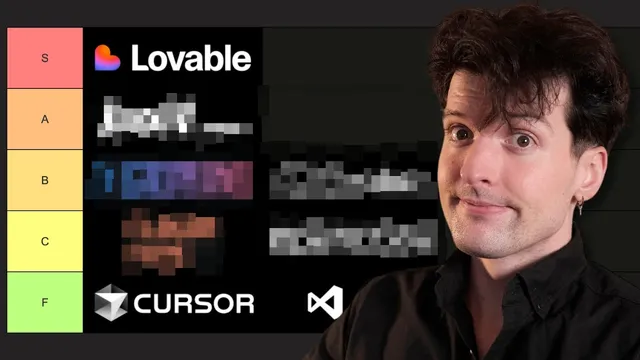
At the top of the practical “vibe” tier sits Cursor, largely because it behaves like an assistant you can actively steer—when you’re in the right mode. Cursor is described as the IDE of choice for Theo - t3․gg, with a key limitation: it’s strong when “driving” the agent, but weaker at autonomous steering. The interface also shows code prominently, which the ranking treats as a negative for vibe coders who prefer not to look at code at all. That same logic pushes several mainstream developer tools down: VS Code with Copilot lands in F tier because it’s fundamentally for coders, not vibe coders.
Windsurf lands in B tier. It started as a plugin-focused alternative and pivoted into a full IDE, but its defining feature is agent mode that can run its own commands—install packages, set up scripts—without the user micromanaging keystrokes. Theo - t3․gg also frames Windsurf as better suited for less competent developers, even noting that many users appear not to be engineers. Kira lands between Cursor and Windsurf: it’s built around spec-driven development, generating massive, hundreds-of-lines markdown plans before writing any code. That structure feels “corporate” and assumes a large existing codebase, making it less ideal for starting from scratch—yet it still matches the vibe of planning-heavy automation.
Trey is initially placed in B tier, then bumped to A tier after a demo that produces “illegible text” and “stunning images” in solo mode—an experience Theo - t3․gg describes as screaming vibe coding. The ranking is sensitive to friction: Trey’s solo mode requires upgrading to Pro and even a waitlist, which holds it back despite strong output.
Cloud Code, Open Code, and Codex illustrate the ranking’s tension between autonomy and vibe. Cloud Code is treated as an early “vibe coding for devs” tool because it hides code and pushes work into background execution, but it still forces users to watch the terminal. Open Code is instantly F tier because it refused investment—an explicit personal bias that becomes part of the meme. Codex is high-ish thanks to GPT5-powered coding success, but it drops because the project moved from TypeScript to Rust, which Theo - t3․gg calls the wrong “vibes” for vibe coders.
The ranking then tests “no-code” style apps: V0ero (now positioned as “no coding needed”), Bolt, Replet, and Lovable. V0ero performs well because it supports a prompt-first workflow and avoids terminal steps, earning A tier. Bolt and Lovable land in B tier due to UI clutter, integration friction, and errors that would be easier for developers to fix. Replet is also B tier, largely because it’s slow and doesn’t deliver the expected smoothness.
Finally, the list widens to other tools and even a “vibe coding demo” built on Convex (Chef). Chef can run full-stack with integrations, but it’s judged too developer-oriented, landing low. The overall takeaway is blunt: the “best” vibe coding tool is the one that minimizes steering, hides code, and gets to a usable outcome with the least cognitive overhead—while tools that demand developer knowledge, terminal fluency, or deep configuration tend to fall.
Cornell Notes
The tier list ranks AI coding tools by “vibe coding” fit: how well they help non-experts produce working results without steering through code, terminals, or developer workflows. Cursor scores well because it’s easy to drive as an assistant, but it’s penalized for showing code and for weaker autonomous steering. Windsurf and Kira land mid-tier due to their agent behaviors and spec-first planning, yet both assume different levels of user competence or existing codebase context. Trey rises after solo-mode output looks highly vibe-friendly, though access friction (Pro/waitlist) limits its placement. Prompt-first “no coding needed” tools like V0ero perform strongly, while Bolt/Replet/Lovable are dragged down by UI clutter, integration steps, and errors that feel too developer-centric.
What criteria determine whether a tool feels “vibe coding” friendly?
Why does Cursor land high even though it’s an IDE?
How do Windsurf and Kira differ in what they automate?
What pushes Trey upward in the ranking?
Why does V0ero score well compared with other “no-code” style tools?
What role does Rust play in lowering Codex?
Review Questions
- If a tool hides code but still requires constant terminal monitoring, where would it likely land in this ranking—and why?
- How would you predict the tier placement of a new tool that supports prompt-first UI editing but requires API keys and GitHub setup?
- Which matters more in this framework: autonomous steering or minimizing developer concepts—and how does that change placements across Cursor, Windsurf, and Cloud Code?
Key Points
- 1
Vibe coding rankings prioritize outcome-first workflows that reduce steering, terminal use, and code visibility for non-experts.
- 2
Cursor performs best when users actively drive it; weaker autonomous steering and prominent code display limit its “vibe” score.
- 3
Windsurf’s agent mode is valued for running commands and setting up projects without bash fluency, fitting less technical users.
- 4
Kira’s spec-first approach can be powerful for large codebases, but its corporate planning and assumptions about existing structure reduce vibe for greenfield work.
- 5
Trey’s solo mode output looks highly vibe-friendly, but access friction (Pro/waitlist) can outweigh raw capability in the tier placement.
- 6
Prompt-first tools like V0ero score well when they avoid terminal steps and let users build via design/chat interactions.
- 7
No-code app builders like Bolt, Replet, and Lovable tend to fall when UI clutter, integration steps, or errors require developer-level troubleshooting.