INSANE Productivity MCP Server Setup in Claude Code
Based on All About AI's video on YouTube. If you like this content, support the original creators by watching, liking and subscribing to their content.
Use a dedicated agent mailbox so inbox content can be safely separated from personal email while still enabling automated reading, searching, and replying.
Briefing
A tightly wired MCP (Model Context Protocol) agent setup turns email, web search, scraping, and Gemini 2.5 Pro reasoning into an end-to-end productivity workflow—then uses incoming messages to trigger real code and send results back. The core payoff is speed and automation: a user can search for opportunities, summarize and act on inbox content, and even generate a localhost 3000 app that compares model pricing, all by chaining specialized tools under one agent.
The setup starts with a dedicated Gmail address for the AI agent (“Chris” on Gmail), kept separate from personal email. That mailbox connects to an MCP email server that can read and search messages—using queries like “all inbox” over a chosen time window (the transcript mentions a 24-hour option). In practice, the agent can pull specific emails, summarize them, and also send replies. The creator highlights that the email search feels stronger than Gmail’s native search when the inbox grows.
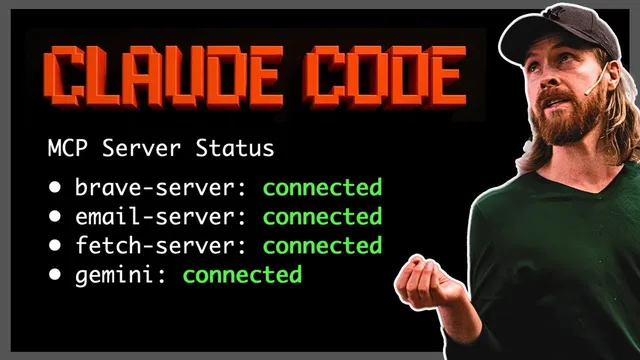
For web research, the agent uses Brave search to find relevant URLs, then a fetch tool to retrieve page content for deeper context. Gemini 2.5 Pro (configured as the “global MCP server”) performs the reasoning and generation step. A simple demo shows the agent summarizing two emails by feeding the email text into Gemini 2.5 Pro and producing a concise digest. The workflow then extends to sending that summary to a boss email address (the transcript references sending to “Chris”).
The more advanced capability comes from chaining tools. In one example, the agent is prompted to find AI engineering jobs in Paris and return a summary with outreach emails. The agent first uses Brave search to identify hiring companies and job pages, then uses fetch to pull details from the discovered sources, and repeats web lookups for additional leads (the transcript mentions examples like “Mistral AI” and “DataDog” appearing in the results). The output includes job titles and locations, and—when available—email contacts. Even when email extraction is sparse, the agent still compiles a usable list and can send it back via email.
The most striking demo uses an email as the trigger for software generation. A “boss” message instructs the agent to: (1) check the latest inbox emails from the last 24 hours, (2) read the job request, and (3) build a local host 3000 application that visually compares API pricing for “o3” (OpenAI) versus “Gemini 2.5 Pro,” including graphs and a side-by-side cost analysis. The agent then performs web lookups for pricing, fetches the needed information, and generates/installs packages and runs an app via npm start. A key operational detail appears mid-demo: the agent initially runs the server before sending the completion email, so the workflow is corrected by sending the “application is ready” email first, then starting the server. The final result is an email confirmation with a localhost 3000 link and a rendered pricing comparison.
Overall, the transcript frames the setup as a practical bridge between information work (email + web research + summarization) and action work (building and running an app, then notifying stakeholders). The creator also suggests future extensions like deploying the generated app to Vercel to avoid local-only access, turning ad-hoc agent output into shareable tools for colleagues.
Cornell Notes
The MCP setup connects a dedicated agent email to tool-based automation: it can read and search inbox messages, use Brave search to find relevant web pages, fetch page content, and rely on Gemini 2.5 Pro for summarization and reasoning. Simple tasks include summarizing emails and emailing the results to a boss. More complex tasks chain tools to compile job leads (e.g., AI engineering roles in Paris) and attempt to extract contact emails. The standout workflow uses an incoming email request to trigger code generation: the agent gathers API pricing for “o3” and “Gemini 2.5 Pro,” builds a localhost 3000 visualization app, runs it, and then emails a completion notice with the link.
How does the agent handle email tasks in this setup?
What role do Brave search and fetch play in the workflow?
How does tool chaining enable the job-search demo?
How does an email become a software-building instruction?
What operational issue appears during the coding demo, and how is it fixed?
Review Questions
- What specific tools are used for discovery (search), retrieval (fetch), and reasoning/generation (Gemini 2.5 Pro), and how do they connect in a chained workflow?
- In the job-search example, what steps occur between the initial prompt and the final email-ready list of roles?
- Why does the email-first vs. server-first ordering matter in the localhost 3000 application demo?
Key Points
- 1
Use a dedicated agent mailbox so inbox content can be safely separated from personal email while still enabling automated reading, searching, and replying.
- 2
Combine Brave search with fetch to move from URL discovery to usable page content for downstream reasoning.
- 3
Rely on Gemini 2.5 Pro as the reasoning/generation layer to summarize emails, extract structured job lists, and drive multi-step tasks.
- 4
Chain tools to automate research workflows—job leads in Paris are assembled by iterating search and scraping steps before compiling results.
- 5
Treat incoming emails as triggers for action: a message can instruct the agent to gather pricing data and generate runnable code.
- 6
Ensure correct execution order for multi-step outcomes (send the “ready” email before starting the server) to avoid mismatched expectations.
- 7
Consider deploying generated apps (e.g., via Vercel) to turn local-only outputs into shareable tools for teams.