Lab 06: Data Annotation (FSDL 2022)
Based on The Full Stack's video on YouTube. If you like this content, support the original creators by watching, liking and subscribing to their content.
Rich annotations at line/word/character level support synthetic paragraph generation, even when the final target is paragraph-level.
Briefing
Data annotation is treated as a make-or-break step in the full machine-learning pipeline: rich, carefully structured labels—often at finer granularity than the final task—are what turn raw handwritten inputs into training data that neural networks can actually learn from. The lab’s first half focuses on how handwritten-text datasets are represented and persisted for PyTorch/PyTorch Lightning, emphasizing that the “flavor” of the raw data matters less than the principle of capturing detailed annotations. Even when the end goal is a whole paragraph, the workflow benefits from labeling at the line, word, and character levels. That detail enables synthetic data generation, such as recombining lines from different paragraphs into new synthetic paragraphs to stretch limited datasets. The lab frames data synthesis as an underrated early-stage strategy for bootstrapping ML systems, especially when data is scarce, and notes that modern image/text synthesis advances (including approaches associated with Stable Diffusion–style image generation and GPT-3–style text generation) make this kind of augmentation increasingly important.
The second half shifts from dataset structure to the practical mechanics of producing annotations from the real world. Raw handwritten pages are easy to collect by scanning and digitizing, but the labels must be created manually. For that, the lab uses Label Studio, a secure web-based annotation tool. Because Label Studio runs as a local web service during the exercise, the setup includes creating a username/password, installing Label Studio, and using ngrok to expose the local service to the public internet without wrestling with firewalls or port forwarding. The lab also uses a publicly accessible FSDL handwriting dataset stored on S3, but in an unannotated form; instead of uploading images directly, Label Studio ingests a manifest (a CSV of URLs). In local development, the manifest can be uploaded directly; in Colab-style workflows, the manifest must be downloaded to the machine running the browser.
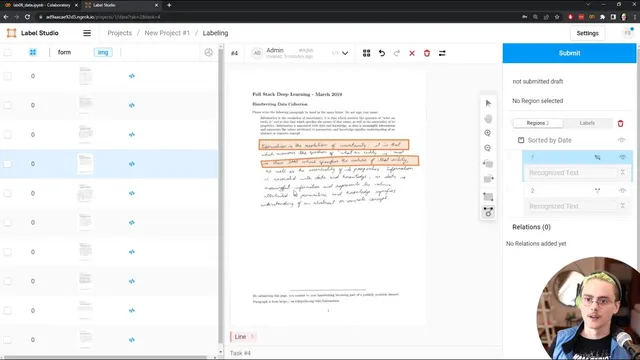
Once Label Studio is running, each row in the CSV becomes a “task” to annotate. The lab then walks through building an annotation interface using Label Studio’s domain-specific language, starting from an OCR template and customizing it to match the desired output: annotators mark each line of handwritten text. The interface supports zooming, rotating, and precise region selection via draggable controls. A key part of the workflow is UI debugging and ambiguity resolution—spending time annotating a few forms end-to-end to understand edge cases such as whether annotators should tightly bound individual letters (even if that overlaps neighboring lines), how much rotation to apply to follow the text baseline, and whether to correct misspellings. The lab’s guidance is explicit: annotators should make a best effort to capture the letters present in the handwriting, not “correct” spelling or replace uncertain handwriting with the printed prompt.
Finally, the lab highlights a practical constraint: if downstream data handling expects rectangular regions, polygon selectors should be removed from the UI even if polygon precision seems useful. It also recommends writing clear instructions inside Label Studio and testing them with real annotation passes. The exercise ends with a teardown step that shuts down the Label Studio service and returns the environment to the model-development setup for the next lab, where trained models are deployed into production.
Cornell Notes
The lab treats data annotation as an end-to-end pipeline requirement, not a clerical step. It argues that labeling should be rich—often at line/word/character level—even if the final model target is coarser (like full paragraphs), because that detail enables synthetic paragraph generation by recombining labeled lines. For producing those labels from raw scans, it uses Label Studio running as a local web service, exposed via ngrok, and fed by a CSV manifest of image URLs. Annotators are guided to mark handwritten text lines with best-effort letter capture, avoiding spelling correction or substituting the printed prompt. The setup also stresses UI debugging and alignment with downstream assumptions, such as removing polygon region tools when the training pipeline expects rectangles.
Why does the lab emphasize labeling at line/word/character granularity when the final task may be a paragraph-level output?
What is the practical difference between collecting handwritten scans and producing the training-ready dataset?
How does Label Studio get the data it needs to annotate in this lab setup?
What kinds of annotation ambiguities does the lab ask annotators (and developers) to resolve?
Why remove polygon region selection even if it seems more precise?
Why use ngrok in this workflow?
Review Questions
- What labeling granularity choices enable synthetic data generation in this lab, and how does that affect model training when data is scarce?
- How do the lab’s annotation instructions prevent annotators from “correcting” handwriting using the printed prompt?
- What mismatch can occur if the annotation UI allows polygon regions but the preprocessing/training code expects rectangles?
Key Points
- 1
Rich annotations at line/word/character level support synthetic paragraph generation, even when the final target is paragraph-level.
- 2
Synthetic data is positioned as a practical early-stage strategy for bootstrapping ML systems under data scarcity.
- 3
Raw scanned images are easy to collect; high-quality annotations require a dedicated workflow and careful UI configuration.
- 4
Label Studio is used to create structured annotation tasks from a CSV manifest of image URLs, with each row treated as a task.
- 5
ngrok enables access to a locally running Label Studio service from a public URL without manual port-forwarding.
- 6
Annotation quality depends on resolving ambiguities (bounding precision, rotation, and transcription rules) through clear instructions and test passes.
- 7
Annotation tools must match downstream preprocessing assumptions, such as using rectangular regions when training code expects rectangles.