Lab 07: Web Deployment (FSDL 2022)
Based on The Full Stack's video on YouTube. If you like this content, support the original creators by watching, liking and subscribing to their content.
Convert training checkpoints into TorchScript to make inference artifacts lighter and more portable across environments.
Briefing
A practical deployment pipeline turns a trained PyTorch text recognizer into a portable, shareable model service—first by compiling it to TorchScript, then by wrapping it in a Gradio interface, and finally by splitting the UI from model execution so it can run behind a stable public URL. The payoff is a workflow that moves beyond “just training” into an application people can actually use: upload an image, submit it, and receive handwritten text output through a web link.
The process starts with model weights saved during training. Checkpoints produced for restarting training are repurposed for inference by loading them into a Lightning module and converting the resulting model to TorchScript via the model’s TorchScript conversion method. That conversion yields a lighter artifact that can run without a Python runtime and without the heavy development dependencies typically required for training stacks. Once compiled, the TorchScript binary is stored in Weights & Biases (W&B) cloud storage, and a small “stage model” script automates the handoff from training to production.
A key operational advantage of using W&B for both training artifacts and production artifacts is traceability. The compiled TorchScript model is linked back to the specific training run that produced the checkpoint, along with logged metrics and experiment metadata. Early on, manual tracking is manageable, but as teams and model versions grow, programmatic access to that lineage becomes essential for debugging, auditing, and iterating.
With the model packaged, the lab introduces a dedicated Python module—ParagraphTextRecognizer—designed to load the TorchScript artifact with a single call (torch.jit.load). Inputs are formatted to match what the model expects, and outputs are converted back into strings, enabling an image-to-text workflow. To keep iteration safe, an end-to-end test script runs the full chain: data ingestion, gradient updates, checkpoint saving, TorchScript conversion, uploading to W&B, and pulling the compiled model back down. Any failure in that pipeline causes the test to fail.
For deployment performance, the lab emphasizes that GPUs are not always necessary for inference. In the provided notebook environment, inference runs without a GPU, and the discussion highlights why batching matters when GPUs are used: training can batch efficiently because it controls data flow, while production requests arrive independently. Profiling comparisons show that batch size 16 maintains high GPU utilization, while batch size 1 drops utilization and shifts the bottleneck to CPU-side work.
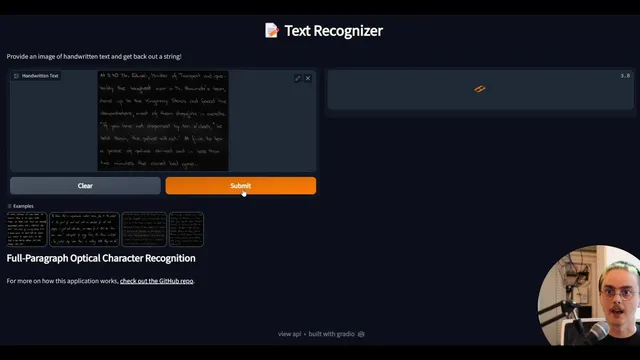
Next comes the user experience. A Gradio app wraps the recognizer’s predict function, automatically generating an interface with image input widgets and text output. Gradio also provides an API endpoint and a REST-style workflow for programmatic access, including base64 encoding for image payloads. A minimal web test verifies that the UI and API respond without errors.
Finally, the lab moves toward a model-as-a-service architecture. The Gradio frontend can call an AWS Lambda function that loads the TorchScript model and returns predictions via JSON over HTTP. This separation allows the UI to run locally while model inference runs on AWS infrastructure. To make the app shareable beyond Gradio’s temporary URLs, the lab uses ngrok to expose the locally running Gradio service over HTTPS, then outlines production deployment on an EC2 instance and an optional Docker-based approach to automate environment setup and execution.
Overall, the workflow—compile to TorchScript, package and trace with W&B, wrap with Gradio, serve via serverless or separated backends, and expose with stable public tunneling—creates a realistic path from research artifacts to an application that users can interact with immediately.
Cornell Notes
The lab builds a complete path from a trained PyTorch text recognizer to a shareable web application. It converts training checkpoints into a TorchScript binary so inference can run with fewer dependencies and greater portability, then stores the compiled artifact in W&B while linking it back to the originating training run. A ParagraphTextRecognizer module loads the TorchScript model and turns image inputs into text outputs. Gradio wraps the predict function to provide both a UI and an API, and the model can be separated from the frontend by serving inference through AWS Lambda. To share the app reliably, ngrok exposes the local Gradio service over HTTPS, and the lab also sketches EC2 and Docker for longer-term deployment and automation.
Why compile a trained PyTorch model into TorchScript before deployment?
How does W&B help once the model is in production, not just during training?
What does the ParagraphTextRecognizer module do in the deployment workflow?
Why does batching matter for GPU efficiency in production?
How do Gradio and its API change how users interact with the model?
What does separating the frontend from the model backend enable?
Review Questions
- What specific steps convert a training checkpoint into a production-ready TorchScript artifact, and where is the compiled output stored?
- How do batching and request patterns in production affect GPU utilization, and what profiling signals indicate a CPU bottleneck?
- In what ways do Gradio’s UI and API endpoints differ, and why is base64 encoding needed for image requests?
Key Points
- 1
Convert training checkpoints into TorchScript to make inference artifacts lighter and more portable across environments.
- 2
Store compiled TorchScript binaries in W&B and link them back to the originating training runs for traceability.
- 3
Use a dedicated recognizer wrapper (ParagraphTextRecognizer) to load TorchScript, format inputs, and return text outputs.
- 4
Add an end-to-end test that validates the full pipeline from training artifacts through TorchScript conversion and W&B upload/download.
- 5
Treat batching as a lever for GPU efficiency in production; batch size 16 can maintain high GPU utilization while batch size 1 often shifts work to the CPU.
- 6
Wrap the model with Gradio to deliver both an interactive UI and a REST-style API, including base64 image encoding for requests.
- 7
Separate the frontend from inference by serving the model through AWS Lambda, then expose the app publicly using ngrok (HTTPS) or longer-term hosting on EC2/Docker.