LangChain Beginner's Tutorial for Typescript/Javascript
Based on Chat with data's video on YouTube. If you like this content, support the original creators by watching, liking and subscribing to their content.
LangChain targets common failure modes in LLM apps: token limits, lack of grounding in custom data, and brittle prompt workflows.
Briefing
LangChain is positioned as a practical framework for building JavaScript/TypeScript applications on top of large language models—especially when prompts alone aren’t enough. The core problem it targets is that real-world AI apps hit hard limits: token caps force chunking for long documents, general-purpose chat models can return irrelevant or misleading answers when custom business knowledge is required, and complex prompt workflows become difficult to scale and manage alongside costs, testing, and formatting.
The tutorial breaks down those pain points in concrete terms. A typical request can handle roughly 4,000 tokens (about 3,800 words when combining prompt and expected response). That makes tasks like summarizing or extracting insights from 10,000-word PDFs or books impractical without splitting text into chunks—while still preserving context across boundaries. Even when developers use a model like ChatGPT, the output may drift into generic explanations unless the system is grounded in the user’s own data. There’s also the operational burden of crafting multi-part prompts (identity, instructions, examples, and constraints) and wiring them to user-provided variables, which quickly turns into a workflow-management problem rather than a simple “send a prompt” problem.
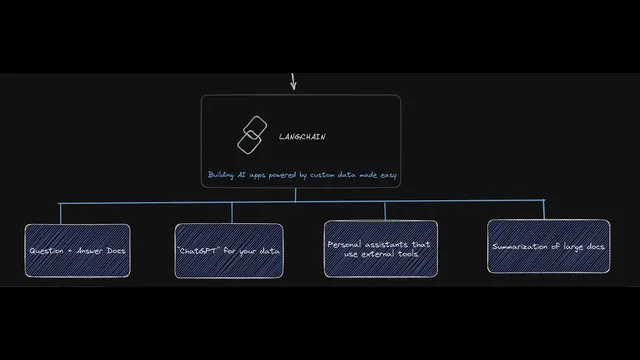
LangChain’s answer is to coordinate the moving parts needed for data-grounded AI: prompts, the model, memory, indexes, document loaders, agents, and chains. Prompts define instructions; memory retains prior conversation context; indexes and vector stores support retrieval over large document collections; document loaders convert PDFs or other sources into text; agents connect the model to external tools; and chains stitch these components into repeatable workflows. The framework’s value proposition is “AI powered by custom data made easy,” enabling use cases like document question answering, summarization, and chat experiences tailored to a company’s documents or database.
The tutorial then walks through building blocks in TypeScript/JavaScript. It starts with a simple chain: take a user query, send it to an OpenAI model, and return a response. Next comes prompt templates, where user inputs (like a country name) fill variables inside a prompt. It extends this to few-shot prompting, where example pairs (country → capital) teach the model a pattern before it answers a new question.
Agents are introduced as “personal assistants” that can think through steps and call external tools. A toy example asks for “the number of countries in Africa to the power of three,” then uses search (via an external API) to find the count and a calculator tool to compute the result. Memory is demonstrated with a conversation that remembers a user’s name across turns.
The most important section is retrieval. The tutorial explains embeddings as a way to convert text into numeric vectors so similarity search can find relevant chunks. It uses Pinecone as a vector store, shows how documents are split into overlapping chunks (via a recursive text splitter), and stores embeddings along with metadata. Finally, it demonstrates document Q&A: a query is embedded, the vector database returns the most similar chunks, and LangChain feeds the top context into a question-answering prompt template (including an instruction to say “do not know” if the answer isn’t present). The result is a grounded response—like pulling “over 6.5 million new jobs” from a large text—along with visibility into which chunks matched the query best.
Cornell Notes
LangChain is presented as a framework that makes LLM apps practical for JavaScript/TypeScript by handling the hard parts: token limits, grounding answers in custom data, and orchestrating multi-step workflows. The tutorial starts with simple chains (query → model → response), then adds prompt templates for user variables and few-shot examples to teach patterns. It moves into agents for tool-using assistants, plus memory for multi-turn context. The centerpiece is retrieval: embeddings convert text into vectors, documents are chunked and embedded into a vector store (Pinecone), and question answering pulls the most similar chunks to supply context to the model. This yields more accurate, data-grounded answers than generic chat alone.
Why do token limits force developers to change how they handle long documents?
What’s the difference between a prompt template and few-shot prompting in LangChain?
How do agents extend LLMs beyond text generation?
What does “memory” add to a chatbot built with LangChain?
How does retrieval-based Q&A work with embeddings and a vector store like Pinecone?
What does the Q&A prompt template do when the answer isn’t in the retrieved context?
Review Questions
- In what situations does chunking become necessary, and what trade-off does it introduce for context?
- How do prompt templates, few-shot examples, and agents each improve outcomes in different ways?
- Walk through the retrieval pipeline from a user question to the final grounded answer using embeddings, chunking, Pinecone, and a question-answering chain.
Key Points
- 1
LangChain targets common failure modes in LLM apps: token limits, lack of grounding in custom data, and brittle prompt workflows.
- 2
Token caps (around 4,000 tokens per request) make long-document tasks require chunking and careful context handling.
- 3
Prompt templates let user inputs fill variables in structured instructions, while few-shot prompting teaches patterns using example pairs.
- 4
Agents turn an LLM into a tool-using assistant by orchestrating external API calls and calculations through a thought/observe/action loop.
- 5
Memory enables multi-turn coherence by carrying prior user facts into later prompts.
- 6
Retrieval-based Q&A relies on embeddings, chunking, and vector similarity search to fetch relevant document snippets before generating an answer.
- 7
A question-answering prompt template can instruct the model to respond “do not know” when retrieved context doesn’t contain the answer.