LangGraph Fundamentals: A Basic Introduction of How to Build AI Agents
Based on Chat with data's video on YouTube. If you like this content, support the original creators by watching, liking and subscribing to their content.
LangGraph is built to orchestrate agentic AI workflows with controllable, inspectable steps rather than a single prompt-to-output chain.
Briefing
LangGraph is an orchestration framework for building AI agents that can reason through multi-step workflows—especially when the system must decide when to answer directly versus when to fetch outside information. Instead of treating an agent as a single prompt-to-response pipeline, LangGraph breaks work into controllable steps, tracks what happens at each stage, and adds mechanisms like routing, checkpoints, and human-in-the-loop approvals to improve reliability.
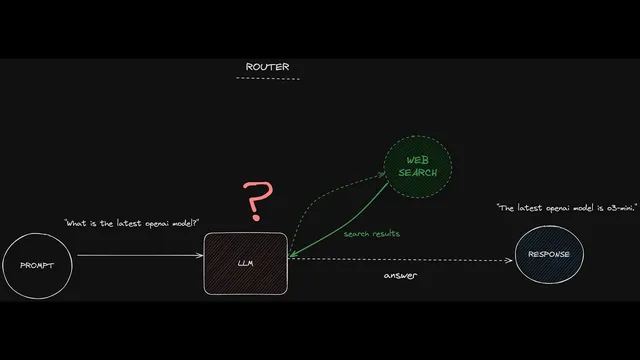
A central idea is routing logic that mirrors how modern chat interfaces sometimes offer “search.” For a question like “What is the latest OpenAI model?”, the agent should choose to retrieve fresh information from the web, then generate an answer using that retrieved context. For a general question like “What is music?”, it can respond directly from its trained knowledge without calling external tools. LangGraph formalizes this choice as conditional paths: one branch returns a direct answer, while another triggers a web-search sub-process, passes results as context, and then produces the final response.
The workflow becomes more autonomous when tasks require multiple stages of planning and execution. For example, “Write a brief report about the latest OpenAI model” forces the system to (1) determine what the latest model is and (2) produce a report with an appropriate structure. In this setup, the agent may run a web-search-driven loop: one pass gathers an overview, another collects research papers or supporting details, and the loop continues until enough information exists to complete the report. An “orchestrator” (a supervisory model or controller) then hands the assembled outline back to the main model for a final write-up.
LangGraph’s reliability comes from explicit visibility and control. LangGraph Studio provides a visual interface to inspect the workflow before deployment, including latency and the ability to rerun from specific sections. Under the hood, the framework represents workflows as graphs with start and end points, nodes (actions such as model calls or API functions), and edges (connections between steps). Conditional edges act like if/else routing rules that determine which path runs.
State is the backbone of this control. Each workflow maintains a structured “state” object—tracking key fields such as the user query, retrieved search results, and the generated answer. As the agent moves through nodes, LangGraph updates the state, letting developers view snapshots at each step. This supports debugging (seeing exactly what inputs produced a given output), testing (forking state and simulating alternative search results), and rollback (returning to earlier checkpoints).
Human-in-the-loop is integrated through interruption points. At chosen checkpoints—such as right before a model proceeds—LangGraph can pause and request user feedback or permission to continue. That reduces the risk of fully autonomous behavior producing outcomes users wouldn’t approve.
In short, LangGraph targets the hard parts of agentic systems: routing, multi-step autonomy, and operational safety. For simple one-off API workflows it may be unnecessary, but once an application needs conditional reasoning, external tool use, checkpoints, and step-by-step observability, LangGraph becomes a practical foundation for building dependable AI agents.
Cornell Notes
LangGraph is an orchestration framework for AI agents that need multi-step reasoning and tool use. It routes questions: some are answered directly from model knowledge, while others trigger external retrieval (like web search) and then generate responses using retrieved context. For more autonomous tasks—such as writing a report—it can run a loop that plans and gathers information in stages before a supervisor/orchestrator produces the final output. LangGraph Studio visualizes the workflow and supports debugging by showing latency, rerunning sections, and inspecting intermediate results. The framework’s state tracking and checkpoints enable rollback, “forking” earlier states for testing, and human-in-the-loop approvals at critical moments.
How does LangGraph decide whether to answer a question directly or fetch external information?
Why does “Write a brief report about the latest OpenAI model” require more than simple routing?
What are nodes, edges, and conditional edges in a LangGraph workflow?
What role does “state” play in making agentic systems debuggable and controllable?
How do checkpoints and rollback reduce risk in autonomous agent behavior?
Where does human-in-the-loop fit into LangGraph workflows?
Review Questions
- In a routing setup, what specific signals or outputs determine whether a question follows the direct-answer branch or the web-search branch?
- How does LangGraph’s state object change as execution moves from the classification step to web search to final answer?
- What testing and debugging advantages come from forking state at an earlier checkpoint compared with rerunning the entire workflow from scratch?
Key Points
- 1
LangGraph is built to orchestrate agentic AI workflows with controllable, inspectable steps rather than a single prompt-to-output chain.
- 2
Routing logic lets an agent choose between direct answering and external retrieval (e.g., web search) based on question type and recency needs.
- 3
More autonomous tasks use sub-processes and loops (plan → research → gather sections) before a supervisor/orchestrator produces the final response.
- 4
LangGraph Studio provides a visual workflow view with debugging support such as latency visibility and rerunning from selected sections.
- 5
Workflows are represented as graphs: start/end points, nodes for actions, edges for connections, and conditional edges for if/else routing.
- 6
State tracking records key fields (query, search results, answer) at every step, enabling step-by-step inspection and reproducible debugging.
- 7
Checkpoints plus human-in-the-loop interruptions reduce risk by enabling rollback, reruns from earlier states, and user approvals at critical moments.