Launch an LLM App in One Hour (LLM Bootcamp)
Based on The Full Stack's video on YouTube. If you like this content, support the original creators by watching, liking and subscribing to their content.
Large language models gain broad usefulness by learning next-token prediction over massive text, enabling many tasks with one underlying tool.
Briefing
Large language models are turning into general-purpose “next-word” engines that can power far more than chat—especially when paired with language user interfaces that let people interact with computers in natural language. The practical takeaway is that teams can prototype and ship an LLM app fast by validating feasibility in a simple chat setup, then adding retrieval, citations, and a deployable interface—before worrying about perfect product polish.
The case for why this moment is different traces back to earlier AI milestones that seemed human-competitive: chess, theorem proving, and even passing school-style exams. Those efforts didn’t sustain for decades, but the shift now is that one tool—language modeling—can be configured with small changes to tackle many tasks that previously required specialized systems. The mechanism is straightforward: predicting the next token in text. Training on broad language patterns makes models useful at code, math, and domain knowledge because those skills are embedded in the text they learn from.
That capability unlocks a long-anticipated interface idea: language user interfaces. Decades of work—from Eliza in the 1960s to block-world experiments like Terry Winograd’s SHRDLU—showed that natural language could steer a computer. But earlier systems were brittle and narrow, often limited to a small “world” (therapy scripts or toy environments) or to search-like interactions. Large language models enable more flexible, conversational interfaces that can operate across richer contexts, which is why the current wave feels like a step change rather than incremental progress.
Still, history warns against hype. The talk points to “AI winters” caused by overselling and under-delivering—highlighted by Sir Richard Lighthill’s report to the British government, which criticized high hopes, large spending with limited results, and lack of commercial value. The proposed antidote is product building: ship software people actually use, gather feedback, and keep funding alive through real utility.
A key theme is narrowing the gap between demos and products. Demos can be assembled quickly, but productization is harder—illustrated by self-driving car progress that produced impressive neural-network demos years before widespread real-world availability. The encouraging sign now is that LLM-powered products are scaling rapidly: ChatGPT’s user growth, coding assistants like GitHub Copilot and “Ghostwriter,” and tools used in content workflows such as Descript.
The bootcamp’s “one hour” playbook starts with rapid prototyping and iteration. Instead of spending weeks on feasibility analysis, teams should test a hosted model in a simple chat interface first, using a concrete goal and known-answer prompts. When the model lacks up-to-date knowledge or invents sources, the fix is retrieval: pull relevant documents into context. The workflow described uses notebooks for experimentation, then moves toward automation with APIs and frameworks like LangChain for model calls, document loading (e.g., PDFs), and embedding-based similarity search.
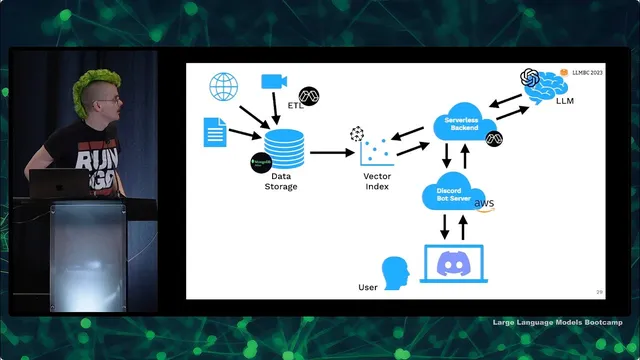
After proving the core Q&A behavior, the next step is deploying an MVP and making it useful to others. The example architecture uses a serverless backend and a lightweight Discord bot, with OpenAI for the model, Pinecone for vector search, MongoDB for storage, and Modal for serverless data processing. The bottleneck—data ingestion and extraction—is handled by parallelizing PDF processing in containers. The resulting bot (“/ask”) answers questions about LLMs and also links to timestamped course materials, while collecting interaction data for monitoring and improvement.
In short: language models make broad capability possible, language user interfaces make it usable, and disciplined prototyping plus retrieval + deployment is the path to shipping before hype turns into another AI winter.
Cornell Notes
Large language models work as general-purpose “next-token” engines, and their real-world impact comes from pairing that capability with language user interfaces and retrieval. The bootcamp emphasizes a fast path: start with a simple chat prototype to test whether a hosted model can answer a well-defined question, then fix failures by injecting real sources (PDFs, papers, course notes) into the prompt using document loading and embedding search. Frameworks like LangChain speed up the plumbing by providing abstractions for model calls, loaders, and vector search. Once the Q&A behavior is reliable, the focus shifts to deployment and user feedback—turning a demo into an MVP with a practical interface (e.g., a Discord bot) and monitoring to learn what works and what breaks.
Why does predicting the next word/token matter for building apps beyond chat?
What is the role of language user interfaces in making LLMs practical?
How do teams avoid the “AI winter” pattern of hype without delivery?
Why do LLM Q&A prototypes often fail, and what’s the fix?
What does the prototyping workflow look like before deployment?
How does the example deployment architecture support scale and speed?
Review Questions
- What specific failure modes (e.g., missing knowledge or invented sources) does retrieval address in LLM applications, and how is retrieval implemented at a high level?
- Why does the talk recommend starting with a simple chat prototype instead of designing a full system from day one?
- How do embedding-based similarity search and document chunking work together to find relevant context for a user’s question?
Key Points
- 1
Large language models gain broad usefulness by learning next-token prediction over massive text, enabling many tasks with one underlying tool.
- 2
Language user interfaces are the practical bridge from model capability to everyday use, making interaction feel natural rather than brittle.
- 3
Avoid repeating AI winter dynamics by prioritizing product value: ship, get feedback, and iterate based on real user needs.
- 4
Rapid prototyping works best when feasibility is tested in a simple chat setup, then upgraded with retrieval and citations when knowledge gaps appear.
- 5
Retrieval-augmented generation typically requires document loading (e.g., PDFs), chunking, embeddings, and vector similarity search to supply grounded context.
- 6
Deployment complexity often comes from data ingestion and processing; serverless/cloud-native tooling can parallelize extraction to remove that bottleneck.
- 7
Monitoring user interactions after launch is essential for improving reliability and understanding where the system fails or succeeds.