Link-first Navigation in Obsidian for Smart Notes
Based on Joshua Duffney's video on YouTube. If you like this content, support the original creators by watching, liking and subscribing to their content.
Obsidian’s slip box is optimized for browsing connected notes, since the main value comes from resurfacing forgotten knowledge through links.
Briefing
Obsidian’s “slip box” is designed to be browsed—not searched—because the payoff comes from stumbling into connected ideas you’d otherwise forget. That browsing model matters most when writing: linking notes to each other creates a network that resurfaces relevant prior knowledge while you’re drafting, turning scattered notes into a usable narrative foundation.
The navigation toolkit starts with the graph view, which visualizes how notes connect. Nodes grow larger as they accumulate links, making it possible to spot which permanent notes have had the most influence on idea generation. In one example, “How to Take Smart Notes” appears as a central node because many permanent notes include a page-number link back to it. The graph doesn’t just show what’s “most interesting,” it often reflects what was most heavily captured early in a topic—when there are more unknowns and more opportunities to take notes. Over time, as knowledge gaps shrink, later reading may compress a long article into fewer notes.
A second browsing path runs through structure notes and an index. Structure notes act like named hubs that link out to related permanent notes and then fracture into topics and subtopics. This naming is presented as valuable because it supports navigation and topic-building without relying on backlinks or other automatic mechanisms. The index then becomes the front door: as notes are added, it enables quick browsing while drafting, including preview-based hovering to read multiple notes at once and opening them in a workspace.
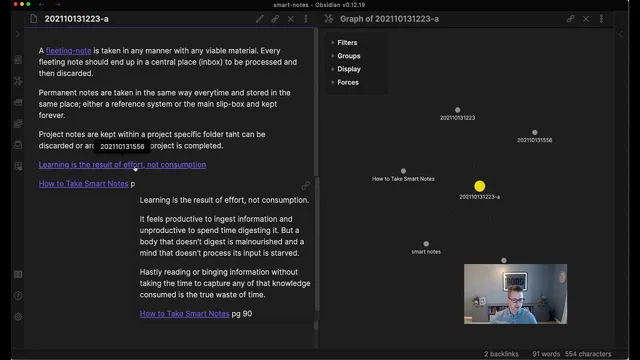
For deeper exploration, local graphs and backlinks help reveal what a note connects to. When a writer selects a note like “fleeting note,” the local graph shows a subnetwork of direct note-to-note links. From there, it’s possible to click into connected notes and see how ideas chain together—for example, linking toward concepts such as “learning is the result of effort not consumption.” The practical result is “compound interest” from linking: the more time invested in connecting notes, the richer the pathways that later support narrative building and help surface unanswered questions.
Beyond browsing, Obsidian still offers search and tags as secondary navigation tools. Full-text search can find notes containing a remembered phrase even when keywords were poorly applied. Tag browsing returns lists of notes, but the workflow described favors using keywords for broader “story” themes—like repeatedly encountering the Zeigarnik effect across different contexts—rather than forcing everything into a single vague structure note. The transcript also frames navigation as two main modes: overall graph view plus index browsing, with local graphs available for context.
Finally, the notes are positioned as raw material for project work, but only after enough investment to justify the effort. The underlying message is that building a connected knowledge lattice functions like a skill: it takes time, practice, and deliberate linking before dividends show up in the quality and speed of writing.
Cornell Notes
The slip box workflow in Obsidian is built around browsing connected notes rather than relying on search. Graph view helps reveal which notes are most influential by showing link density, while structure notes and an index provide named entry points for navigating topics. Local graphs and backlinks let writers explore a note’s immediate network and follow note-to-note links to resurface relevant prior knowledge during drafting. Search (including full-text search) and tags exist as backup tools, but the workflow emphasizes that linking creates “compound interest,” improving narrative building and helping surface unanswered questions over time.
Why does the workflow emphasize browsing over search in a note system?
How does graph view indicate which notes have been most impactful?
What role do structure notes and the index play in navigation?
What does “local graph” browsing add beyond backlinks?
When does search become useful, and how are tags used differently?
How does the transcript describe using keywords for recurring themes?
Review Questions
- What navigation elements are treated as primary (and why), and which are treated as secondary backup tools?
- How does the system’s linking behavior create “compound interest” for writing later on?
- What limitations of graph view are mentioned, and how do structure notes and the index mitigate navigation challenges?
Key Points
- 1
Obsidian’s slip box is optimized for browsing connected notes, since the main value comes from resurfacing forgotten knowledge through links.
- 2
Graph view highlights influential notes by showing node size and link density, but high influence can reflect early note-taking volume rather than pure interest.
- 3
Structure notes provide named hubs that fracture into topics and subtopics, making topic navigation easier than relying on backlinks alone.
- 4
The index functions as a front door for browsing while drafting, including preview/hover reading and opening notes in workspaces.
- 5
Local graphs and backlinks help writers explore a note’s immediate network and follow note-to-note chains to build narratives.
- 6
Full-text search is a fallback when keywords fail, while tags mainly return lists rather than a navigable local graph.
- 7
Keywords can be used to track recurring themes across multiple structure notes when a single topic hub would be too vague.