Logseq Database DB Version - Play Around
Based on Ed Nico's video on YouTube. If you like this content, support the original creators by watching, liking and subscribing to their content.
DB version adds “classes” (super tags) that let users define typed properties once and apply them across many pages.
Briefing
Logseq’s pre-alpha “DB version” mode adds a more structured way to model data—using “classes” (super tags) with configurable properties—so users can turn scattered notes into consistent, queryable records. The biggest practical shift is that properties like title, author, status, dates, and page counts can be defined once on a class and then applied across many pages, reducing the repetitive template-and-property setup that previously required manual steps for each note.
In the demo, a new graph (“test one”) is created, then the familiar journal page remains largely unchanged: indentation, bullet behavior, and scrolling work as before. The meaningful differences show up when creating and managing structured data. A new “new class” option appears, enabling a super-tag-like workflow where the class can be configured with typed properties (for example, text fields, number fields, checkboxes, and date-like fields). The interface also introduces a “configure” popup when hovering over a class-linked item, letting users edit the property schema tied to that class.
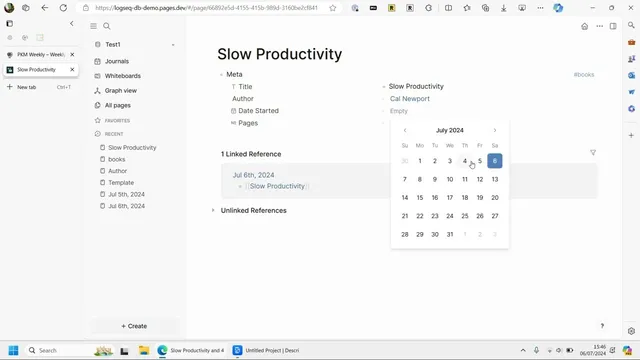
The workflow is demonstrated by creating two classes: one for “books” and one for “author.” The author class is set up so book entries can reference authors as linked objects rather than plain text. When a new book page is created from the journal, applying the “books” class prompts property entry through the configured fields. Selecting an author creates or links an author object, and the author’s name becomes accessible as a linked page. The demo highlights both the power and the learning curve: the first property in the class behaves like the object’s name, making some explicit “title/name” properties feel redundant, and the author/tag behavior can be inconsistent depending on how the author is created.
Once properties exist, the DB version’s query tools become central. A query can pull all pages matching a property condition (e.g., all books by a given author) and display results in a table. The demo shows sorting and filtering improvements compared with older “all pages” views—especially the ability to sort by page name and to navigate large sets more effectively. Still, the interface has rough edges: scrolling in result tables can be limited, navigation sometimes forces exiting and restarting, and the table layout can feel cluttered with system fields like created/updated/tags.
The demo also touches on schema evolution: renaming or deleting properties in the class template updates existing pages in a “safe proof” way. Deleting a property removes it from the template, but existing values may persist in some views, while new pages follow the updated schema. Finally, the demo shows that web-based features like PDF upload and text highlighting/referencing appear to work in this mode, though some highlight types (like an “area highlight”) seem missing or not visible.
Overall, the pre-alpha DB version aims to make Logseq’s data modeling more consistent and scalable: define classes with typed properties, apply them to pages, link objects like authors, and query across the resulting structure—while the UI and edge cases remain under active refinement.
Cornell Notes
Logseq’s DB version (pre-alpha) introduces “classes” that act like super tags with configurable, typed properties. Instead of repeatedly creating templates and manually assigning properties, users can define a books class and an author class once, then apply them to new journal pages to collect structured data (title/name, dates, page counts, status, and linked authors). Hovering reveals a “configure” panel for editing the property schema, and changes propagate across pages in ways that reduce accidental inconsistencies. Query tools then let users filter and display results in tables (e.g., all books by a specific author), with sorting improvements over older “all pages” views. The interface still has rough navigation and table-layout limitations, and some tag/link behavior depends on how objects are created.
What new mechanism replaces (or reduces) the old template-and-property workflow?
How does linking authors work compared with typing plain text?
What does the “configure” popup change in day-to-day use?
How do queries behave, and what improvements are shown?
What happens when properties are deleted or renamed in the class template?
Which non-database features appear to work in DB version (based on the demo)?
Review Questions
- How do classes with typed properties change the process of creating structured entries compared with templates in older Logseq setups?
- What does the demo suggest about the relationship between the first configured property in a class and the object’s displayed name?
- When a property is deleted from a class template, what kinds of inconsistencies or persistence issues might still appear across existing pages and query results?
Key Points
- 1
DB version adds “classes” (super tags) that let users define typed properties once and apply them across many pages.
- 2
A “configure” popup enables editing the property schema tied to a class, including adding fields and changing types (e.g., status to checkbox).
- 3
Linking object properties (like author) creates navigable author pages rather than relying solely on plain-text fields.
- 4
Query tools filter pages by property values and display results in tables, with sorting improvements over older “all pages” views.
- 5
Schema updates propagate through the system, but deleting properties may not fully purge existing values from every view.
- 6
Some UI rough edges remain in pre-alpha: navigation can require restarting, tables can be cluttered, and scrolling/filters may be limited.
- 7
Web-side actions like PDF upload and text highlighting/references appear to work, though certain highlight modes may be missing.