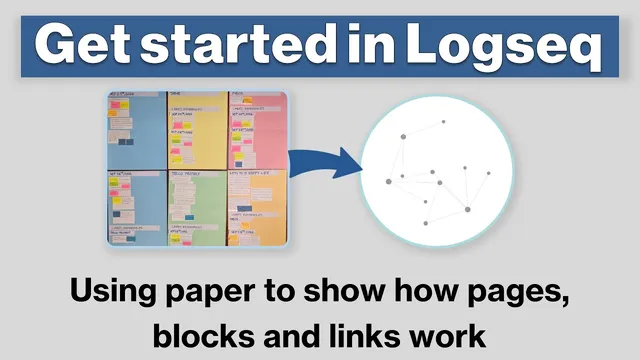
Logseq Tutorial: How To Get Started - Using Paper to Show How Pages, Blocks & Links Work
Based on CombiningMinds's video on YouTube. If you like this content, support the original creators by watching, liking and subscribing to their content.
Treat pages as nodes and blocks as the content containers; retrieval depends on how blocks are linked and nested.
Briefing
Logseq’s core model is built around three mechanics—pages as nodes, blocks as containers (often bullet points), and links/backlinks that make the same block appear in multiple places—so information stays easy to retrieve without duplicating it. The tutorial uses a “physical model” with colored sheets (pages) and index cards (blocks) to show how data flows through linking and indentation, then maps that model onto Logseq’s real journal pages, page files, and graph view.
Pages are treated as nodes that can receive information. Journal pages (like a date-based entry) are created automatically, while other colored pages represent user-defined nodes. The key difference highlighted: pages correspond to actual text files in the Logseq folder when they contain information, whereas journal pages always exist as date nodes even if other pages only point to them. Blocks are the basic containers of content—think of them as bullet points that live on a page.
The tutorial’s centerpiece is the double square bracket syntax (and the hashtag variant) that creates backlinks and, in the process, generates new pages as references. When a block contains a link like [[Jane]] or [[Telco project]] (or a hashtag tag), Logseq creates those referenced pages (nodes) even if they’re empty at first. More importantly, every linked page gains a “linked references” section that automatically lists the same block wherever it’s referenced. That means one block can show up on multiple pages—such as the same “Jane” task appearing under the September 28 journal page, the Jane page, and an Inbox page—along with metadata showing where the block originates (including the journal date). This creates a built-in retrieval system and a traceable history of where ideas came from.
Indentation adds structure. Nested blocks under a linked block inherit the same visibility across linked pages, so the tutorial emphasizes that retrieval depends on both linking and nesting: a block nested under a linked block appears in the linked page’s linked references as well. The example builds an Inbox workflow: tasks and notes are first captured in journal pages, then surfaced through linked references on Inbox, Jane, and project pages. Once content becomes “permanently retrievable,” the tutorial shows adding real text directly into the referenced page so Logseq creates a corresponding markdown file for that node.
The tutorial then expands the model beyond one-way linking from journal pages. Links can connect pages to other pages, reminders can be attached to journal dates from project pages, and block references can embed the same block content elsewhere so edits propagate everywhere. In the computer view, the graph view visualizes pages as nodes and backlinks as edges, while filters in linked references help narrow results (e.g., showing only blocks related to Jane). Finally, favorites help reduce the initial intimidation of navigating a graph-based workspace, turning the system into a practical workflow for structuring information and building feedback loops over time.
Cornell Notes
Logseq’s information retrieval system hinges on pages as nodes, blocks as the content containers, and links/backlinks that make the same block appear across multiple pages. Journal pages (date nodes) are created automatically, while linked pages (like [[Jane]] or [[Telco project]]) are created as nodes when referenced, initially empty until content is added. A linked block shows up in each target page’s “linked references” section, including where it originated (such as the journal date), and indentation determines how nested structure propagates. This combination supports efficient retrieval, traceability, and feedback loops without copying content—then block references and embeds let changes flow to every location where the block is used.
What is the practical difference between a journal page and a regular page in Logseq’s model?
How do double square brackets and hashtags relate to creating pages and backlinks?
Why does indentation matter for retrieval, not just for formatting?
What does “linked references” do, and how does it help track where information came from?
When should content be written directly into a page versus left only as a journal-linked reference?
How do block references and the graph view change the workflow?
Review Questions
- How does Logseq decide when a referenced page becomes a real markdown file on disk?
- Explain how a single block can appear in multiple places without duplication—what roles do links/backlinks and indentation play?
- What’s the difference between using linked references for retrieval and using block references for reuse/edit propagation?
Key Points
- 1
Treat pages as nodes and blocks as the content containers; retrieval depends on how blocks are linked and nested.
- 2
Use [[double square brackets]] or hashtags to create backlinks that automatically populate each target page’s linked references section.
- 3
Understand that linked references show both the block and its origin context (such as the journal date), improving traceability.
- 4
Indentation is structural: nested blocks under a linked block propagate into the linked page’s linked references view.
- 5
Write directly into a page (so it becomes a markdown file) when information needs to be permanently retrievable, not just date-captured.
- 6
Link between pages in both directions (journal → pages and pages → journal dates) to support planning, reminders, and cross-context retrieval.
- 7
Use block references when the same content should be reused and kept consistent across multiple locations.