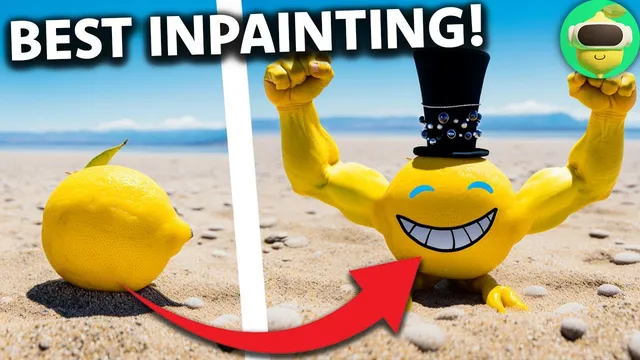
Midjourney's Inpainting is SUPER Impressive!
Based on MattVidPro's video on YouTube. If you like this content, support the original creators by watching, liking and subscribing to their content.
Midjourney inpainting is enabled by turning on “Remix mode” in /settings, then using “Vary (Region)” after upscaling an image.
Briefing
Midjourney’s long-awaited inpainting feature is rolling out inside Discord, and early tests suggest it can edit selected regions while preserving the rest of an image’s style, lighting, and character consistency. The workflow hinges on enabling “Remix mode” via /settings, generating an image as usual, then using a new “Vary (Region)” option on upscaled results to open an inpainting editor with selection tools (rectangle and lasso) plus an undo button. With that setup, users can prompt for localized changes—like adding a face to a lemon, swapping clothing, or rebuilding missing body parts—without losing the original scene.
In simple demonstrations, Midjourney handles small, targeted edits reliably. A lemon on a sandy beach can be given a realistic, smiling face while the background remains consistent. The same image can then be iterated again: a Lincoln-style top hat is added, and the system continues to maintain the underlying image quality rather than degrading as more edits accumulate. More ambitious prompts—like generating anthropomorphic legs and feet—show a mixed hit rate, with some outputs producing anatomically odd or “corn-like” feet. Yet the feature improves when prompts focus on specific, human-like details; comically large buff arms and hands often come out better than expected, including cases with five fingers and convincing transitions that preserve the lemon’s texture.
The most telling stress test involves a complex, character-specific edit: a photo of Walter White in a yellow hazmat suit eating a burger in a McDonald’s setting. Midjourney struggles with consistency in some iterations—hands may not match the intended burger-holding pose, and the environment can drift toward “subway-like” visuals. Still, the inpainting tool can remove unwanted elements by clearing the prompt and pressing enter, and it can rework hands and objects through region-specific prompts (for example, replacing a Big Mac with a cheeseburger). Background replacement also works: the tiled floor and lighting can be adjusted to look more McDonald’s-like, and clutter can be erased with no prompt. The final result in the demo lands close to the intended composition, including a coherent McDonald’s logo and a background that matches the lighting conditions.
Beyond one-off experiments, community examples point to the same core advantage: subtle, localized changes that keep the character and scene intact. Users report being able to swap sunglasses, clothing, and even vehicles or add new context elements while maintaining the original art style and lighting. Compared with alternatives like Adobe’s generative fill, the consensus in these early comparisons is that Midjourney’s inpainting is among the strongest options for image editing that stays “in-family” with the generated output.
Even so, limitations remain. Editing is currently Discord-based, which can be a barrier for non-technical users, and the feature lacks some UI conveniences such as a website interface and more granular brush controls (e.g., circle/magic-wand selection, feathering, and blending controls). Community feedback also highlights occasional unpredictability and the need for better prompt guidance. Still, the overall takeaway is clear: Midjourney’s inpainting is a meaningful leap for existing users, enabling precise fixes and creative refinements without exporting images to other tools.
Cornell Notes
Midjourney’s new inpainting feature brings region-based editing to its Discord workflow. After enabling Remix mode, users upscale an image and then use “Vary (Region)” to open an editor where selections (rectangle or lasso) can be re-generated with text prompts. Early tests show strong preservation of the original character, lighting, and style during localized edits—especially for clothing, facial changes, and object swaps—though complex anatomy (like feet) can still produce odd results. The feature also supports practical cleanup, including removing unwanted elements by clearing the prompt and re-running. Community examples suggest it enables subtle “tweak-and-iterate” improvements that are difficult to match with pan/zoom-only tools.
How does Midjourney’s inpainting workflow work inside Discord?
What kinds of edits look most reliable in early demos?
Where does the feature struggle, and why does prompting matter?
How can users remove unwanted elements using inpainting?
How does Midjourney handle larger scene changes like backgrounds and logos?
What community feedback suggests about the feature’s maturity?
Review Questions
- What steps are required to enable inpainting in Midjourney, and where does “Vary (Region)” appear in the workflow?
- Give one example of an edit that preserved the original image well and one example where results were inconsistent. What role did prompting play?
- How does clearing the prompt and re-running the region help with cleanup tasks, and what does that imply about how the model treats selected areas?
Key Points
- 1
Midjourney inpainting is enabled by turning on “Remix mode” in /settings, then using “Vary (Region)” after upscaling an image.
- 2
The inpainting editor appears within Discord and includes selection tools (rectangle and lasso) plus undo and a prompt bar.
- 3
Localized edits can preserve the original character, lighting, and art style, enabling iterative “tweak” workflows rather than full re-generation.
- 4
Anatomy and pose-dependent edits (especially feet and consistent hand-to-object interaction) can be unpredictable and often require re-rolling with more precise prompts.
- 5
Cleanup is practical: highlighting an unwanted region and running with no prompt can remove blobs and clutter.
- 6
Background replacement and logo edits can work while maintaining lighting conditions, but environment drift and unexpected text can require additional passes.
- 7
Community enthusiasm is high, but the Discord-only interface and limited brush/feathering controls leave room for refinement, including a hoped-for website UI.