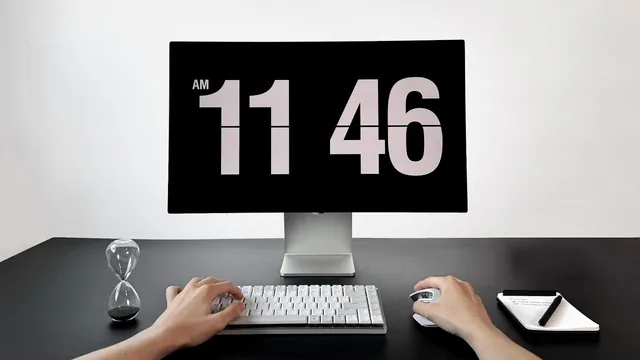
My Minimal Desk Setup for Productivity
Based on Easlo's video on YouTube. If you like this content, support the original creators by watching, liking and subscribing to their content.
Treat productivity as an environment design problem by managing physical space, white space, and digital space together.
Briefing
A minimal, distraction-resistant workspace can boost focus by treating productivity as an environment problem—not a willpower problem. The setup centers on three kinds of space: physical space (what sits on the desk), white space (what’s intentionally left empty), and digital space (how devices behave). The core idea is simple: remove what causes friction or cognitive load, then design cues that make starting and staying on task easier.
On the physical side, the desk is pared back to essentials after a full teardown, with the goal of reducing distractions and increasing sustained output. A standing desk is used more actively than before by switching between three positions—sitting, standing, and working on a treadmill—based on energy levels. When lethargy hits around the hour mark during a two-hour focus block, a quick sip of water and a mode switch to standing helps reset the body. The chair is a Herman Miller Aeron, chosen for long-session comfort and posture support, which helps maintain a flow state.
The visual and tech foundation is built around an Apple Studio display paired with an M3 MacBook Pro. The monitor’s clean aesthetic is a major draw, but practical benefits matter too: it supports graphic design work, includes a built-in camera for quick meetings, and has strong speakers used to play soundscapes from Endel during deep work. Lighting is handled with Philips Hue light bars behind the monitor—bias lighting—meant to soften the viewing environment, reduce eye strain, and improve display comfort.
Input devices reinforce speed and ergonomics. A Logitech keyboard blends mechanical feel with productivity, while the MX Master 3S mouse adds advanced functionality; even without fully using everything, the horizontal scroll is highlighted for navigation in Notion and video editing. The desk also includes low-tech productivity anchors: a pen and notepad for nightly planning (review the to-do list in Notion and write 1–3 must-dos for tomorrow), plus a 3-minute hourglass timer. The timer is used as a “start switch” for tasks that feel boring or intimidating—commit for only three minutes, and momentum often carries the work forward.
White space is treated as deliberate emptiness that creates mental breathing room. The concept—borrowed from design’s negative space—applies to time, physical layout, and digital clutter. Fewer items means fewer distractions, less cognitive load, and less decision fatigue. A practical starting point is keeping phones out of the room or at least away from the desk.
Digital space is managed with the same discipline. Focus modes sync across phone and computer to block notifications during work sessions, preventing the tiny interruptions that can break flow. The computer dock is minimized and set to hide automatically, the desktop stays file-free, and a Notion Calendar widget on the menu bar provides a quick view of what’s next. Endel soundscapes support deep work, and apps run full screen by default to keep attention locked—except when side-by-side windows are needed for research or note-taking.
Cornell Notes
The setup boosts productivity by designing three layers of environment: physical space, white space, and digital space. It uses a minimal desk with ergonomic hardware (Herman Miller Aeron chair, Apple Studio display, M3 MacBook Pro) and movement options (sitting, standing, treadmill) to reduce fatigue and sustain focus. White space means intentionally leaving things empty—especially removing phones and keeping the desk and desktop uncluttered—to cut distractions and decision fatigue. Digital focus is enforced through synced focus modes that block notifications, a hidden/minimized dock, a clean desktop, and a Notion Calendar widget for quick planning. Small start cues—like a 3-minute hourglass timer—help overcome procrastination by turning commitment into a short, actionable “on switch.”
How does the setup use “positional variance” to maintain energy during long focus sessions?
Why does the desk include both a nightly planning ritual and a physical 1–3 task list?
What role does the 3-minute hourglass timer play in handling procrastination?
How does “white space” translate from design theory into everyday productivity habits?
What specific digital controls are used to protect focus from notifications and app clutter?
How do audio and lighting choices support deep work comfort?
Review Questions
- Which three “spaces” structure the productivity system, and what does each one control?
- How do the physical start cues (notepad planning and the 3-minute hourglass) reduce friction before work begins?
- What digital habits most directly prevent flow from being broken, and how are they implemented (focus modes, dock behavior, desktop cleanliness, full-screen apps)?
Key Points
- 1
Treat productivity as an environment design problem by managing physical space, white space, and digital space together.
- 2
Use movement as a focus tool by switching between sitting, standing, and treadmill work when energy dips.
- 3
Keep the desk and desktop visually clear so priorities are obvious and distractions are harder to trigger.
- 4
Enforce notification control with synced focus modes and scheduled “do not disturb” to protect flow sessions.
- 5
Reduce cognitive load by limiting dock apps and running apps full screen by default.
- 6
Use a short, time-boxed start ritual (3-minute hourglass) to convert procrastination into momentum.
- 7
Support comfort and concentration with ergonomic seating, bias lighting, and consistent deep-work soundscapes.