New AI Video Editor - Text to Video is Mindblowing!
Based on MattVidPro's video on YouTube. If you like this content, support the original creators by watching, liking and subscribing to their content.
Runway’s “text to video” direction is currently demonstrated primarily as prompt-driven AI video editing, not purely as full motion generation from scratch.
Briefing
Runway’s upcoming “text to video” pitch is landing less like a brand-new video generator and more like a fast, prompt-driven AI video editor—where text controls edits such as color grading, object removal, inpainting, and green-screen-style masking. The viral demo that circulated online shows a “magical box” workflow, but the early segments appear to import existing footage and then apply AI-assisted adjustments rather than synthesizing entirely new scenes from scratch. That distinction matters because it sets expectations: the near-term breakthrough is editing automation, not fully generative cinema.
In the demo, prompts like “make it look cinematic” trigger changes that resemble automatic color and look adjustments on an existing clip. Other prompts point to more advanced manipulation. “Removed this object” suggests the system can identify a target and eliminate it from the surrounding frames—an operation that typically requires heavy processing to maintain visual consistency over time. The transcript also flags a key nuance: some prompts use “import” (implying footage is brought in and then edited), while later prompts use “generate” (implying AI generation at least for still imagery). When “generate a lush Garden” appears, the results shown are still images presented across multiple options, not moving video.
The most eye-catching editing capability shown is “green screen character.” Instead of requiring a traditional chroma-key setup, the system performs masking and background replacement-like compositing even when the subject isn’t originally shot against a perfect green screen. The demo includes controls such as feathering and masking, and it previews a replacement clip over the masked area. The workflow then extends into a browser-based editing experience on Runway’s site, where AI-powered tools are already available.
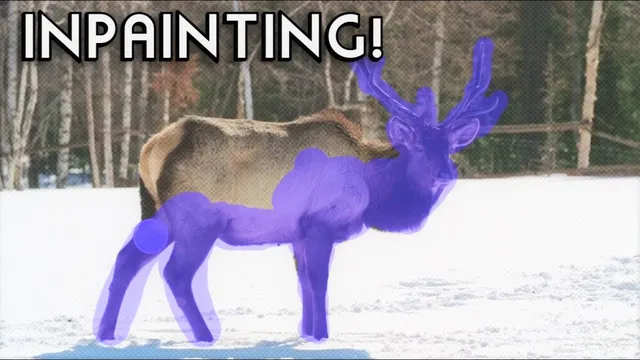
On the Runway website, the editor is presented as “edit video in seconds” with features including background removal and inpainting. A live test described in the transcript deletes a moose from a scene using an inpainting brush. The result is described as surprisingly effective, with the system tracking the subject’s motion and handling difficult edges—though not perfectly, as shadows and artifacts can still shift during playback. A second test uses a dancer clip to demonstrate green-screen-style extraction and replacement, again described as performing well despite the subject not being shot on a true green-screen background.
Overall, the takeaway is that Runway’s “text to video” direction is already materializing as AI-assisted video editing: prompt-driven effects, object removal, inpainting, and compositing. If full text-to-video generation arrives later, it will likely build on these editing primitives rather than replace them outright. For creators, the practical impact is immediate—fewer manual steps for masking, cleanup, and background swaps—while the longer-term promise is turning natural-language instructions into end-to-end video changes.
Cornell Notes
Runway’s “text to video” concept is presented as prompt-driven video editing that automates tasks creators normally do manually. Early demos suggest some prompts “import” existing footage and then apply AI edits like cinematic color adjustments, while other prompts “generate” still images (not full motion video). The most advanced showcased tools include object removal via inpainting and green-screen-style masking/compositing, where a subject can be extracted and replaced even without perfect chroma-key footage. Live browser tests described in the transcript show inpainting that can remove an entire moose and track motion, plus green-screen replacement with feathering and masking controls. The practical value is faster editing; the bigger question remains how quickly true text-to-video generation will match the editing capabilities.
What’s the key distinction between “import” and “generate” in the demo workflow?
Why is object removal harder than basic visual adjustments?
How does the inpainting test illustrate the system’s strengths and limits?
What makes the green-screen demo notable?
What does the browser-based interface suggest about product readiness?
Review Questions
- Which parts of the demo appear to rely on editing existing footage versus generating new content, and how can you tell?
- What makes video inpainting (like removing a moose) more difficult than image inpainting?
- In what ways does the green-screen replacement demo reduce the need for traditional chroma-key filming?
Key Points
- 1
Runway’s “text to video” direction is currently demonstrated primarily as prompt-driven AI video editing, not purely as full motion generation from scratch.
- 2
Prompts labeled “import” suggest existing footage is brought in and then edited (e.g., cinematic color adjustments), while “generate” examples shown are still images rather than moving video.
- 3
Object removal is positioned as a harder capability than basic look changes because it requires temporally consistent reconstruction across frames.
- 4
In-browser tests described include successful moose removal via inpainting, with motion tracking working well but shadows still sometimes behaving imperfectly.
- 5
Green-screen-style compositing is shown as usable even when the subject isn’t shot against a perfect green screen, aided by masking and feathering controls.
- 6
The practical near-term value for creators is faster cleanup and compositing—masking, inpainting, and background replacement—through natural-language prompts.