NEW ChatGPT Plugins & Web Browsing - Hands On
Based on MattVidPro's video on YouTube. If you like this content, support the original creators by watching, liking and subscribing to their content.
ChatGPT Plus users must enable both “web browsing” and “plugins” under Settings → Beta features before the modes appear in chat.
Briefing
OpenAI’s rollout of ChatGPT Plugins and Web Browsing to ChatGPT Plus users is live, but early hands-on testing finds a split reality: plugins can deliver impressive, tool-like results, while built-in web browsing is heavily constrained and often fails to retrieve even basic facts. The update matters because it turns ChatGPT from a text-only assistant into a system that can call external services—yet the usefulness depends on whether those services can reliably access the web and the user’s documents.
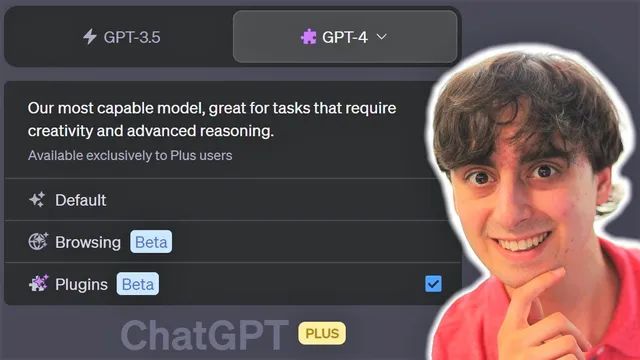
Access starts with a subscription gate—ChatGPT Plus at $20/month—and then a manual switch in settings. Users must enable both “web browsing” and “plugins” under Beta features before the options appear in chat. The interface also adds model selection and modes: GPT-3.5 for faster everyday tasks, GPT-4 for Plus users, plus separate “browsing mode” and “plugins mode.” In practice, the browsing mode behaves like a more controlled version of search-based assistants: it can initiate searches and sometimes open links, but click attempts frequently fail.
In the browsing test, ChatGPT searched for “matvid pro AI” and returned partial information, including a source reference to the YouTube channel, but it couldn’t pull key details like the subscriber count. Multiple “click failed” events followed, suggesting that automated browsing requests are blocked by safety controls or by the target sites themselves. Even a simple check—like retrieving the latest tweet—ran into access limits, with failures preventing the assistant from reaching Twitter. By contrast, OpenAI’s own domain loaded successfully, reinforcing the pattern: the browsing tool can work when access is permitted, but many common sites appear blocked or unreliable.
Plugins, however, show more promise because they connect ChatGPT to third-party applications with user-controlled installation and a limit on concurrency. The plugin store lists a wide range of capabilities, including real-time stock and crypto data, PDF Q&A, diagram generation, web research via “Web Pilot,” and automation tools like Zapier. In testing, only up to three plugins could run at once. A combined workflow—Web Pilot for research plus Show Me for visualization—successfully produced a diagram based on search results, including nodes representing MattVidPro’s YouTube, Twitter, and OpenArt profiles.
PDF-related plugins were more fragile. Attempts to generate diagrams from a PDF repeatedly hit “internal server error” when the document was accessed via a link. A workaround involved converting the file into a PDF URL using a plugin-specific upload flow, after which the assistant could at least produce a node diagram from the document’s structured data. Still, errors persisted intermittently.
The strongest performer was the Wolfram Alpha plugin. It handled estimation-heavy questions with step-by-step reasoning—such as approximating how many chickens could fit in the Grand Canyon by calculating canyon volume and chicken volume—and also tackled physics-style problems like the speed needed for a school bus to jump a one-kilometer gap. The plugin’s outputs were treated as reliable enough to be used directly, unlike the browsing tool’s inconsistent link access.
Overall, the update lands as an early-stage toolkit: plugins can be powerful and practical (especially Wolfram Alpha), but web browsing remains too safety-locked to function smoothly across the open web, and several plugins—particularly PDF access—still need stability improvements before they feel fully dependable.
Cornell Notes
ChatGPT Plus users can now enable Web Browsing and Plugins via Beta settings, and the interface adds separate modes for GPT-3.5, GPT-4, browsing, and plugins. Hands-on testing finds web browsing is heavily restricted: searches may return partial info, but many link clicks fail, preventing retrieval of details like YouTube subscriber counts or Twitter updates. Plugins are more capable because they call external services; a Web Pilot + Show Me workflow successfully generated a diagram from search results. PDF plugins showed intermittent “internal server error” issues, requiring a workaround to convert documents into plugin-compatible PDF URLs. The Wolfram Alpha plugin performed best, producing usable calculations for estimation and physics-style questions.
What must ChatGPT Plus users do before Web Browsing and Plugins appear in chat?
Why did the built-in web browsing feel unreliable during testing?
How did plugins differ from web browsing in what they could accomplish?
What limitation affected plugin usage during the hands-on tests?
What went wrong with PDF-based plugin workflows, and what workaround helped?
Which plugin delivered the most dependable results, and what kinds of tasks did it handle?
Review Questions
- What evidence from the testing suggests that web browsing is blocked by safety controls rather than purely by search quality?
- How does the “up to three plugins at once” constraint change how a user should plan multi-step workflows?
- Why might a PDF URL conversion step be necessary for plugin-based document understanding?
Key Points
- 1
ChatGPT Plus users must enable both “web browsing” and “plugins” under Settings → Beta features before the modes appear in chat.
- 2
The interface separates GPT-3.5 and GPT-4 selection and adds distinct “browsing mode” and “plugins mode.”
- 3
Web browsing can search and sometimes open pages, but frequent “click failed” events prevent reliable retrieval of details from many sites.
- 4
Plugins run external third-party tools and can produce end-to-end outputs, such as diagrams generated from Web Pilot search results.
- 5
Only up to three plugins can be active at once, shaping how complex tasks should be composed.
- 6
PDF plugins showed instability with link-based access, with “internal server error” recurring until PDFs were converted into plugin-compatible PDF URLs.
- 7
The Wolfram Alpha plugin was the most consistently useful, delivering calculation-heavy answers and physics-style estimates with clear intermediate steps.