Note-taking methods | templates you can copy to take better notes
Based on Reflect Notes's video on YouTube. If you like this content, support the original creators by watching, liking and subscribing to their content.
Save note templates directly in the notes app’s preferences so pages can be pre-structured instantly.
Briefing
Note-taking gets faster and more consistent when templates are built into a notes system so ideas can be captured in a structured format with minimal setup. The walkthrough centers on a practical workflow: copy pre-made note templates into personal preferences, then summon them instantly with a slash command (e.g., “/daily reflection” or “/Cornell template”) to start writing right away—no reformatting required.
The first example is a Daily Reflection template designed for quick, repeatable exercises. It includes a set of components—reframing, a gratitude list, a top-priority list, and an aspiration—so users can focus on content rather than layout. In the creator’s setup, the template exists in preferences and is “stripped out” to be ready for direct typing. A monthly reflection template is also available in the same style. The key operational detail is how the template is invoked: on a new day, the user types “/” followed by the template name, which automatically populates the page with the right sections. A backlink feature is also highlighted as a way to navigate between related entries; clicking the backlink from a main note reveals prior daily reflections.
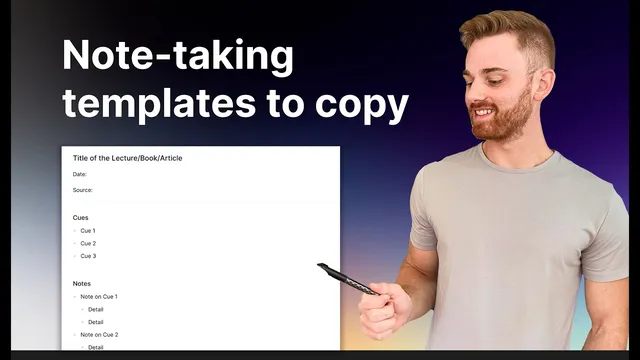
Next comes the Cornell Method, presented as a template suited to lectures, videos, and other structured learning. The workflow is hands-on: copy the Cornell template text, paste it into the notes app’s template preferences, name it, and then use it on new notes by typing “/” and selecting the template. When a new note is created for a specific source (for example, labeling the source as “YouTube” and setting the date), the template pre-fills the Cornell layout, leaving only the user’s content to complete. The transcript emphasizes that the template is only part of the system; an accompanying guide provides deeper instructions on how the Cornell cues work.
The walkthrough then shifts to Bullet Journaling, where the template concept extends beyond a single page. Instead of treating everything as one fixed form, the method can be split into multiple pages—such as a “Future Log” page, a monthly log, and daily log pages. Backlinks and an index page help connect these pages so tasks and events remain navigable. The transcript also notes that some methods may not need templates because the app’s built-in structure already supports them; outlining is cited as an example.
Finally, the transcript points to broader template ecosystems for other popular systems. The PARA method is described as being set up in an entire “brain” with pinned notes for Projects, Areas, Resources, and Archives, and the creator provides a dedicated YouTube resource for that setup. A Casting method is mentioned as already captured by Reflect’s network note-taking concept, so it doesn’t require a separate template. Overall, the message is straightforward: save templates (and the related guides) so note-taking becomes frictionless, consistent, and easier to reuse across contexts.
Cornell Notes
Templates turn note-taking into a repeatable workflow by pre-structuring pages so users can start writing immediately. The Daily Reflection template includes reframing, gratitude, top priorities, and an aspiration, and it can be summoned on any day via a slash command to auto-populate the page. The Cornell Method template is copied into preferences and then used for lecture- or video-based notes, with fields for date, source, and Cornell-style cues. Bullet Journaling is treated as a multi-page system using an index and backlinks (e.g., Future Log, monthly logs, daily logs). The approach matters because it reduces formatting friction and makes notes easier to navigate and reuse over time.
How does the Daily Reflection template reduce friction during everyday note-taking?
What makes the Cornell Method template useful for learning from lectures or videos?
Why might Bullet Journaling benefit from splitting into multiple pages rather than one template?
When is it better not to create a template for a note-taking method?
How does the PARA method setup differ from a single-page template approach?
Review Questions
- What are the specific sections included in the Daily Reflection template, and how is it invoked on a new day?
- Walk through the steps to add and use the Cornell Method as a template, including how a new note gets pre-populated.
- How does Bullet Journaling use backlinks and an index to connect Future Log, monthly logs, and daily logs?
Key Points
- 1
Save note templates directly in the notes app’s preferences so pages can be pre-structured instantly.
- 2
Use slash commands (e.g., “/daily reflection” or “/Cornell template”) to auto-populate sections and avoid manual formatting.
- 3
Daily Reflection templates should include consistent exercises such as reframing, gratitude, top priorities, and an aspiration to keep entries comparable over time.
- 4
The Cornell Method template is especially suited for lecture and video notes, with fields for title, date, and source plus Cornell-style cues.
- 5
Bullet Journaling works best as a connected multi-page system using an index and backlinks (e.g., Future Log, monthly log, daily log).
- 6
Some methods, like outlining, may not need templates because app-native structure already supports them.
- 7
PARA can be organized as a workspace with pinned category pages rather than relying on a single reusable template.