Notion for Content Creators: How I Efficiently Manage My Content Creation Workflows
Based on Rosidssoy's video on YouTube. If you like this content, support the original creators by watching, liking and subscribing to their content.
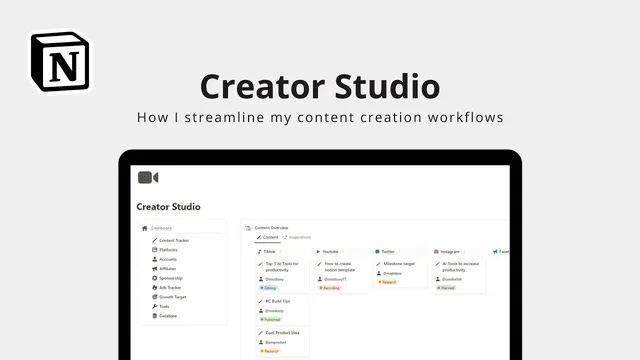
Use a central Notion dashboard as the single hub for content status, accounts, and goals so every workflow step has a home.
Briefing
A Notion dashboard can function as a single command center for managing a multi-platform content workflow—turning scattered notes, drafts, schedules, and metrics into one organized system. The setup centers on a central hub that provides a bird’s-eye view of the entire pipeline, with navigation for content status, accounts, account goals, and supporting databases like inspiration, affiliates, sponsorships, ad spending, connections, and tools. The practical payoff is clear: every piece of work—from an idea to a published post—has a place, a status, and a path forward.
Content creation starts with adding entries for each platform and account. New items are created through a “new” button, and platform-specific templates can speed up drafting. For example, the YouTube template is structured into sections such as reference, title, outline, and script, while a content tracker view shows more detailed status information per platform. Progress updates are handled through drag-and-drop status changes, making it easy to move work through stages like draft, in review, or done.
Inspiration is treated as first-class data rather than informal brainstorming. Ideas, articles, or references are captured in an “inspiration” section by entering the inspiration text and pasting relevant links. Each entry is stored in a dedicated inspiration database, where creators can also assign a status (such as still in review or completed). This creates a centralized library for turning raw material into future concepts.
Scheduling is managed through a published date property connected to a calendar view. By setting a publish target date and using drag-and-drop to adjust timing, content appears on the calendar automatically—reducing the risk of missed deadlines when multiple posts are in motion.
The system also scales to multiple accounts and platforms. Accounts are added in an accounts section, and content tied to each account updates automatically within that account page. Goals can be created for follower growth, engagement, or content milestones, with target timing tied to specific accounts and platforms. Platform expansion is handled by adding new platforms through a platform page.
For monetization and budgeting, the workflow includes affiliate and sponsorship tracking, with inactive affiliates archived via a check mark. Ad spending is tracked through dedicated spending trackers that record account, spending amount, duration, and objective—supporting budgeting and campaign optimization.
Finally, relationship-building and production tooling are organized through databases for connections (industry professionals, collaborators, potential clients) and tools (software used to create content). Tool entries store name, description, function, platform, and URL, keeping the creator’s stack searchable and up to date. Overall, the approach ties planning, drafting, scheduling, monetization, and operations into one cohesive Notion-based management system.
Cornell Notes
A Notion dashboard can centralize a creator’s entire workflow: drafting, tracking status, capturing inspiration, scheduling posts, and managing monetization and operations. Platform-specific templates (like a YouTube structure with reference, title, outline, and script) streamline content creation, while drag-and-drop status updates keep work moving through stages. Inspiration entries are stored with links in a dedicated database and can be marked with statuses such as “in review” or “done.” Published dates feed a calendar view, and multi-account/multi-platform support ties content, goals, and targets together. Additional databases track affiliates, sponsorships, ad spending, connections, and tools so budgeting and collaboration don’t live in separate places.
How does the system keep content creation organized across multiple platforms and accounts?
What role does the “inspiration” database play, and how is it managed?
How does scheduling work, and what makes it reliable?
How are goals and progress targets handled for different platforms and accounts?
What monetization and budgeting tracking features are included?
How does the system support relationships and the creator’s tool stack?
Review Questions
- What specific fields and sections are included in the platform template example for YouTube content, and how does that template reduce drafting friction?
- How does setting a published target date change how content appears in the calendar view, and why is that helpful for multi-post planning?
- Which databases in the system support monetization (affiliates/sponsorships/ad spending) and relationship management (connections), and what key details does each one store?
Key Points
- 1
Use a central Notion dashboard as the single hub for content status, accounts, and goals so every workflow step has a home.
- 2
Create platform-specific content entries using templates (e.g., a YouTube template with reference, title, outline, and script) to standardize drafts.
- 3
Capture inspiration with both text and links in a dedicated inspiration database, then track each item’s status from review to done.
- 4
Schedule posts by setting a published target date so entries automatically appear on a calendar view and can be adjusted via drag-and-drop.
- 5
Scale to multiple accounts and platforms by adding accounts and platforms in their respective sections, keeping content and goals linked correctly.
- 6
Track monetization with separate affiliate, sponsorship, and ad spending databases, including archiving inactive affiliates and recording ad objectives.
- 7
Organize collaboration and production by maintaining connections and tools databases with contact details and software URLs.