Notion Masterclass: Build Your Second Brain in Notion
Based on The Organized Notebook's video on YouTube. If you like this content, support the original creators by watching, liking and subscribing to their content.
The second brain method is designed to turn incoming ideas into a usable knowledge base, not just a storage location.
Briefing
A “second brain” in Notion is built to solve a practical problem: people can capture far more information than they can reliably store, find, and use. The core method—popularized by Thiago Forte—turns note-taking into a system for capturing knowledge quickly, organizing it so it’s searchable, distilling it into what matters, and then expressing it when needed. With online information and ideas constantly arriving from reading, meetings, and conversations, the system’s goal is to prevent knowledge overload from becoming knowledge loss.
At the center of the approach is the idea that notes are only useful if they land in the right place. Forte’s “CODE” framework—capture, organize, distill, express—guides how notes should flow from raw input to a usable knowledge base. To keep organization from becoming “mindless note-taking,” the method uses the “PARA” structure: Projects, Areas, Resources, and an Archive. Projects are time-bound goals with an end date (like writing a book). Areas are ongoing responsibilities (like family or business). Resources are reference materials that don’t fit neatly into a single life area (like marketing assets). Anything no longer active can be archived without being deleted, preserving long-term access.
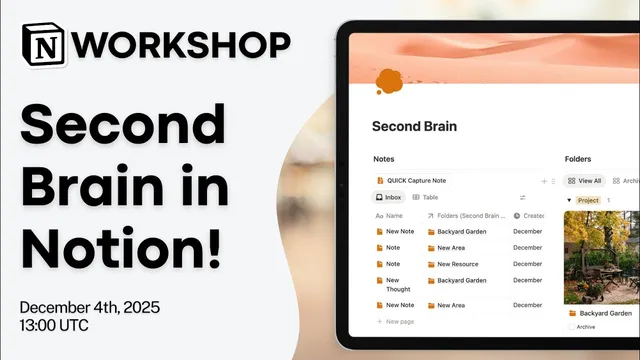
The session then demonstrates a working Notion setup built from two linked databases: one for “folders” (the PARA categories) and one for “notes.” Notes start in an inbox-like state when they don’t yet have a folder assigned. A bulk organization step—or automation with Notion AI—then connects each note to the correct PARA folder. The build emphasizes a clean workflow: folders are visually managed in a gallery view with cover images, notes are created with properties like created time, tags (multi-select), and optional URLs, and archived folders are filtered into a separate view using an “archive” checkbox.
A key implementation detail is the relation between the two databases. The notes database includes a relation property that links each note to exactly one folder category, using a two-way relation so the connection is visible from both sides. To reduce clutter, the folder pages use a tabbed layout that shows related notes without overwhelming the interface. An “inbox” view is created by filtering for notes whose folder relation is empty, making it obvious what still needs processing.
To speed up capture, the setup adds quick action buttons that create new note pages directly in the notes database, optionally pre-filling properties like the folder type. For faster cleanup, Notion AI’s agent feature can be prompted to categorize notes by relating them to the correct folders; changes can be reviewed and undone if needed. The presenter also points to a more complete “second brain + tasks” template that expands the same PARA structure into task management, including due-date views and weekly/monthly review cycles.
Overall, the system matters because it turns scattered ideas into a searchable, maintainable knowledge base—one that supports both learning and creativity—while keeping the organization burden manageable through inbox processing, archiving, and AI-assisted categorization.
Cornell Notes
The second brain method aims to prevent knowledge overload by making notes easy to capture, organize, and retrieve when they matter. It uses Thiago Forte’s CODE framework (capture, organize, distill, express) and the PARA structure: Projects, Areas, Resources, and Archive. In Notion, the demonstrated build uses two linked databases—folders (PARA categories) and notes—connected through a relation so each note can be assigned to exactly one folder type. Notes without a folder go into an “inbox” view for later processing, and archived folders remain accessible. Notion AI can optionally categorize notes into the correct folders, helping clear a clogged inbox faster.
Why does the second brain method treat note-taking as more than storage?
How does PARA reduce “mindless note-taking”?
What is the practical role of an “inbox” in the Notion build?
How are notes connected to folders in the demonstrated Notion setup?
What does Notion AI add to the workflow?
What extra capabilities appear in the “second brain + tasks” template mentioned at the end?
Review Questions
- How do Projects, Areas, Resources, and Archive differ, and why does the system require clear boundaries between them?
- In the Notion build, what triggers a note to appear in the inbox view, and what changes after the note is categorized?
- Why is a relation between the notes and folders databases essential for keeping the second brain searchable and maintainable?
Key Points
- 1
The second brain method is designed to turn incoming ideas into a usable knowledge base, not just a storage location.
- 2
Thiago Forte’s CODE framework (capture, organize, distill, express) provides the workflow for making notes actionable.
- 3
PARA organizes knowledge into Projects, Areas, Resources, and an Archive, with inactive items archived rather than deleted.
- 4
A Notion implementation can use two linked databases—folders (PARA) and notes—connected via a relation so each note can be assigned to the right category.
- 5
An inbox view based on “empty folder relation” supports fast capture followed by later processing.
- 6
Quick action buttons speed up capturing new notes, while Notion AI can assist with bulk categorization of uncategorized notes.
- 7
A more advanced template can extend the same structure into task management and scheduled weekly/monthly reviews.