Notion Office Hours: Academic Productivity 📗
Based on Notion's video on YouTube. If you like this content, support the original creators by watching, liking and subscribing to their content.
Monica and Russell build their academic workflow around two core databases—projects and tasks—so calendars and boards stay consistent.
Briefing
Academic productivity at Goldie Beacon College is being run through Notion as a single, connected system for research, publishing, and day-to-day administration—reducing tool sprawl and making work easier to track, delegate, and reuse. Monica and Russell Maholic describe using Notion since January (Monica) and rolling it out for staff after a period of internal testing, with the goal of consolidating scholarship workflows and team coordination that previously lived across many separate platforms.
Their setup centers on a “scholarship dashboard” that treats scholarship as everything being researched, written, and presented. The dashboard is organized around two core databases—projects and tasks—so calendars, boards, and tables all pull from the same underlying records. To make long pages navigable, they rely on Notion’s table of contents and use toggles to hide subpage links while still keeping sidebar-friendly navigation. They also lean heavily on visual cues—color coding and emojis—to speed scanning and retrieval, and they keep “everything in here” without deleting entries so past submissions, including rejected or intentionally skipped opportunities, remain searchable.
A key productivity engine is their pipeline for calls for proposals (CFPs). Instead of treating CFPs as fleeting reminders, they store them in Notion with timelines and statuses, then view them through filtered board views (e.g., CFP-related events vs. general CFP opportunities such as chapters, articles, and workshops). This approach helps them stay intentional about what they pursue, avoid forgetting deadlines, and reuse prior language when similar opportunities reappear. They also keep “not submitted” records, which becomes useful for learning why something was skipped—time conflicts, money constraints, lack of fit, or simply deciding the pitch wasn’t strong enough.
Calendars are used more minimally than other views. Monica prefers due-date views over event-date views and notes friction with Microsoft Outlook integration, which forces some duplication. Russell adds that hosted Exchange limitations complicate calendar publishing via a URL, so they embed a Google Calendar as a view rather than an editable integration.
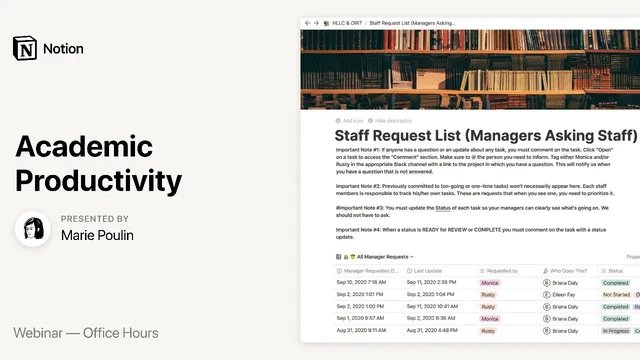
On the staff side, Notion becomes a coordination layer for supervisors, employees, and student workers. Russell describes replacing scattered communication (Slack messages, ad-hoc check-ins, and email threads) with a “staff request list” dashboard that tracks who requested what, status, last updated timestamps, and due dates. Multiple views—pending, ready for review, not started—let managers triage daily work without scrolling through one massive table. They also connect tasks to projects through relationships so each project page surfaces its associated tasks.
Beyond operations, they use Notion for academic identity and output: a digital academic portfolio that organizes publications, presentations, and author profiles, making it easier to answer committee questions about past scholarship and to share a visually accessible alternative to a traditional CV. They also discuss embedding video training (Loom and Panopto) inside Notion for onboarding, with Panopto analytics and time-stamped questions.
The session ends with a clear theme: Notion’s value comes from deliberate constraints—fewer tools, consistent data models, reusable records, and compartmentalized workflows—plus a strong desire for future improvements like better API-driven integrations, more flexible calendar and file handling, and deeper analytics/automation for academic use cases.
Cornell Notes
Monica and Russell Maholic use Notion to consolidate academic and administrative work into a small number of connected databases. Their scholarship dashboard is built around projects and tasks, with views (table/board/calendar) that support CFP tracking, writing timelines, and reuse of past proposal content. They keep records of both submissions and intentional non-submissions so decisions remain searchable and informative over time. On the staff side, a staff request list dashboard replaces scattered email/Slack coordination with status-based views, due dates, and relationships that tie requests back to projects. The payoff is less tool-switching, clearer delegation, and faster preparation for recurring academic duties like annual reviews and committee requests.
How do Monica and Russell structure their scholarship workflow so it doesn’t turn into a pile of disconnected pages?
Why does CFP tracking matter so much in their system, and what do they store that most people would forget?
What’s their approach to calendars, and what limitations do they run into?
How does Notion change day-to-day staff coordination compared with email and Slack?
What training and onboarding tactics do they use inside Notion?
How do they use Notion for academic identity and recurring reporting tasks?
Review Questions
- What design choices (databases, relationships, views) make their scholarship dashboard usable months later rather than becoming clutter?
- How do “not submitted” CFP records function as a learning tool in their workflow?
- What specific staff-request fields and views help them triage work without relying on email threads?
Key Points
- 1
Monica and Russell build their academic workflow around two core databases—projects and tasks—so calendars and boards stay consistent.
- 2
Calls for proposals are tracked as a pipeline with timelines and statuses, including opportunities they intentionally do not pursue.
- 3
They keep historical records (including “not submitted” decisions) to preserve context, improve future selection, and enable reuse of proposal language.
- 4
Calendars are used as a lightweight visibility layer, while due dates and task/project relationships remain the system of record.
- 5
On the staff side, a staff request list dashboard replaces scattered email/Slack coordination with status-based views, due dates, and last-updated tracking.
- 6
Notion supports onboarding by embedding training videos (Loom and Panopto) and structuring access levels with clear “who can use it” guidance.
- 7
They use Notion for academic portfolio and reporting to reduce CV friction and speed up recurring tasks like annual reviews and committee responses.