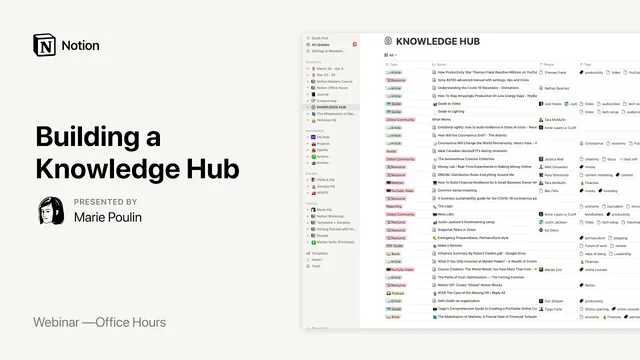
Notion Office Hours: Building a Knowledge Hub 🔖
Based on Notion's video on YouTube. If you like this content, support the original creators by watching, liking and subscribing to their content.
Use a single Knowledge Hub as the first landing zone for consumed resources, then add only lightweight metadata (Type, tags, reminders) during capture.
Briefing
Notion resource hubs are built to turn scattered “clipped” information into something searchable, filterable, and eventually actionable—so knowledge stops piling up and starts getting reused. The core workflow centers on a single Knowledge Hub database that acts as an ingestion point for everything being consumed (books, podcasts, courses, articles, bookmarks), with lightweight metadata—especially a “type” field, tags, and occasional reminders—to keep the data organized without demanding constant manual upkeep. Instead of returning to a cluttered archive, the system encourages progressive summarization: highlight what matters, extract quotes into a dedicated Words & Wisdom area, and optionally link items to projects or ideas when they become relevant.
The setup follows a PARA-style structure at the top level (Projects, Areas, Resources, Archives), but the Knowledge Hub sits inside Resources as the “giant table” where new material lands first. Information typically enters via the Notion clipper or photo clipper while browsing, then gets opened in Notion for quick enrichment—mostly selecting a pre-made type, adding a few tags (like coronavirus-related topics), and setting reminders to resurface items later. Over time, the hub becomes more useful as relations and tags connect it to other databases such as People, Notes & Ideas, and Projects. A People database supports fast navigation across creators and influencers: once a person is linked, related courses, posts, and saved items can be traced through relations.
Where the hub becomes powerful is in the way it’s “activated” through views and rollups. Rather than relying on one default table, the Knowledge Hub is copied into multiple filtered views: for example, a gallery filtered to online courses with an “in progress” status, including notes, PDFs, and cost details—so weekly reviews can pull the right subset instantly. Rollups then provide at-a-glance analytics across relations. A Master Tag database can roll up counts of Knowledge Hub items tagged with “Best Self,” letting the user sort tags by how much material has been collected for each theme. Rollups can also pull properties from related records (like a person’s role, URL, or Twitter bio), effectively bringing context from “a couple steps away” into the same workspace.
A key distinction emerges between Knowledge Hub and Content Hub: Knowledge Hub is for consuming and collecting, while Content Hub is for creating—blog posts, workshop presentations, and other outputs—often viewed as an editorial calendar. Idea capture is treated as flexible: thoughts can be entered into Notes & Ideas directly, or captured via daily journaling and then forwarded after a “brain dump.” Articles are clipped immediately into Knowledge Hub, and only later—during weekly processing—are they connected to projects, given summaries, and assigned statuses like “review.”
DJ extends the concept with an entertainment-focused recommendation engine built on the same PARA logic. He creates “cues” and “trackers” for movies (and other media) that compute relevance using formulas combining IMDb scores, personal interest levels, and contextual relevance (“what am I doing right now”). After watching, items flow into a review tracker with ratings and criteria, so consumption and creation stay linked. He also adds inbox-style staging for unprocessed items—keeping captured content in an “Inbox” view until it’s tagged and moved into the correct database—solving the common problem of knowing what’s fresh.
Across both systems, the message is consistent: the value comes from designing metadata, views, and relations so the workspace can surface the right information at the right moment—whether that’s for weekly review, content creation, or deciding what to watch next—without drowning in manual organization.
Cornell Notes
The Knowledge Hub approach treats Notion as a “resource ingestion + activation” system. Everything consumed (books, podcasts, courses, articles, bookmarks) is clipped into a single Knowledge Hub database with minimal but consistent metadata like Type, tags, and reminders. Progressive summarization turns highlights into reusable assets: quotes get saved to Words & Wisdom, and key ideas can be linked to Projects or Notes & Ideas when they become relevant. Filtered views and rollups then transform the raw table into targeted dashboards (e.g., in-progress courses) and quick analytics (e.g., how many items are tagged “Best Self”). DJ’s entertainment engine applies the same principles using formulas to compute relevance and bubble up what’s most worth watching next.
How does the Knowledge Hub prevent “Evernote-style” clutter from becoming unusable?
What’s the practical difference between Knowledge Hub and Content Hub?
How do rollups turn relations into quick, decision-ready summaries?
What does “progressive summarization” look like inside Notion?
How does DJ’s movie recommendation engine compute “what to watch next” automatically?
Why use an Inbox staging area for captured items?
Review Questions
- If someone already has a large archive of clipped content, what minimal metadata would you standardize first (Type, tags, reminders, status) to make filtered views and rollups work?
- Describe a workflow for moving an article from initial clipping into a project-linked resource during weekly review.
- In DJ’s approach, what inputs feed the watch score, and how would you modify the formula to incorporate friend recommendations?
Key Points
- 1
Use a single Knowledge Hub as the first landing zone for consumed resources, then add only lightweight metadata (Type, tags, reminders) during capture.
- 2
Turn highlights into reusable assets via progressive summarization, storing quotes in a dedicated Words & Wisdom area for later writing and content planning.
- 3
Create multiple filtered views (e.g., in-progress courses, podcasts listened to) so weekly review pulls the right subset instantly.
- 4
Leverage relations plus rollups to produce quick analytics like “how many Knowledge Hub items are tagged Best Self,” and to pull context from related People records.
- 5
Keep Knowledge Hub (consumption) separate from Content Hub (creation) to avoid mixing ingestion and publishing workflows.
- 6
Use inbox-style staging for unprocessed captures so “fresh” items are visible until tagging and categorization are completed.
- 7
Apply the same PARA + metadata + formulas logic to recommendation engines by computing relevance scores from IMDb, personal interest, and contextual relevance.