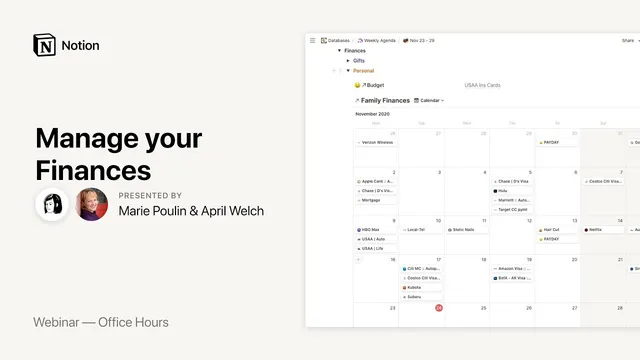
Notion Office Hours: Manage your Finances 💵
Based on Notion's video on YouTube. If you like this content, support the original creators by watching, liking and subscribing to their content.
Welch’s Notion finance system prioritizes weekly visibility and intention over automated transaction syncing that can require constant cleanup.
Briefing
A Notion-based finance system can replace “set-and-forget” budgeting apps by shifting the focus from automation to weekly, intentional check-ins—so spending stays visible down to the penny and mistakes are caught early. April Welch, a long-time Notion user and productivity consultant, built her setup after getting frustrated with tools that synced transactions automatically and then required constant cleanup. Instead of relying on bank-to-app automation, she uses Notion primarily as a tracking and planning workspace, with light budgeting features like rollups to summarize bills paid.
Her workflow starts with a weekly dashboard that acts like a control center. Each week, she copies recurring items from Google Calendar into Notion, then marks off what’s been handled using toggles—so completed financial tasks collapse out of view. The dashboard is built from a small number of real database properties, while most fields are handled through relations and rollups. Under the hood, she maintains separate databases for personal finances, business finances, and credit card payments, all connected back to a master “financials” page that serves as the root holding spot.
The personal finance portion is designed for clarity rather than accounting-grade complexity. She templates recurring bills (for example, Netflix) so only a few fields need manual entry each time—month, week, and any notes about changes. Categories and tags let her slice spending by time period (like early-month vs. late-month pay cycles), by expense type, and by payment account. She also tracks subscriptions and streaming spending, plus recurring “adulting” items and projects, using the same dashboard so money decisions stay tied to real life.
A key reason the system works for her is trust. After an identity-theft scare involving her husband’s credit card, she realized automated tools had masked what was actually happening in accounts. With her Notion process, she checks payment accounts at least weekly because bills and due dates are front-and-center. That routine helped her notice charges she might otherwise have missed for months.
For credit cards, she splits data into a dedicated database and uses formulas to calculate key metrics like a target portion of the credit limit (she mentions staying around 33%) and to track balances and APR. She also distinguishes between autopay and manual payments using separate templates, so she can see what cleared automatically versus what she intentionally paid down.
Welch’s approach also emphasizes customization and security boundaries. She avoids storing sensitive information like Social Security numbers, passwords, or full banking details inside Notion; the system logs “enough” information to track payments and totals, while the actual account security remains with the bank portals. When sharing or teaching, she recommends duplicating databases for experimentation, using templates carefully, and—when needed—sharing only specific pages or entries rather than exposing entire databases.
Overall, the session frames Notion finance management as a flexible, human-centered system: build a weekly rhythm, use templates to reduce friction, rely on views and filters for answers (like month-by-month spending), and keep automation minimal so the numbers remain accountable to the person who’s checking them.
Cornell Notes
April Welch uses Notion to manage finances through weekly planning and manual check-ins rather than heavy transaction automation. Her system centers on a weekly dashboard built with toggles, relations, and rollups, where recurring items are brought in from Google Calendar and then marked as completed. She maintains separate databases for personal finances, business finances, and credit card payments, all linked to a master “financials” page. Templates prefill most bill data so only a few fields (like month/week and notes) require attention. The approach matters because it restores trust: she checks payment accounts weekly and catches issues that automated syncing tools can hide for months.
Why does Welch avoid relying on automated budgeting apps for her finances?
How does the weekly dashboard structure reduce friction day-to-day?
What design choices keep her Notion finance setup simple enough to maintain?
How does the system improve account trust after a credit-card identity scare?
What’s distinctive about her credit card tracking?
What security boundaries does she set for sensitive financial data in Notion?
Review Questions
- How does Welch’s workflow combine Google Calendar and Notion to manage recurring bills and weekly planning?
- What role do templates, toggles, and rollups play in keeping her finance system usable rather than overwhelming?
- Why does separating personal finances, business finances, and credit card payments matter for her reporting and trust?
Key Points
- 1
Welch’s Notion finance system prioritizes weekly visibility and intention over automated transaction syncing that can require constant cleanup.
- 2
Google Calendar serves as the recurring-event staging area; weekly planning imports those items into Notion for execution and tracking.
- 3
A weekly dashboard built with toggles helps completed financial tasks collapse out of view, reducing clutter and decision fatigue.
- 4
Separate databases for personal finances, business finances, and credit card payments enable targeted views, rollups, and formulas without mixing unrelated logic.
- 5
Templates prefill standard bill data so manual entry stays minimal—typically limited to month/week and any notes about changes.
- 6
Credit card tracking uses dedicated templates and formulas (including a target credit-limit portion) and distinguishes autopay from manual payments.
- 7
Welch avoids storing highly sensitive information (like Social Security numbers, passwords, or full account numbers) inside Notion, keeping security responsibilities with bank portals.