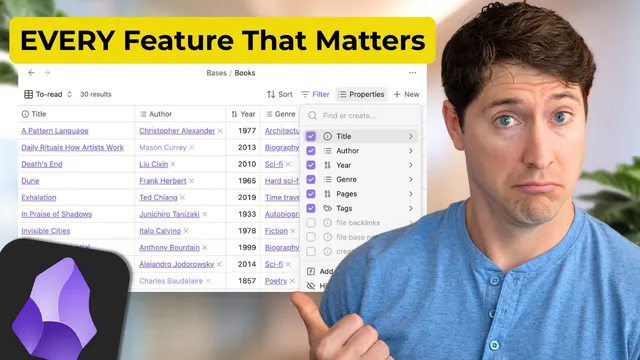
Obsidian Bases: Obsidian's Biggest Upgrade (Complete Guide)
Based on Linking Your Thinking with Nick Milo's video on YouTube. If you like this content, support the original creators by watching, liking and subscribing to their content.
Obsidian Bases’ standout value is dynamic links: embedded Bases views auto-update based on the note currently selected, turning backlinks into context-rich navigation.
Briefing
Obsidian Bases’ biggest upgrade isn’t just faster organization—it’s the way it turns note links into live, contextual “dynamic links” that update as soon as you click into a note. That shift changes how people navigate an “idea verse”: instead of browsing a static database or scrolling a backlink list with no context, Bases can surface the right subset of related notes (movies, quotes, people, projects, calendar entries, and more) in a sidebar, sorted and filtered to match the note you’re currently viewing.
Speed is the first practical win. Creating a new base via Command-P (Mac) or Control-P (Windows) is described as effectively instantaneous, with built-in optimizations for scrolling large tables. The workflow is tested against vaults with tens of thousands of files, and the experience remains smooth while moving through large result sets.
The second major feature is that a single base can hold multiple views—table, cards, and more—each showing the same underlying dataset through different lenses. In the “sources” example, one base contains pre-built views for books, shows, and other categories. Clicking between views immediately changes layout and filtering without rebuilding anything.
The third feature is live editing with autocomplete, letting users rapidly update properties (like ratings) and see those changes propagate into the base’s sorted results right away.
Under the hood, Bases rely on note properties. Properties live inside individual notes (for example, a “book” note can store metadata such as year, rating, and other fields). Bases then use those properties to create columns, sort order, and filters. The transcript emphasizes that properties are the control panel: once they’re present, Bases can filter and present notes that match specific parameters.
Views are where the system becomes usable. A “main view” can apply a global filter (such as “folder contains sources”), and then each duplicated view adds its own narrower filter (such as “folder contains …/books”). This structure keeps shared constraints consistent while letting each view focus on a different slice of the vault.
The most transformative capability is embedding views via Obsidian syntax and “dynamic links.” When a note includes an embedded reference to a specific Bases view, the embedded results auto-update based on the note you’re currently in. The transcript demonstrates this with directors like Peter Jackson, Hayao Miyazaki, and James Cameron: clicking between director notes updates the sidebar to show only the movies in the database that match that director, sorted by personal rating.
The walkthrough then scales up into a full personal system (“Ideaverse Pro 2.5” and related bases). Bases are organized around an “ACE folder framework” (Atlas, Calendar, Efforts, X/Extra, plus an Add folder). High-level bases (like “Atlas,” “Dots,” “Maps,” “Sources,” and “Projects”) are intentionally broad, while views inside them zoom in by note type—people, questions, quotes, statements, and “dots” (timeless knowledge units). The result is a navigational map where clicking a note reveals connected context across time, projects, and collections.
Practical automation also appears: Claude Code is used to populate missing book cover images by finding notes with an “image” YAML property and then searching online (via a Google Books API approach) for covers, ultimately updating dozens of book notes.
Finally, the transcript argues that Bases make links more meaningful rather than replacing writing. Dynamic links and contextual sidebars are framed as “echolocation” for memory—reinforcing relationships over time—while guidance urges users to start small (10–20 notes) and expand gradually, rather than trying to retrofit properties across thousands of notes at once.
Cornell Notes
Obsidian Bases turns note collections into fast, queryable databases built on note properties. A base can contain multiple views (table, cards, etc.) that share global filters while applying view-specific filters, letting users zoom in on different slices of the same dataset. The key leap is dynamic links: embedded Bases views auto-update based on the note currently selected, so a sidebar can show context-rich results (e.g., all movies directed by the person you clicked) instead of a generic backlink list. This makes navigation feel like exploring a “three-dimensional” idea map, reinforcing memory and strengthening connections as work continues.
What makes Bases feel “instant,” and why does that matter for large vaults?
How do note properties control what appears in a base?
What’s the practical difference between a base’s “main view” filter and a view-specific filter?
How do dynamic links change the experience of backlinks?
Why does the transcript recommend starting with broader bases rather than the narrowest possible one?
How was AI used to enrich the vault beyond text properties?
Review Questions
- When you create a new view in Bases, how do you ensure it inherits the main view’s global filter while adding its own narrower filter?
- What role do note properties play in enabling sorting and filtering inside a base? Give one concrete example from the transcript.
- How do dynamic links differ from standard backlinks in terms of context and what appears in the sidebar?
Key Points
- 1
Obsidian Bases’ standout value is dynamic links: embedded Bases views auto-update based on the note currently selected, turning backlinks into context-rich navigation.
- 2
Bases are built on note properties; without consistent metadata inside notes, sorting and filtering inside Bases can’t work as powerfully.
- 3
A base can host multiple views (table/cards), letting one dataset be explored through different layouts and filters without rebuilding the structure.
- 4
Use a “main view” for global constraints (like a root folder) and duplicate views to add narrower filters for each category (like books vs. shows).
- 5
Start with broader bases (e.g., an entire folder) and let views zoom in; this keeps the system flexible as needs change.
- 6
AI can automate enrichment tasks like adding missing book cover images by filling YAML properties and updating many notes in batches.
- 7
Adopt a gradual rollout: begin with a small set of notes (10–20) and expand, rather than retrofitting properties across thousands of files at once.