"Obsidian" Canvas on STEROIDS: Excalidraw 1.9.5 release
Based on Zsolt's Visual Personal Knowledge Management's video on YouTube. If you like this content, support the original creators by watching, liking and subscribing to their content.
Excalidraw 1.9.5 adds frames in Obsidian to group elements, move them together, and adjust frame-level properties like opacity.
Briefing
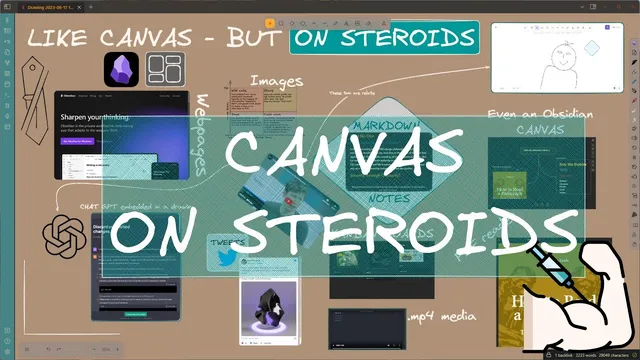
Excalidraw 1.9.5 for Obsidian adds “frames” and a new way to embed almost any file from your Vault as live, interactive iframes—turning Obsidian notes into canvases that can host PDFs, markdown, Kanban boards, videos, tweets, web pages, and even shared ChatGPT conversations. The practical payoff is straightforward: instead of pasting static screenshots, users can drop in content that stays interactive inside the Excalidraw canvas, resize it, and in many cases scroll or edit it in place.
The release starts with frames, a tool that lets users group multiple elements so they can move them together and adjust frame-level properties like opacity. Frames can also be managed quickly: elements can be moved into or out of a frame, and right-click options allow selecting all elements within a frame, removing them, or deleting the frame entirely.
The bigger shift comes with “Insert any file from The Vault.” A new button and a matching command-palette action make it possible to pick a Vault document, choose a section, and import it as an iframe. For PDFs and markdown, the iframe can be scrolled; for markdown, the content can be edited when inserted normally. The workflow also supports resizing and rotation. Rotation has a tradeoff: rotated iframes can be readable but not editable until rotated back (using Shift while rotating).
Embedding isn’t limited to Vault files. Drag-and-drop works too, with platform-specific modifier keys to force iframe insertion. On Windows, holding Ctrl+Shift while dropping inserts as an iframe; on macOS, the equivalent is the Control key plus Shift. The same modifier logic applies when dropping links from the internet.
Once embedded, the content’s behavior depends on type. A Kanban board imported as an iframe remains fully functional: cards can be moved around directly inside Obsidian. Videos imported as iframes can play in the background; clicking toggles the “active” state (indicated by a thick border), enabling resizing and transformations while active. Tweets can be pasted as links and become interactive embeds. Web pages can be embedded on desktop, with the caveat that mobile support is limited.
Theme handling is another key detail. The iframe background and styling follow the Excalidraw theme (including light/dark mode). Users can override this in plugin settings so iframes match Obsidian’s theme instead, or force a specific mode per file via markdown front matter using an iframe color mode key with values like dark, light, auto, and default.
The release also introduces “web embed” frames, enabling embedding of identity-requiring services via shared links—most notably shared ChatGPT chats. Pasting a ChatGPT conversation link into a web embed frame allows continuing the conversation inside the canvas, with the chat preserved in the embedded context. There’s also a deliberate limitation: embedding an Excalidraw drawing inside Obsidian as an iframe is not fully supported yet, and some embedded content may degrade to placeholders when the entire canvas is embedded into another document. The author frames this as a minimum viable product: usable and stable, but with rough edges, including known issues like iframe scrolling/editing behavior that are expected to be fixed. The release invites bug reports on GitHub and iteration based on user feedback.
Cornell Notes
Excalidraw 1.9.5 for Obsidian introduces frames and a major embedding upgrade: “Insert any file from The Vault” can import Vault documents as interactive iframes inside Excalidraw canvases. Users can group elements with frames, then embed content like PDFs, markdown, Kanban boards, videos, tweets, and desktop web pages—often with scrolling, editing, or live interaction. Theme behavior can follow Excalidraw’s light/dark mode, match Obsidian’s theme via settings, or be overridden per file using markdown front matter (dark/light/auto/default). Drag-and-drop supports iframe insertion using modifier keys (Ctrl+Shift on Windows; Control+Shift on macOS). Some limitations remain, including rotation/editing constraints and incomplete support when embedding canvases into other documents.
What does the new “frame” tool change for organizing content in Excalidraw canvases?
How does “Insert any file from The Vault” work, and what kinds of content become interactive?
What are the iframe insertion drag-and-drop shortcuts, and why do they matter?
How do theme and color modes affect embedded iframes?
What limitations or special behaviors show up with iframes—especially rotation and nested embedding?
How does “web embed” extend iframe embedding to identity-based services like ChatGPT?
Review Questions
- When would you use frames versus iframes, and how do they interact in a workflow?
- What modifier keys are required to force iframe insertion on Windows and macOS during drag-and-drop?
- How can you override iframe theme behavior per file using markdown front matter, and what do the dark/light/Auto/default options imply?
Key Points
- 1
Excalidraw 1.9.5 adds frames in Obsidian to group elements, move them together, and adjust frame-level properties like opacity.
- 2
“Insert any file from The Vault” imports selected Vault documents as interactive iframes, enabling scrolling/editing for many formats.
- 3
Kanban boards embedded as iframes remain fully functional, allowing card movement directly inside the canvas.
- 4
Iframe insertion via drag-and-drop requires modifier keys: Ctrl+Shift on Windows and Control+Shift on macOS.
- 5
Theme handling can follow Excalidraw, match Obsidian via plugin settings, or be overridden per file using markdown front matter (dark/light/Auto/default).
- 6
Web embeds support identity-based services through shared links, including continuing shared ChatGPT chats inside the canvas.
- 7
Known limitations include editability constraints when iframes are rotated and placeholder behavior when embedding canvases into other documents.