Obsidian - Embed A Website With Iframe
Based on Josh Plunkett's video on YouTube. If you like this content, support the original creators by watching, liking and subscribing to their content.
Obsidian supports iframe embedding without installing plugins, enabling live websites inside notes.
Briefing
Embedding live websites inside Obsidian notes is done with a built-in iframe mechanism—no plugins required. By inserting a simple iframe snippet and pointing it at a URL, notes can display interactive content like character sheets, menus, generators, and even spreadsheet tools directly inside the workspace. That matters because it turns Obsidian from a static note-taking app into a dashboard for game prep and day-to-day reference, without forcing extra setup or workflow changes.
The practical payoff shows up in tabletop roleplaying workflows. A DM can keep an NPC generator or tavern/menu site open inside a note, click through options, and read the results at the table. The same approach can support quick character sheets for players who may not want to wrestle with reading or editing in Obsidian itself. Instead of building a character-sheet plugin, the workflow keeps players on their own character sheets (for example on DND Beyond) and lets Obsidian act as a window into the latest version. When the note is revisited, the embedded page loads the current state, so the DM gets updated information without taking control of players’ sheets.
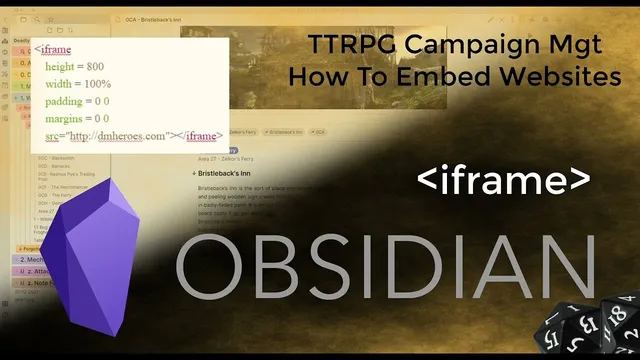
Technically, the iframe setup is straightforward: use an iframe tag with parameters such as height and width, optionally padding, and—most importantly—the source URL (the “src” value). The transcript emphasizes that iframe support is already present in Obsidian (via obsidian.md), so the only real task is copying the snippet into a note and swapping in the desired URL. The creator references basic iframe documentation from W3Schools for background, but the core requirement remains simple: correct HTML formatting and the right URL.
To make this repeatable, a template is used. A saved template note containing the iframe code can be inserted with a hotkey, then edited by replacing the URL. This reduces the chance of formatting mistakes and speeds up adding new embedded tools.
Beyond RPG generators, the same iframe method works for spreadsheets. By embedding Google Sheets, interactive spreadsheet features—formulas, dropdowns, and calculations—remain usable inside Obsidian. The transcript describes using a sheet with inventory-style math (e.g., SUM formulas) and adjusting iframe height so the embedded grid fits the screen. With enough layout control, spreadsheets can become inventory checkers, random table tools, or even quick “maps” by coloring cells.
Finally, the workflow can leverage websites that export content in formats useful to Obsidian. Some generators can output markdown, which can be downloaded and saved as a note so formatting lands correctly. Overall, the central takeaway is that iframe embedding turns existing web tools into native-feeling Obsidian components—fast to set up, easy to reuse via templates, and flexible enough to support both interactive web apps and spreadsheet-driven utilities for game prep.
Cornell Notes
Iframes let Obsidian display live web content inside notes without installing plugins. A simple iframe HTML snippet—especially the src URL plus sizing like height—can embed tools such as NPC generators, tavern/menu pages, and DND Beyond character sheets. Using templates and a hotkey makes it easy to insert the iframe repeatedly and avoid formatting errors. Embedding Google Sheets extends the idea further: formulas, dropdowns, and calculations work inside Obsidian, enabling inventory trackers, random table helpers, and other spreadsheet-based utilities. The result is a faster, more interactive workflow for tabletop prep and reference.
What is the minimum setup needed to embed a website inside an Obsidian note?
Why does the iframe approach work well for tabletop character sheets?
How can templates make iframe embedding faster and less error-prone?
How do embedded Google Sheets behave inside Obsidian?
What kinds of utilities can be built or repurposed using embedded web content?
Review Questions
- What parts of an iframe snippet must be changed to embed a new website in Obsidian?
- How does embedding a character sheet via iframe differ from using a dedicated Obsidian plugin for character sheets?
- Give two examples of interactive content types that can work inside Obsidian using iframes, and explain why sizing (like height) matters.
Key Points
- 1
Obsidian supports iframe embedding without installing plugins, enabling live websites inside notes.
- 2
A working iframe requires correct HTML formatting and a src value pointing to the target URL.
- 3
Adjust iframe height (and optionally width/padding) to fit the embedded content cleanly on screen.
- 4
Templates and hotkeys can streamline repeated iframe insertion and reduce mistakes.
- 5
Embedding DND Beyond-style character sheets can preserve player control while giving the DM a live reference view.
- 6
Embedding Google Sheets keeps spreadsheet features like formulas and dropdowns functional inside Obsidian.
- 7
Existing web generators can be embedded directly, and some can also export markdown for notes.