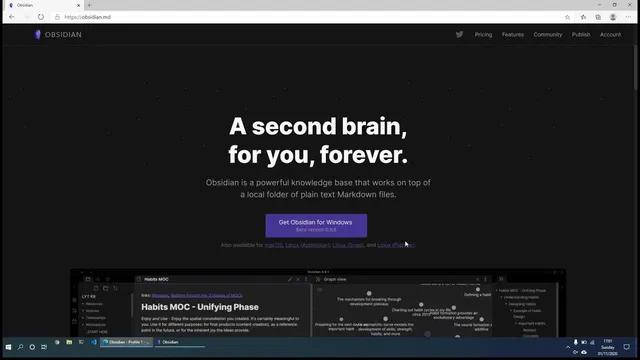
Obsidian Introduction - A alternative Roam Research app for Notes / PKM / To Do / Journal
Based on Ed Nico's video on YouTube. If you like this content, support the original creators by watching, liking and subscribing to their content.
Obsidian stores notes as plain Markdown files inside a user-created vault on the local machine, enabling portability and avoiding proprietary lock-in.
Briefing
Obsidian positions itself as a “second brain” built on plain Markdown files stored locally, letting users keep full control of their notes without proprietary lock-in. Notes live as regular text on the user’s hard drive, so they can be copied, deleted, pasted, or opened with any plain text editor—while still gaining Obsidian’s interface features like outline view, multi-pane editing, graph view, and structured hierarchies.
Getting started centers on creating a “vault,” which is essentially a folder of Markdown notes. After installation, users can open an existing vault, create a new one, or start from a help vault full of tips. The walkthrough demonstrates enabling built-in conveniences such as Daily Notes and Outline. With Daily Notes turned on, opening today’s entry automatically creates a dated note for the current day, and tomorrow will generate the next one. Notes are written in Markdown using simple syntax—headings with “#”, lists with dashes—and users can toggle between editing and a live preview to see how formatting will render.
Navigation and structure are handled through multiple views. Outline view acts like an index of a long note by listing headings; clicking an entry jumps directly to that section. For faster note creation, users can create standalone notes or generate pages on demand using links. The transcript highlights wiki-style linking: typing a page name inside double brackets (or using a link syntax) can create the page automatically, and later navigation will recognize the linked page. If a page is renamed, Obsidian can update existing links automatically so references stay consistent.
Beyond page-to-page links, Obsidian supports more granular connections. Block-level linking lets users link to a specific bullet point or section within a note, so clicking a link can take readers to the exact referenced area rather than just the top of the document. Heading links similarly jump to a particular section identified by headings.
The graph view visualizes how notes connect, showing nodes for pages and edges for links. Filters can hide non-existent pages or focus on existing ones, which becomes more useful as the vault grows. For organization, users can create folders (such as a Daily Notes folder or a Programming folder) and move notes via drag-and-drop; Obsidian updates links automatically when notes are relocated.
Finally, the interface supports active research workflows: a backlinks pane shows where a note is referenced, and multiple notes can be kept open side-by-side for comparison and drafting. The closing pitch emphasizes practical benefits—Obsidian is free, updates arrive frequently, and the development team engages with users through Discord, taking feedback and suggestions—framing the app as a flexible, user-controlled system for notes, PKM, tasks, and journaling.
Cornell Notes
Obsidian builds a “second brain” using plain Markdown files stored locally in a vault, avoiding proprietary lock-in. It combines simple text-based writing with features that make large note collections navigable: Daily Notes for automatic dated entries, Outline view for quick section jumping, and graph view for visualizing connections. Wiki-style links (double brackets) can create pages on demand, and renaming a page can automatically update existing links. Newer capabilities include block-level linking, which targets a specific bullet or section inside a note, plus backlinks that show where a page is referenced. These tools make it easier to organize, cross-reference, and retrieve information over time.
How does Obsidian achieve “second brain” functionality without trapping users in proprietary formats?
What practical workflow does Daily Notes enable for journaling or recurring entries?
How does Outline view help when a note becomes long?
What’s the difference between linking to a page and linking to a specific part of a page?
How does graph view support sense-making across many notes?
How do backlinks and multi-pane editing change day-to-day navigation?
Review Questions
- What are the implications of storing notes as local Markdown files for portability and long-term access?
- Describe how wiki-style links and renaming interact—what happens to existing links when a page title changes?
- Give one example of when block-level linking would be more useful than page-level linking.
Key Points
- 1
Obsidian stores notes as plain Markdown files inside a user-created vault on the local machine, enabling portability and avoiding proprietary lock-in.
- 2
Daily Notes can automatically generate dated entries, reducing friction for journaling and recurring capture.
- 3
Outline view turns heading structure into an index, allowing instant navigation within long notes.
- 4
Wiki-style links (double brackets) can create pages on demand and support automatic link updates after renaming.
- 5
Block-level linking enables precise references to a specific bullet or section, not just the top of a page.
- 6
Graph view visualizes how notes connect, with filters to manage existing versus non-existent linked pages.
- 7
Backlinks and multi-pane editing support fast retrieval and side-by-side drafting across multiple notes.