OnSong Connect API
Based on OnSong App's video on YouTube. If you like this content, support the original creators by watching, liking and subscribing to their content.
OnSong Connect API is a REST-style local service that returns JSON for interacting with an OnSong library.
Briefing
OnSong Connect API lets developers build custom apps that read and manipulate an OnSong library—whether the library is being used on stage or stored elsewhere—through a local, REST-style service that returns JSON. The practical payoff is immediate: once an app authenticates and registers a device, it can list songs, search by query, fetch detailed metadata, and retrieve or export song content (including external files) over the network.
The walkthrough starts by turning an iPad into a Connect server from the iOS app’s Share menu. After enabling “Share your library with others,” the iPad appears in the servers list with an IP address and port. Developers then open API documentation via a browser using the server’s address and the fixed port (spelled out as 5076). From there, the core requirement becomes clear: every request must include an auth token (“off token”) that is at least 16 characters long. The token must be stored by the client application and reused for subsequent calls. Before the token works, the device must be accepted by the iPad—an initial “not currently accepting users” response flips to “accepted” after the iPad grants permission.
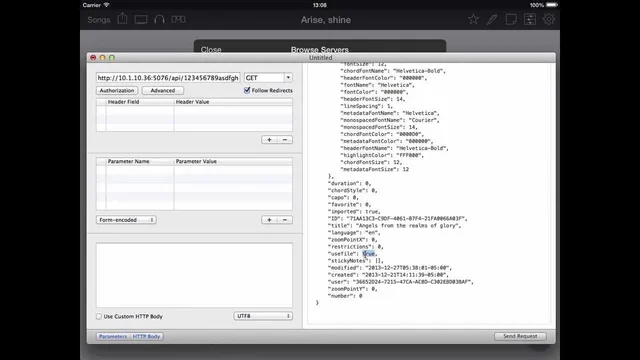
With authentication in place, the API behaves like a set of straightforward endpoints. A GET request to a songs endpoint returns an array of song records, including fields such as id, title, artist, favorite status, and key. Query string parameters enable filtering; for example, adding q=love returns a smaller subset of songs matching that term. The same pattern extends to books: a books endpoint lists available books, and songs can be scoped to a specific book using a book parameter (e.g., songs?book=christmas). Fetching one song’s details uses the song’s id appended to the songs URL, returning structured properties like styles, keywords, duration, and chord-related information.
The most operationally useful part is content retrieval. For songs with embedded text content, calling /content returns the actual lyric/chord text. For songs that reference an external file, the API indicates this via a file-related property; in that case, requesting /file returns an attachment (the example shows a PDF). The export workflow is also built in: requesting content in different formats (such as content.pdf, content.html, xml, or plain text) triggers server-side generation of the requested representation. The result is a developer-friendly way to integrate OnSong library data into projection tools, editors, or other stage workflows without reimplementing OnSong’s internal formats.
Overall, the Connect API is presented as a local-network bridge between OnSong’s library and custom software—fast enough for interactive use, structured enough for automation, and flexible enough to handle both embedded content and external attachments through consistent REST endpoints and query parameters.
Cornell Notes
OnSong Connect API provides a REST service that returns JSON for interacting with an OnSong library over a local network. After enabling library sharing on an iPad, developers authenticate using an auth token (minimum 16 characters) and must get the device accepted before requests succeed. Once registered, GET requests can list songs and books, filter songs with query strings (like q=love), and fetch song metadata by id. Content endpoints support retrieving embedded text and downloading external attachments via /file. Export options let clients request content in multiple formats such as PDF, HTML, XML, or plain text using variations of the /content endpoint.
What must be done before an app can make successful Connect API calls?
How does a developer discover the API documentation and endpoints for a local OnSong Connect server?
How can a client list songs and filter them without downloading everything?
How does the API handle organizing content by books?
What’s the difference between retrieving song metadata and retrieving song content?
How can a client request the same song content in different formats?
Review Questions
- Why does the auth token need to be accepted by the iPad before requests succeed, and what happens if the token isn’t yet accepted?
- Describe the sequence of endpoints needed to go from listing songs to retrieving a specific song’s exported content in a chosen format.
- How would you handle a song that has no embedded content but instead references an external PDF file?
Key Points
- 1
OnSong Connect API is a REST-style local service that returns JSON for interacting with an OnSong library.
- 2
An iPad must be configured as a server by enabling “Share your library with others,” after which it appears with an IP address and port.
- 3
Every API request requires an auth token of at least 16 characters, and the token must be reused across requests.
- 4
The device must be accepted by the iPad; otherwise requests can fail with a “not currently accepting users” response.
- 5
GET requests can list songs and books, and query strings (like q=love or book=christmas) filter results.
- 6
Song metadata is retrieved by song id, while song content is retrieved via /content and may require /file when an external attachment is used.
- 7
Content can be exported on demand by requesting formats such as content.pdf, HTML, XML, or plain text.