OpenAI Whisper, Stable Diffusion inpainting/outpainting, DALL E API? - AI NEWS
Based on MattVidPro's video on YouTube. If you like this content, support the original creators by watching, liking and subscribing to their content.
OpenAI released Whisper as an open-source speech-recognition model aimed at near-human robustness and accuracy for English.
Briefing
OpenAI’s Whisper is the week’s biggest practical upgrade: an open-source speech-recognition neural network aimed at near-human robustness and accuracy for English. The pitch is straightforward—when phones mishear speech, Whisper is designed to do better, including with fast delivery and heavy accents. Examples in the demo include speed-talking and a thick-accent passage that would typically be hard for consumer transcription systems; the transcripts come out clean enough to suggest the model is handling difficult audio conditions more reliably than standard mobile transcription.
Whisper also matters because it’s not just a “transcribe English” tool. The workflow described includes handling speech from other languages and converting it into English text, which points toward real-time, cross-language communication—someone speaks, the system transcribes and translates automatically, and the other person reads it in their own language. The transcript walkthrough touches on how the token-based transcription process works and notes that OpenAI provides a GitHub/Collab example for trying it out, making it easier for developers to integrate Whisper into phones and apps.
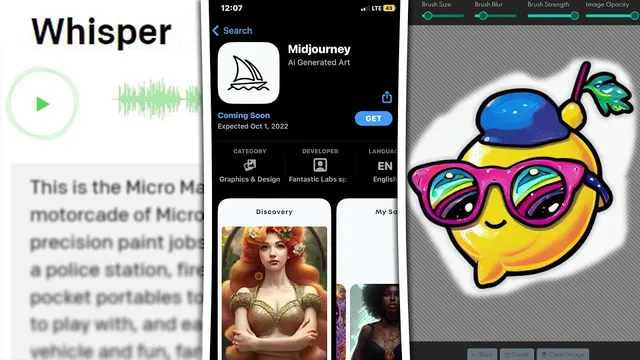
The second major development is Dream Studio’s new editing system for Stable Diffusion, positioned as a full inpainting and outpainting editor rather than a basic image-to-image variation tool. The interface adds controls like select-and-move for repositioning elements, scaling for resizing, and a masking brush for targeted edits. Compared with earlier DALL·E-style editing workflows, the editor adds more granular controls such as blur size, strength, and image opacity—useful for blending edited regions back into the original image. A “restore” option is also highlighted, letting users recover parts of the original image after erasing.
A hands-on example centers on adding “yellow legs” to a lemon character. The editor blurs around the edited area while generating, then produces results that actually add the requested legs. The workflow supports multiple generations (including up to nine variations) so users can iterate quickly, and the interface includes advanced settings such as CFG scale and sampler choices, with the ability to apply different settings across parts of an image. An image-to-image mode is also available, where a prompt like “a photo of a lemon” shifts the style toward more photorealistic outputs, with strength settings controlling how closely the result tracks the original.
Beyond these two concrete releases, the transcript flags rumors and ecosystem momentum: a possible Midjourney app appearing on the Apple App Store (with a stated expected date), a surge in third-party AI image generator apps across app stores, and chatter that OpenAI may allow other companies to purchase access to the DALL·E API. Taken together, the theme is clear—speech transcription is getting more accurate and more accessible via open tooling, while image generation is moving from “generate once” toward interactive, controllable editing inside dedicated web and app-style interfaces.
Cornell Notes
OpenAI released Whisper, an open-source speech-recognition model designed for high robustness and accuracy in English, including fast speech and thick accents. The workflow also supports transcribing speech from other languages into English, which could enable near-real-time cross-language communication. On the image side, Dream Studio added a full editing interface for Stable Diffusion, bringing true inpainting and outpainting with masking, select-and-move, scaling, blur/strength controls, and a restore option. Users can generate multiple variations (up to nine) and tune advanced parameters like CFG scale and samplers. The combined shift points toward AI tools that are both more reliable (speech) and more editable (images) in everyday applications.
What makes Whisper more useful than typical phone transcription for real-world audio?
How does Whisper’s multilingual-to-English capability change what developers can build?
What new capabilities does Dream Studio’s editor add compared with simpler image-to-image tools?
How do the editor controls support more precise image edits?
What workflow is demonstrated for inpainting in Dream Studio?
What does Dream Studio’s image-to-image mode aim to do?
Review Questions
- How does Whisper’s handling of speed and thick accents affect its usefulness for mobile transcription?
- Which Dream Studio editor features enable targeted inpainting and outpainting beyond basic image-to-image variation?
- What role do parameters like CFG scale, sampler choice, and strength play in controlling Stable Diffusion edits?
Key Points
- 1
OpenAI released Whisper as an open-source speech-recognition model aimed at near-human robustness and accuracy for English.
- 2
Whisper’s demo performance is emphasized on difficult inputs like speed-talking and thick accents, where many transcription tools falter.
- 3
Whisper can transcribe speech from other languages into English, enabling a path toward real-time cross-language communication.
- 4
Dream Studio added a full Stable Diffusion editing interface with masking, select-and-move, scaling, and a restore option for more controllable edits.
- 5
The editor supports inpainting/outpainting workflows and iterative generation, including up to nine variations per edit.
- 6
Advanced controls such as blur size, strength, image opacity, CFG scale, and sampler selection help fine-tune how edits blend and how strongly the model changes selected regions.
- 7
Rumors point to potential expansion of DALL·E API access for third parties and continued growth of AI image generator apps across app stores.