Organizing docs & wikis for large teams
Based on Notion's video on YouTube. If you like this content, support the original creators by watching, liking and subscribing to their content.
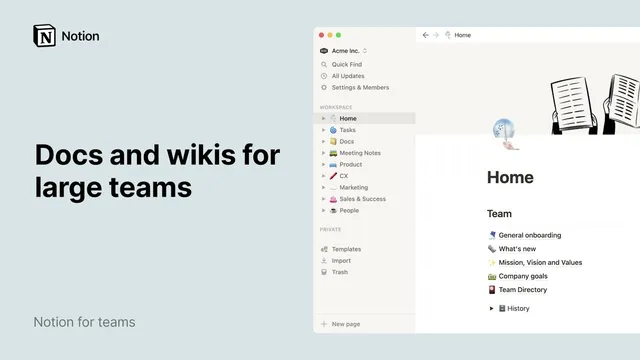
Create a team wiki (home page) for each vertical and a separate general onboarding homepage for cross-team information.
Briefing
Notion can serve as a central knowledge hub for large organizations, but it only stays useful at scale when teams standardize where information lives and how pages connect. The core setup is a “home” or team wiki for each vertical—such as Product, CX, Marketing, Sales, and Success—plus a company-wide homepage for cross-team onboarding. These hubs store repeatable assets like processes, best practices, and OKRs, while onboarding pages give new hires a single place to find everything they need. Clear page structure matters: long onboarding documents work better with headings and subheadings, and a table of contents can be added by typing “/toc” so readers can jump directly to what they need.
As work expands into thousands of pages, linking becomes the glue that prevents knowledge from turning into isolated silos. When a page mentions something like a team directory, replacing plain text with a page link lets readers jump straight to the source. Notion also automatically creates backlinks: whenever a page is linked, the destination page gains a backlink trail, making it easier to trace where key documents are referenced. This linking discipline also helps teams keep important materials in circulation—especially when onboarding, policies, and operational guides are referenced repeatedly.
For consistency, Notion supports syncing content across multiple locations. Teams can copy selected sections from a source page (for example, “Mission, Vision and Values”) and paste them back into another page using “paste and sync,” which keeps updates aligned in real time. That approach reduces the risk of outdated duplicates as organizations grow and different teams develop their own operating habits.
The next scale lever is shared databases that keep common knowledge in one place. A docs database can hold procedural knowledge, brand guidance, and company-wide policies like vacation rules, so teams don’t reinvent the same information in different corners. How-to documentation can also live in the same system, and different database views—paired with filters and sorts—help tailor what people see. One view might group docs by owner, showing only items created by the currently logged-in user (e.g., Mary Cassatt), while another user would see their own items instead. Sorting can surface the latest edits or arrange content alphabetically.
Meeting knowledge fits the same model. A shared database for meeting notes makes decisions and action items accessible asynchronously, and database templates can standardize recurring note structures like weekly syncs—so teams don’t rebuild the same sections every time.
Finally, large teams need disciplined sharing controls. Pages can be kept private or restricted while work is in progress, with access levels ranging from no access to view/comment/edit. Guests—people outside the workspace—can be invited to a single page without joining the whole workspace. Admins can review members, grant admin access, and track guests and page-level sharing. Together, page headings, backlinks, synced sections, shared databases, templates, and granular sharing settings form a practical system for organizing documentation and wikis at organizational scale in Notion.
Cornell Notes
Large organizations can use Notion effectively by combining standardized “team wiki” home pages with strong linking and shared databases. Each vertical gets its own wiki for processes, best practices, and OKRs, while a company-wide homepage supports onboarding with clear headings and a table of contents. As the workspace grows, page links and automatic backlinks connect related documents and prevent knowledge from getting stranded. For consistency, teams can sync selected page sections so updates propagate in real time instead of creating outdated duplicates. Shared databases—backed by templates for recurring structures—centralize docs and meeting notes, while page-level sharing settings control who can view, comment, edit, or access guests.
How should a large team structure its Notion workspace so people always know where to look?
Why do page links and backlinks matter once a workspace reaches thousands of pages?
What’s the difference between copying content and using “paste and sync” in Notion?
How can shared databases improve consistency for docs, policies, and how-to guides?
How do templates help with recurring meeting notes?
What are the practical steps for restricting a Notion page to a small group while it’s still in progress?
Review Questions
- What combination of features prevents documentation from becoming a set of disconnected silos as page counts grow?
- When would “paste and sync” be preferable to duplicating content manually, and what problem does it solve?
- How do database views and filters change what different users see without duplicating the underlying documents?
Key Points
- 1
Create a team wiki (home page) for each vertical and a separate general onboarding homepage for cross-team information.
- 2
Use headings/subheadings and add a table of contents (“/toc”) so long documents remain navigable.
- 3
Replace references with actual page links to enable direct navigation and automatic backlinks for traceability.
- 4
Use “paste and sync” to keep shared sections consistent across multiple pages in real time.
- 5
Centralize procedural knowledge, brand guidance, and policies in shared databases, then use views with filters/sorts to tailor visibility.
- 6
Standardize recurring documentation (like weekly meeting notes) with database templates instead of rebuilding structures each time.
- 7
Apply page-level sharing controls—restrict access, invite specific people, manage access levels, and track guests—to prevent accidental exposure or edits.