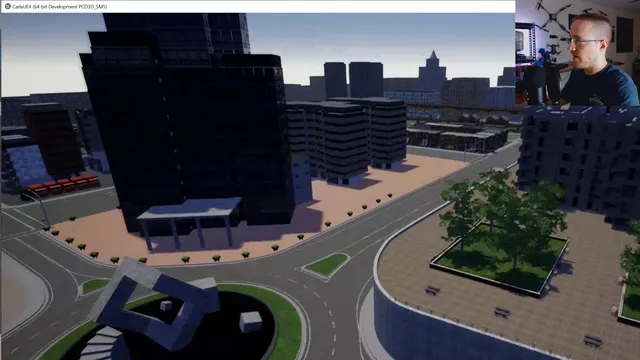
Programming Autonomous self-driving cars with Carla and Python
Based on sentdex's video on YouTube. If you like this content, support the original creators by watching, liking and subscribing to their content.
CARLA is an autonomous-driving simulator with a dedicated API, sensor models, and a server/client architecture suited to multi-agent experiments.
Briefing
CARLA is an open-source autonomous-driving simulator that lets researchers and developers iterate on self-driving behaviors inside a controllable world—complete with an API, sensors, and multi-client setups—without the friction of real-world testing. The core takeaway from this walkthrough is practical: getting CARLA running on a fresh machine is mostly about matching the right CARLA release, satisfying dependencies (notably pygame and numpy), and aligning Python versions so the provided example scripts can import CARLA correctly.
After a quick overview of CARLA’s capabilities—server/client architecture for multiple agents, optional rendering to speed up experiments, and built-in autonomous-driving baselines—the walkthrough shifts into a “get started” checklist. The setup hinges on using a CARLA release that works with Unreal Engine 4 (explicitly called out as a requirement). The author then selects a stable release and, on Windows, downloads an experimental build that includes a new town environment with narrow roads plus an OpenDrive parser and waypoints API. The process also emphasizes network requirements: CARLA uses TCP ports that must be open, and the second port is effectively the first port plus one.
Once the environment is running, the workflow becomes clearer: start the CARLA server, then run Python client scripts that connect to it (often with a spectator view for observing the simulation). The tutorial then demonstrates core simulation concepts through the Python API—actors, blueprints, the world object, and sensors—showing how vehicles, pedestrians, and sensor feeds are all represented as actors instantiated from blueprint definitions.
The hands-on portion focuses on driving the simulator rather than building an autonomous stack immediately. The author spawns non-player characters (NPCs) to populate the city, experiments with scaling the number of vehicles (encountering spawn-point limits and collisions), and tests dynamic weather to see how lighting and conditions change the scene. A manual control mode is used to verify that keyboard driving works, including throttle, brake, reverse, gear toggling, autopilot toggling, and recording camera images to disk.
A key troubleshooting moment occurs when an example fails with “No module named carla.” The fix is version alignment: the CARLA Python package in the distribution targets a specific Python version (Python 3.7 in this case), while the user’s environment was Python 3.6. Updating the command to use Python 3.7 resolves the import and allows spawning vehicles successfully.
The session ends with a pivot toward next steps: moving from manual driving and environment validation to controlling a single vehicle, attaching a hood camera, collecting sensor data, and eventually using reinforcement learning with collision detection as a penalty signal. The immediate value is that the simulator is now operational end-to-end—server up, client scripts running, sensors accessible, and basic driving verified—so later work can focus on learning and control rather than setup failures.
Cornell Notes
CARLA is a simulator for autonomous-driving research that provides a server/client setup, an API, and sensor models (cameras, lidar, etc.) inside a controllable world. This walkthrough’s main lesson is operational: CARLA runs on Unreal Engine 4 and the Python examples require matching the CARLA distribution’s expected Python version (Python 3.7 here), plus dependencies like pygame and numpy. After resolving setup issues, the author verifies functionality by spawning NPC vehicles, switching weather, and using manual control to drive and observe collisions and lane/line crossings. With the environment working, the next goal becomes simpler: spawn one vehicle, attach a hood camera, collect sensor data, and use collision events as a penalty for reinforcement learning.
What makes CARLA useful compared with using a general game like Grand Theft Auto for autonomous-driving experiments?
How does the server/client model show up in everyday CARLA usage with Python?
Why did the “No module named carla” error happen, and how was it fixed?
What are actors and blueprints in CARLA’s Python API, and how do they relate to vehicles and sensors?
How does the walkthrough validate that manual control and simulation feedback work?
What’s the planned path from “driving the sim” to reinforcement learning?
Review Questions
- What specific setup mismatch caused the CARLA import failure, and what change resolved it?
- How do actors and blueprints work together to create vehicles and sensors in CARLA?
- What simulation events could serve as reward or penalty signals for reinforcement learning in this workflow?
Key Points
- 1
CARLA is an autonomous-driving simulator with a dedicated API, sensor models, and a server/client architecture suited to multi-agent experiments.
- 2
CARLA depends on Unreal Engine 4, so the installation and runtime environment must support that underlying engine requirement.
- 3
Python setup is critical: CARLA’s example scripts import a CARLA package built for a particular Python version (Python 3.7 in this walkthrough).
- 4
CARLA requires specific TCP ports for client connections; port availability can be a common source of “it runs but won’t connect” failures.
- 5
A practical validation path is to start the server, run a client for manual control, then confirm collisions and lane/line crossing feedback.
- 6
Dynamic weather and NPC spawning are useful for stress-testing perception and control logic before training an autonomous policy.
- 7
A sensible next step is to spawn one vehicle, attach a hood camera, collect sensor data, and use collision events as reinforcement-learning penalties.