Readwise NEW Feature: Themed Reviews
Based on Systematic Mastery's video on YouTube. If you like this content, support the original creators by watching, liking and subscribing to their content.
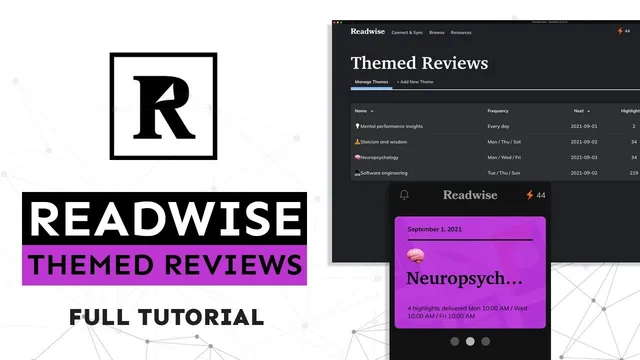
Themed Reviews group highlights by topic using tags and/or selected books, creating separate scheduled review sessions alongside the default daily review.
Briefing
Readwise’s new “themed reviews” add a configurable layer on top of daily reviews, letting users group highlights by topic (via tags and/or specific books) and deliver them on a schedule without breaking their streak. The practical payoff is less context switching and more depth: instead of getting a random mix of programming, psychology, and other interests in one sitting, themed reviews keep related ideas closer together so they’re easier to process and connect.
At the core is the distinction between the default daily review and themed reviews. Daily review pulls a set of highlights from reading activity based on user settings, aiming to surface information that matters while avoiding information overload. Themed reviews then target situations where daily randomness becomes a problem—especially for people with eclectic interests who want to optimize for depth. When highlights jump between unrelated domains, it can feel harder to integrate what’s learned. Themed reviews address that by letting users choose a “cognitive proximity” target: after reading one software engineering highlight, for example, it becomes more effective to follow with additional programming-related highlights.
Setup is flexible. Users can create multiple themed reviews (effectively unlimited), each defined by selected tags such as “stoicism,” “wisdom,” “meditation,” and “philosophy,” or by choosing particular articles/books as sources. Frequency is also configurable: themed reviews can run daily or on specific days and times (the walkthrough mentions a custom schedule like Monday/Thursday/Saturday at 12 pm). Importantly, skipping a themed review doesn’t cost the user their streak. What does change is visibility: if a themed review isn’t completed, the user can still see that not all highlights prepared for that day have been reviewed.
The walkthrough also highlights a more experimental workflow that links Readwise to a “second brain” system in Obsidian. Instead of relying only on imported highlights from books, users can create custom “digest” collections—freeform highlight entries authored by the user—and then build themed reviews that draw from those custom sources. In the example, the user creates a digest of “mental performance insights,” adds multiple insights (including one about meditation), and then sets up a themed review (tagged with an emoji theme) to receive a small number of those digest items daily. The goal is to re-consume synthesized ideas later—useful when returning to a topic for research or ongoing reflection.
Finally, themed reviews can function like a focused reminder system. By adding reflection questions to custom reviews and scheduling them (such as weekly prompts), users can prime themselves to think about a topic in a structured way rather than passively collecting more information. Overall, themed reviews are positioned as a way to keep Readwise’s daily cadence while tailoring attention toward specific domains, at the user’s chosen times, with room for experimentation across tools like Obsidian.
Cornell Notes
Themed Reviews in Readwise let users bundle highlights into topic-specific review sessions using tags and/or selected books, delivered on a schedule. This reduces context switching and supports deeper processing by keeping related ideas together (e.g., neuropsychology highlights grouped by cognitive proximity). Users can create many themed reviews and tune both the number of highlights and the delivery frequency. Skipping a themed review doesn’t break a streak, though it signals that not all prepared highlights for that day were completed. The workflow can extend beyond imported book highlights by creating custom “digest” collections and using themed reviews to re-consume synthesized insights and reflection prompts in a second-brain setup like Obsidian.
How do themed reviews differ from Readwise’s default daily review?
Why does grouping highlights by topic improve learning for users with broad interests?
What scheduling and streak behavior should users expect with themed reviews?
How can users build a themed review that draws from more than books?
How does the transcript connect themed reviews to an Obsidian workflow?
Review Questions
- What mechanisms in themed reviews reduce context switching compared with daily review?
- How does skipping a themed review affect streaks and highlight completion indicators?
- Describe one way themed reviews can be used as a reflection or reminder system beyond simply reviewing book highlights.
Key Points
- 1
Themed Reviews group highlights by topic using tags and/or selected books, creating separate scheduled review sessions alongside the default daily review.
- 2
Themed reviews are designed to improve depth by keeping related ideas closer together, reducing the mental cost of switching between unrelated domains.
- 3
Users can create multiple themed reviews (effectively unlimited) and tune both the number of highlights and delivery frequency.
- 4
Skipping a themed review does not break a streak, though Readwise indicates when not all prepared highlights for the day were completed.
- 5
Themed reviews can use custom “digest” collections created from freeform user-added insights, not only imported book highlights.
- 6
A practical workflow pairs Readwise with Obsidian by capturing insights in notes, importing them into Readwise, and then re-surfacing them later for research or reflection.
- 7
Adding reflection questions to custom themed reviews turns the system into a structured prompt mechanism, not just a passive reading recap.