Reflect AI – Use GPT-4 and custom prompts in your notes
Based on Reflect Notes's video on YouTube. If you like this content, support the original creators by watching, liking and subscribing to their content.
Reflect Notes added GPT-4 support and improved prompt-driven writing quality compared with the prior model.
Briefing
Reflect Notes has added GPT-4 to its workflow and, crucially, lets users edit the built-in prompts instead of treating them as fixed templates. The update boosts both creativity and intelligence compared with the prior model, and it also introduces a practical way to turn prompt patterns into reusable “custom prompts” that can be called later from the notes editor.
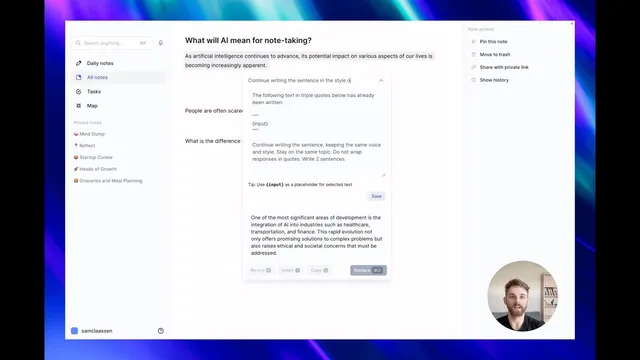
The workflow starts with triggering an AI action (via the Stars button or the Command J shortcut) and then inspecting the exact prompt behind a pre-written action using a dropdown. Users can clone a prompt to create a starting point, then adjust instructions to match their writing goals. A key example is rewriting in the voice of a specific columnist: after cloning a prompt that continues a sentence while preserving the original tone, the user changes the instruction to “continue writing the sentence in voice and style of Matt Levine,” saves it, and then runs the new custom prompt from the Custom section. The inserted text follows the requested style as closely as possible, and the output can be inserted directly into an article or blog draft.
Another example targets how AI handles explanations. A pre-written prompt for “analogies” is cloned and modified to “write historical examples,” with the user specifying the number of examples to generate. After saving, the custom prompt is run again, and the assistant switches from analogies to a list of three historical examples—showing that small prompt edits can materially change output format and content.
Users can also build prompts from scratch, but the transcript emphasizes that it’s easier to start from an existing template and then refine. When creating a custom prompt to answer a question, the user highlights the importance of a specific format: the prompt instructs the assistant to answer the question contained within the highlighted text between markers (the transcript references “between [Music]” and the three rotations). Additional constraints—such as requiring the answer to be clear, concise, and free of filler—help control verbosity and relevance.
After testing, the user keeps the prompt when the answer matches expectations. If the response is too long, the user revisits the template and adds a constraint like “limit the answer to three sentences,” updates the prompt, and reruns it to get a shorter result. The overall takeaway is that prompt editing, cloning, and iterative constraint-setting turn AI writing into a repeatable tool tailored to a personal workflow, with custom prompts saved under a dedicated section for later reuse.
Cornell Notes
Reflect Notes now uses GPT-4 and adds a prompt editor so users can modify pre-written prompts and save them as custom templates. The workflow lets users trigger an AI action, inspect the underlying prompt, clone it, and then change instructions such as writing style (e.g., Matt Levine) or output type (analogies vs. historical examples). For custom question-answering, the transcript stresses using a template format that ties the prompt to the highlighted text, plus adding constraints like “clear, concise” and “no filler.” Users can iterate by updating the template—for example, limiting answers to three sentences—to control length and improve results.
How does a user turn a pre-written Reflect Notes prompt into a reusable custom prompt?
What changes when the prompt is edited to mimic a specific writing voice?
How can prompt edits switch the output from analogies to a different content type?
Why does the transcript emphasize following a template format for question-answering prompts?
How can a user control answer length after testing a custom prompt?
Review Questions
- What steps are required to clone, edit, and save a custom prompt in Reflect Notes?
- Give one example of how changing prompt wording can alter both style and content type.
- How does the highlighted-text template format affect the quality of question-answering outputs?
Key Points
- 1
Reflect Notes added GPT-4 support and improved prompt-driven writing quality compared with the prior model.
- 2
Users can inspect, edit, and clone pre-written prompts instead of using them as fixed templates.
- 3
Custom prompts are saved under a dedicated Custom section and can be reused later for drafting and insertion.
- 4
Prompt edits can target writing style (e.g., continuing text in the voice of Matt Levine).
- 5
Small instruction changes can switch output type, such as replacing analogies with a specified number of historical examples.
- 6
Building prompts from scratch works best when the prompt follows the highlighted-text template format and includes constraints to prevent filler.
- 7
Iterating on templates—like limiting answers to a set number of sentences—helps control verbosity and improve consistency.