RemNote’s New Tables Feature: Study Flashcards Better
Based on Liam Gower's video on YouTube. If you like this content, support the original creators by watching, liking and subscribing to their content.
Build a RemNote table with structured columns (text, single-select, and image) to store facts you want to memorize.
Briefing
RemNote’s new Tables feature turns structured study data—like country facts—into flashcards automatically, bridging the gap between organizing knowledge and actually practicing it. The core workflow is straightforward: build a table with columns for the fields you care about (e.g., country, capital, currency, continent, flag), then generate flashcards directly from specific columns. Instead of manually creating decks, the table becomes a source of flashcard prompts at scale, including one-way and two-way card directions depending on whether the relationship is one-to-many or many-to-one.
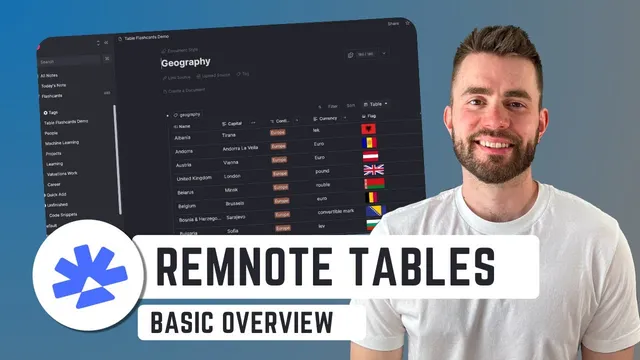
The example geography table shows how the feature works in practice. A “country” column holds entries such as Albania and Andorra, while additional properties store related facts: currency and capital as text fields, continent as a single-select property (with a limited discrete set of choices), and flag as an image property. The flag field relies on image URLs, which makes it easy to pull standard flag images from the internet, though it may be limiting if users want to upload custom images.
Once the table is populated, RemNote adds a “Generate flashcards from this column” option for each property. For a column like “currency,” the correct card direction is typically one-way: the prompt should be “What is the currency of Andorra?” rather than “What country uses the euro?” because multiple countries can share the same currency. For “capital,” a one-to-one mapping makes two-way cards more useful: “What is the capital of Albania?” and “Which country has the capital Tirana?” With one click, the system can create flashcards for every row—so a table with dozens or hundreds of entries can become a large deck quickly.
Studying is then handled through RemNote’s flashcard interface. Flashcards generated from any page or document appear in a dedicated “flashcards home,” where daily practice can be focused on a specific source like the “geography YouTube” document. That makes the table-to-flashcard pipeline feel like a single study loop rather than separate tools.
Beyond basic generation, Tables support customization and filtering. Cards can be configured so extra properties appear on the front or back of each flashcard—for example, showing a flag image when quizzing on a capital city to strengthen visual association. Filtering works like spreadsheet or Notion-style views: rows can be restricted by conditions such as continent equals Europe. The same underlying table can also be reused via tags to create multiple filtered views (e.g., Europe-only vs. North America-only), letting learners practice targeted subsets without rebuilding the dataset.
Overall, Tables matter because they make structured knowledge reusable: the same dataset can power flashcards, customized card layouts, and exam-focused filtered decks. The feature is positioned as a meaningful upgrade for anyone who studies with flashcards but wants a cleaner way to organize facts first and quiz them second.
Cornell Notes
RemNote’s Tables feature lets users organize related facts in a spreadsheet-like layout and then generate flashcards automatically from table columns. Columns can use different property types—text, single-select (for discrete categories like continent), and image URLs (for flags). Flashcards can be created in one-way or two-way directions depending on whether the relationship is one-to-one (e.g., country–capital) or one-to-many (e.g., currency shared by multiple countries). Learners can study the generated cards from Flashcards Home, and can further customize card fronts/backs by adding extra properties like flags. Filtering enables multiple study views (such as Europe-only) from the same underlying table.
How does RemNote turn a table of facts into flashcards, and what determines whether cards should be one-way or two-way?
What property types are used in the geography example, and why do they matter for study?
How are flag images handled in the table, and what limitation is noted?
What customization is possible for flashcards generated from table columns?
How does filtering work, and how can it create multiple study decks from the same table?
Where do generated flashcards show up for practice?
Review Questions
- When would one-way flashcards be preferred over two-way flashcards in a table-driven quiz system? Give a concrete example from the geography dataset.
- How do single-select properties and filters work together to create targeted study sets like Europe-only?
- What are two ways to strengthen memory using card customization in RemNote tables?
Key Points
- 1
Build a RemNote table with structured columns (text, single-select, and image) to store facts you want to memorize.
- 2
Use “Generate flashcards from this column” to create flashcards automatically for every row in the table.
- 3
Choose one-way vs two-way card direction based on whether the relationship is one-to-many (e.g., currency) or one-to-one (e.g., country–capital).
- 4
Study generated cards from Flashcards Home by selecting the specific table-backed document.
- 5
Customize flashcards by adding extra properties to the front or back, such as showing a flag when quizzing on a capital.
- 6
Use filters to create exam-focused subsets (like Europe-only) without rebuilding the underlying dataset.
- 7
Reuse the same table data via tags to create multiple filtered views and decks for different topics or regions.