Requests-HTML - Checking out a new HTML parsing library for Python
Based on sentdex's video on YouTube. If you like this content, support the original creators by watching, liking and subscribing to their content.
Install Requests-HTML with `pip install requests-html` and use Python 3.6+ as required by the latest release discussed.
Briefing
Requests-HTML is positioned as a fast, Pythonic way to fetch and parse HTML using the same author as the popular Requests library. The core pitch is simple: pull a page with `requests.get`, then use Requests-HTML’s built-in helpers to inspect encoding, headers, redirects, links, and structured content without reaching for heavier parsing workflows.
After installing with `pip install requests-html` (requiring Python 3.6+), the walkthrough uses a controllable test page (“/parse-me”) to demonstrate the main ergonomics. A single fetch returns an object that supports convenient properties and methods. The HTML can be accessed in multiple forms: “raw” HTML preserves the original formatting, while the library’s formatted HTML normalizes whitespace and indentation. Link extraction is equally straightforward—calling the links-related helper returns a set of URLs, deduplicating repeats. The object also exposes metadata like response encoding, cookies, whether a redirect occurred, and the ability to convert responses into JSON when the server provides JSON.
The most distinctive capability is JavaScript rendering. Instead of treating the page as static HTML, Requests-HTML can run client-side JavaScript via a headless browser. The workflow is to fetch the page, then call `.render()` to execute scripts and update the DOM before querying it. In the example, the rendered output includes text that only appears after JavaScript runs, confirming that the library can extract post-JS content.
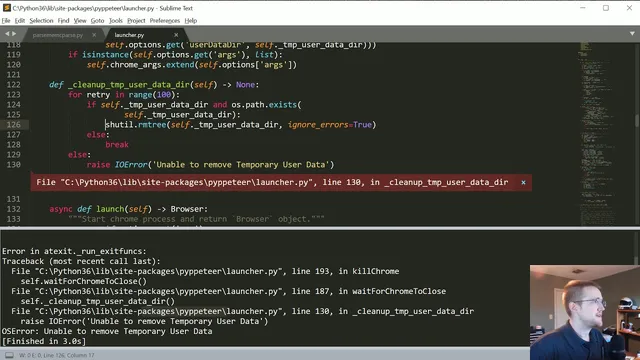
On Windows, however, the rendering step hits a practical edge: Chromium is downloaded and rendering succeeds, but cleanup fails when the library tries to delete its temporary user-data directory. The error is traced to a permissions issue during directory removal (using `shutil.rmtree`), and the presenter experiments with toggling error-ignoring behavior. Even with elevated privileges, deletion still fails, so a workaround is to avoid raising the exception and continue, or manually delete the temporary directory later.
Beyond basic parsing, the tutorial experiments with searching the DOM—using methods like `.find()` to locate elements such as links, IDs, divs, and table cells. The search syntax is shown to be quick, but also somewhat finicky, especially when targeting attributes or classes with spaces and when mixing selector-like patterns.
Finally, the walkthrough tests Requests-HTML’s pagination support, which can follow “next page” links automatically through an iterator-like interface. It appears to work on Reddit, but the pagination behavior is inconsistent on other sites. On Hacker News, the “next” traversal sometimes lands on the wrong page, suggesting that pagination detection is heuristic and may require tuning or improvement.
Overall, Requests-HTML is presented as a strong alternative to BeautifulSoup for straightforward HTML parsing and for cases where JavaScript-rendered content matters. The main caveats are platform-specific cleanup issues during rendering (notably on Windows) and imperfect pagination across different site structures.
Cornell Notes
Requests-HTML offers a streamlined way to fetch and parse HTML in Python, with convenience methods for links, formatted vs raw HTML, response metadata, and DOM searching. Its standout feature is JavaScript rendering: calling `.render()` executes page scripts so elements populated after load become queryable. In practice, rendering works, but on Windows the library can fail to delete its temporary Chromium user-data directory due to permissions, requiring a workaround or manual cleanup. Pagination support can follow “next” links automatically, but results vary by site, indicating heuristic limitations. The net effect: fast HTML parsing with optional JS execution, plus some rough edges around cleanup and pagination reliability.
How does Requests-HTML make basic HTML parsing easier than manual parsing?
What’s the difference between raw HTML and formatted HTML in this workflow?
How does JavaScript rendering work, and what does it enable?
What problem appears during `.render()` on Windows, and how is it handled?
How does pagination support behave, and why is it unreliable across sites?
What does `.find()` help with, and what are common friction points?
Review Questions
- When would you choose `raw_html` over formatted HTML, and what practical benefit does formatting provide?
- What steps are required to query elements that only appear after JavaScript runs?
- Why might pagination work on one site but fail or misroute on another when using Requests-HTML?
Key Points
- 1
Install Requests-HTML with `pip install requests-html` and use Python 3.6+ as required by the latest release discussed.
- 2
Use the fetched page object to inspect response details like encoding, cookies, headers, and redirect status without extra plumbing.
- 3
Extract links directly into a deduplicated set using the library’s link helper methods.
- 4
Use `.render()` to execute JavaScript and make post-load DOM content available for `.find()` queries.
- 5
Expect Windows-specific rendering cleanup issues: Chromium temporary user-data directory deletion can fail due to permissions.
- 6
Pagination support can follow “next” links automatically, but heuristic detection may misidentify the correct next page on some sites.
- 7
For DOM searching, start with broader tag queries and refine selectors carefully, since attribute/class targeting can be sensitive to syntax.