Research Paper Writing - How to Use Select-n-Explore Feature to Comprehend Research Papers Quickly
Based on Enago Read (Previously Raxter.io)'s video on YouTube. If you like this content, support the original creators by watching, liking and subscribing to their content.
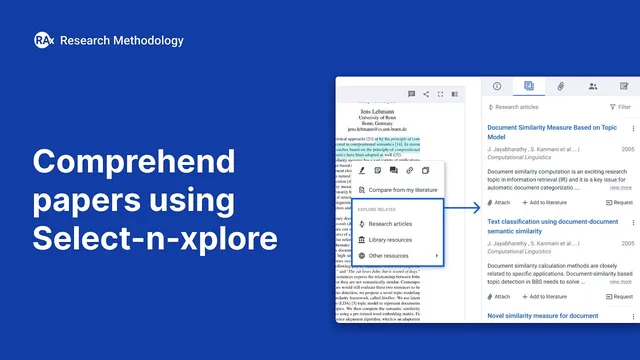
Selection Explorer turns mid-reading confusion into immediate, targeted follow-up by letting readers select a concept or passage and fetch relevant resources.
Briefing
Selection Explorer is presented as a fast way to turn “on-the-fly” confusion during reading into targeted follow-up research—so a reader can understand a paper’s key ideas and still build a deeper literature survey without getting stuck all day. The core workflow centers on selecting a concept (or a chunk of text) inside a paper, then immediately pulling in complementary resources and attaching them to the relevant section for later review.
The process starts with a practical problem: literature analysis often forces readers to pause when unfamiliar terms appear, when concepts are only partially remembered, or when new ideas require quick context. Instead of losing momentum, Selection Explorer lets readers highlight a concept—such as “language models” in a summarization-focused paper—and instantly gather learning materials. Those materials can range from Wikipedia entries to online lectures, including recordings and tutorials tied to major conferences and workshops, plus blogs, research articles, and lighter reads. The interface supports choosing what fits the reader’s current needs, then attaching selected resources directly inline to the section where the concept appeared. That attachment becomes a structured “mini reading list” tied to the paper’s specific part, not a scattered set of bookmarks.
A second use case targets deeper literature expansion based on what the reader is currently focused on inside the paper. After understanding the overall paper, readers may want more papers related to specific methodological or thematic components—such as the authors’ approach. By selecting an entire paragraph and using the “research articles” option, the system surfaces multiple relevant papers (shown as a set of selectable items). Those papers can then be attached to that paragraph, letting the reader return later and review the connected literature in one place.
The same mechanism applies to other aspects as the reading shifts. If the reader later wants to focus on datasets—looking for work that used similar data for comparable research goals—they can select the dataset-related portion and again pull in papers tied to that aspect. Over time, the paper becomes an organized map of concepts, each with attached supporting resources and related studies.
A key clarification is that Selection Explorer is not limited to finding papers that match the title or the broad topic label. The selection can connect to aspects of the content that may not align with the paper’s title, but are related through the underlying methods, concepts, or components the reader selects. The result is a more controlled, section-by-section literature review that helps readers answer “what was this paper about?” with confidence while still expanding their research depth.
Cornell Notes
Selection Explorer helps readers handle unfamiliar or forgotten concepts while reading research papers by letting them select a term or passage and instantly attach relevant resources to that exact section. It supports both quick context building (e.g., pulling Wikipedia, lectures, and lighter reads for “language models”) and deeper expansion (e.g., selecting a paragraph about an approach to attach related research articles). Readers can repeat the process as their interests shift—such as moving from methods to datasets—so the literature survey grows in step with the paper they’re studying. A key point is that the feature isn’t restricted to title-matching; it can connect resources based on the specific aspect selected within the text.
How does Selection Explorer help when a reader encounters an unfamiliar concept mid-paper?
What’s the workflow for expanding literature based on a specific part of the paper (like methods)?
How does the feature support shifting interests during reading, such as moving from approaches to datasets?
Why is attaching resources inline to a section useful for literature analysis?
What misconception does the transcript address about how Selection Explorer finds related work?
Review Questions
- When you highlight a concept like “language models,” what kinds of resources can be attached, and where do they appear in relation to the paper?
- How would you use Selection Explorer to build a literature set for an authors’ approach versus for datasets?
- What does the transcript say about whether related papers are determined by title similarity or by the selected aspect of the text?
Key Points
- 1
Selection Explorer turns mid-reading confusion into immediate, targeted follow-up by letting readers select a concept or passage and fetch relevant resources.
- 2
Inline attachments tie each added resource to the exact section that triggered the question, reducing scattered notes and improving recall.
- 3
Readers can use the feature for quick context (e.g., Wikipedia, lectures, blogs) when encountering unfamiliar terms.
- 4
The same selection-and-attach workflow supports deeper expansion by pulling related research articles for selected paragraphs (such as methods).
- 5
As interests shift during reading, selecting different aspects (like datasets) can generate new sets of related papers aligned to the current research goal.
- 6
Selection Explorer is not limited to title-matching; it can connect resources based on other content aspects selected within the paper.