Resource Management (4) - Infrastructure & Tooling - Full Stack Deep Learning
Based on The Full Stack's video on YouTube. If you like this content, support the original creators by watching, liking and subscribing to their content.
Resource management aims to let many users launch experiments easily while ensuring dependencies are ready and the right GPUs/CPUs are allocated without contention.
Briefing
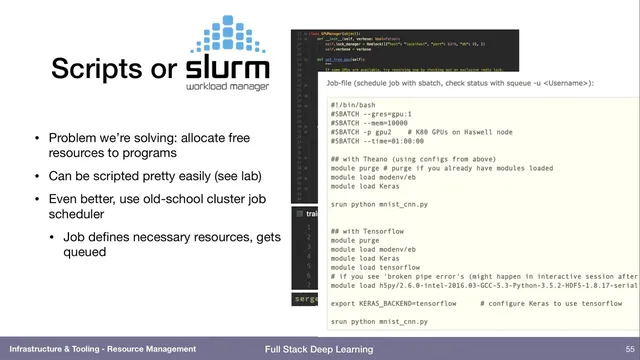
Resource management in deep learning is about making shared compute usable: multiple people need to launch experiments quickly, with dependencies handled and the right GPUs and CPUs allocated—without fighting over hardware. The spectrum runs from low-tech coordination (spreadsheets reserving machines) to full systems built for machine learning clusters. A more practical middle step is automation on a single machine: a short script can allocate free GPUs to incoming jobs so experiments start with the correct resources and minimal manual bookkeeping.
For larger teams and multi-user environments, workload managers like SLURM provide the standard approach. Users declare requirements—such as “two GPUs, eight CPUs, and 12 GB of RAM”—then submit a job. The scheduler queues it, waits until the requested resources are available, locks them down to prevent contention, and runs the job. That model removes the need for manual reservation and makes it easy to run repeatable batches of experiments.
Container tooling then addresses the dependency problem. Docker packages an entire software stack into a lightweight unit, avoiding the heavier overhead of full virtual machines. Kubernetes takes this further by orchestrating many Docker containers across a cluster, allocating compute to containers as resources become available. In the course’s compute setup, Kubernetes runs a JupyterHub environment (JupyterHub with JupyterLab) across shared GPUs and CPUs, enabling multiple users to work concurrently on the same underlying hardware.
On top of Kubernetes, machine-learning-specific platforms aim to handle common training patterns. Kubeflow (an open-source project associated with Google, with contributions now largely coming from outside Google) includes modules for launching and managing Jupyter notebooks with specified GPU counts—so a user can request a “two-GPU notebook” without knowing which physical machine will host it. Kubeflow also supports multi-step workflows, where preprocessing and data preparation can be CPU-heavy while later training is GPU-heavy. For example, downloading and cropping a large image dataset may not benefit from GPUs initially, but the subsequent concatenation and training do. The platform’s goal is to allocate different resources at different stages rather than overprovisioning everything for the entire pipeline.
The discussion also notes related workflow tooling such as Polyaxon, described as open source with enterprise features, and suggested to be more actively developed than Kubeflow. Finally, a practical question arises about cost and utilization: in the cloud, teams can request 50 GPUs for a day and stop paying afterward, but on-prem hardware can sit idle. The conversation floats the idea of sharing or contributing idle on-prem GPUs to a peer-to-peer style “cloud,” potentially combining ownership with compensation—though no concrete solution is provided. Overall, Kubernetes is positioned as the dominant container orchestration layer for packing workloads onto shared infrastructure, with higher-level ML platforms like Kubeflow handling the workflow and user experience on top of it.
Cornell Notes
Resource management for deep learning focuses on allocating GPUs and CPUs to many users while keeping dependencies and workflows manageable. SLURM solves multi-user contention by letting users declare resource needs and scheduling jobs when those resources are free. Docker packages dependencies into portable units, and Kubernetes orchestrates many containers across a cluster, enabling shared compute for environments like JupyterHub. Kubeflow builds on Kubernetes to provide GPU-backed notebooks and multi-step workflows where preprocessing may use CPUs while later training uses GPUs. This matters because overprovisioning (e.g., reserving 96 CPUs plus GPUs for every step) wastes hardware and increases cost or delays.
Why do teams move beyond spreadsheets to systems like SLURM for GPU access?
How do Docker and Kubernetes split responsibilities in shared compute?
What does Kubeflow add on top of Kubernetes for machine learning users?
What is a multi-step workflow, and why does it change resource allocation?
What question comes up about on-prem GPUs sitting idle, and what idea is floated?
Review Questions
- How does SLURM prevent contention compared with manual reservation methods?
- Describe how Docker and Kubernetes work together to support multi-user environments like JupyterHub.
- Give an example of a multi-step ML pipeline and explain which stages likely need CPUs versus GPUs.
Key Points
- 1
Resource management aims to let many users launch experiments easily while ensuring dependencies are ready and the right GPUs/CPUs are allocated without contention.
- 2
Spreadsheets can coordinate GPU access but scale poorly; automation scripts can handle simple single-machine GPU allocation.
- 3
SLURM enables multi-user scheduling by letting jobs declare resource requirements and running them only when those resources are available and locked.
- 4
Docker packages dependencies into portable containers, while Kubernetes orchestrates those containers across a cluster to share compute efficiently.
- 5
Kubeflow adds ML-specific workflow support on top of Kubernetes, including GPU-backed Jupyter notebooks and multi-step pipelines with stage-specific resource needs.
- 6
Multi-step workflows require different resource allocations per stage (e.g., CPU-heavy preprocessing followed by GPU training), avoiding wasteful overprovisioning.
- 7
Idle on-prem GPUs raise a utilization challenge; peer-to-peer sharing is suggested as a potential way to combine ownership with external demand.