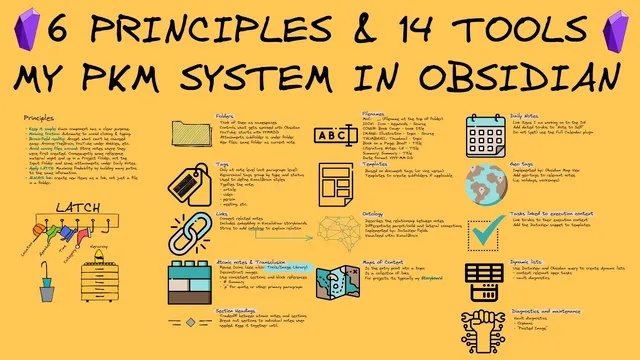
Rethinking MY PKM: How I Organize Everything In Obsidian
Based on Zsolt's Visual Personal Knowledge Management's video on YouTube. If you like this content, support the original creators by watching, liking and subscribing to their content.
Apply latch (location, alphabet, time, category, hierarchy) as the design goal for findability, not as an afterthought.
Briefing
A disciplined Obsidian system built around “latch” is the core through-line: every note is placed so it can be found by location, alphabet, time, category, and hierarchy—while automation and strict linking prevent the vault from turning into a pile of disconnected files. The practical payoff is findability. Instead of relying on search alone, the workflow treats each piece of information as something that should connect to a graph, a timeline, or a namespace, so retrieval stays fast even as the vault grows.
The system starts with six principles. First, each of the 14 components has a clear, single purpose, keeping the workflow from becoming a tangle of overlapping tools. Second, friction is minimized through automation—primarily using Templater and Data View. Third, the “brownfield reality” is embraced: past PKM systems and imported content (including archives going back decades and materials from tools like Evernote and research workflows) are messy, so the approach focuses on managing the mess rather than pretending it can be cleaned instantly. Fourth, files are not moved around; relocating content breaks links in Obsidian, so items are placed once and left in place even when folder structure isn’t perfect.
Fifth, latch becomes the organizing engine. The workflow is designed so information can be retrieved by calendar/time (daily notes), by physical or memorable location (geotags and map view), by alphabetic anchors (people and other namespaces), by category (single-tag “type” per page), and by hierarchy (parent/child relationships via ontology). Sixth, linking is treated as non-negotiable. Orphan notes—files nobody points to—were found in the high hundreds (roughly 500–600). The fix: only keep files in the vault when they can be linked into the graph.
From there, the system’s components are implemented with concrete Obsidian mechanics. Folders are treated less like storage and more like namespaces. Ghost links let us create “people” entries (e.g., authors) without first creating the underlying folder, and folder naming supports synchronization control: large media folders can be excluded from Obsidian Sync while still living inside the vault. Attachments are kept under topic subfolders, and new-note placement follows a default-location rule unless a namespace path is used.
Tags are used sparingly—typically one tag per page—to define a document’s type and drive consistent styling in Excalidraw Brain (including color schemes and icons). Links are structured through an ontology defined with Data View fields, distinguishing parent/child and lateral “friend” relationships. Those relationships then shape how nodes appear on the graph and how connections are suggested during editing.
The workflow leans heavily on reuse: atomic notes and transclusion prevent duplication, while consistent section headings (like “summary”) make embedding predictable. File naming conventions reinforce retrieval: Map of Contents (MOCs) start with an underscore, image libraries use structured names that include type, keywords, and source, and dates follow a year-month-day format. Templates automate repetitive creation, including multi-file and folder setups for workflows like YouTube.
Finally, daily notes create the time hierarchy that latch depends on, while geotags and check-in/check-out events link trips (Rome, Sicily, Aetna, and more) to specific days. Tasks are surfaced in context using Data View queries and dynamic lists, so when someone’s page is opened, the relevant “waiting for / promised / discuss” actions appear immediately. A diagnostics and maintenance page tracks orphan notes and pasted images that need cleanup, keeping the system healthy as it scales.
Cornell Notes
The system is built to keep an Obsidian vault findable as it grows by enforcing six principles—especially “latch” (location, alphabet, time, category, hierarchy) plus deliberate linking. Automation (Templater and Data View) reduces friction, while a “brownfield reality” approach accepts messy imported history instead of trying to reset everything. Files are placed once and rarely moved to avoid broken links, and orphan notes are treated as a failure mode (hundreds existed before the linking rule). Folders act like namespaces, tags define a single document type and drive consistent graph styling, and an ontology (parent/child vs lateral links) structures the graph. Daily notes and geotags provide the time and location axes for latch, while Data View task queries bring action items into the context of people and projects.
How does “latch” translate into actual retrieval paths inside the vault?
Why does the workflow avoid moving files around, and what problem does it prevent?
What does “linking only” mean in practice, and how is orphan-note risk managed?
How do tags function beyond search—what do they control?
What role does ontology play in building the graph structure?
How are tasks made context-sensitive for people and projects?
Review Questions
- Which five retrieval axes does latch provide, and what Obsidian features support each one in this system?
- What mechanisms prevent orphan notes from accumulating, and how does the system detect them?
- How do ontology relationships (parent/child vs lateral) and tags work together to shape graph structure and readability?
Key Points
- 1
Apply latch (location, alphabet, time, category, hierarchy) as the design goal for findability, not as an afterthought.
- 2
Use automation (Templater and Data View) to reduce repetitive setup and keep workflows consistent.
- 3
Accept brownfield history by managing imported and archived content rather than trying to fully reorganize it immediately.
- 4
Place files once and avoid moving them to prevent broken links; treat stable paths as part of the system.
- 5
Enforce linking discipline: keep files only when they connect into the graph, and monitor orphan notes via a diagnostics page.
- 6
Use folders as namespaces and ghost links to create typed entities (like authors) without requiring physical folder creation first.
- 7
Make tasks context-sensitive by embedding Data View task queries into person/project/topic pages via templates.