Running our Reinforcement Learning Agent - Self-driving cars with Carla and Python p.5
Based on sentdex's video on YouTube. If you like this content, support the original creators by watching, liking and subscribing to their content.
Set random seeds across Python/NumPy/TensorFlow to make training runs comparable during debugging and tuning.
Briefing
Reinforcement learning training for a self-driving agent in CARLA is stitched into a full end-to-end loop: TensorFlow session setup, GPU memory throttling, model checkpointing, and an episode-based experience replay pipeline that updates a DQN agent while it simultaneously plays. The core outcome is that the training run can finally proceed reliably—after a long chain of fixes for shape mismatches, variable naming errors, and TensorBoard logging—so the system can start producing measurable learning signals like reward trends, Q-value changes, and loss/accuracy curves.
The training script begins by enforcing repeatability: random seeds are set for Python, NumPy, and TensorFlow. It then configures GPU behavior to avoid out-of-memory crashes by limiting per-process GPU memory fraction (the tutorial notes that running multiple agents or other GPU workloads requires this). With the session configured, the code ensures a models directory exists, instantiates the DQN agent, and launches a training thread that runs the agent’s training loop in parallel.
Once the agent is ready, the main loop runs episodes under a progress bar. Each episode starts with a CARLA environment reset to obtain the initial observation (the “current state”). The loop uses an epsilon-greedy policy: with probability tied to epsilon, the agent picks a random action (fast, avoids neural-network inference), otherwise it selects an action based on predicted Q-values from the network. A key practical detail is timing: the code sleeps based on a target FPS so that both random-action steps and model-action steps occur at roughly comparable rates—important because the effective frame rate influences training stability.
For every step, the environment returns a new state, a reward, and a done flag. The transition (current state, action, reward, new state, done) is pushed into replay memory via an update call. The script increments step counters and breaks out cleanly when the episode ends. Statistics are tracked across episodes—minimum, maximum, and average reward—and the model is saved when performance crosses a chosen threshold (the notes suggest average reward as a better criterion than minimum reward, since minimum can be dragged down by unavoidable early crashes).
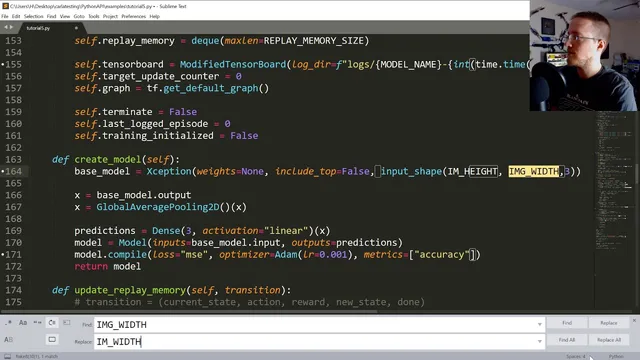
A major portion of the transcript is troubleshooting so training can actually run: input-shape errors, threading/name mismatches, missing TensorBoard callback imports, and CARLA state/image dimension bugs (including case-sensitive “height/width” variable fixes). TensorBoard is handled carefully because reinforcement learning can call fit repeatedly; a custom TensorBoard setup logs per episode rather than per frame to prevent log-file explosion.
Results are mixed but informative. TensorBoard curves show accuracy spikes to 100% at times (flagged as suspicious), while loss sometimes explodes to extremely large values—an indicator that something is unstable in learning. Even so, qualitative behavior improves in certain runs: the agent can stay in a lane and make turns, and Q-values visibly change as it interacts with the environment. The training speed is also reported (e.g., around ~18.5 FPS in one run), reinforcing that performance constraints matter.
The next steps are framed around controlled experimentation: train longer before declaring changes effective, adjust network architecture, and test environment/action-space modifications such as giving the agent throttle and brake control. There’s also interest in generalizing beyond CARLA’s current setup—potentially moving toward Grand Theft Auto 5—but only if camera position and sensor parameters (like field of view) can be made dynamic so the model doesn’t collapse when inputs shift.
Cornell Notes
Training a CARLA self-driving agent with a DQN-style reinforcement learning loop is brought together into a runnable system. The script sets seeds for repeatability, limits GPU memory per process to prevent crashes, initializes a DQN agent, and runs episodes where epsilon-greedy actions generate transitions for replay memory. Each step collects (state, action, reward, next state, done), updates replay memory, and a separate training thread learns from that stream. TensorBoard logging is customized to avoid per-frame log spam, and model checkpoints save when reward metrics cross a threshold. Early training runs show lane-keeping and turning plus visible Q-value updates, but loss instability (including huge spikes) and suspicious accuracy spikes suggest learning is not yet fully stable.
How does the training loop decide between random actions and neural-network actions, and why does that matter for FPS?
What exactly gets stored in replay memory each step, and what role does the done flag play?
Why is GPU memory fraction configuration emphasized in this setup?
Why is TensorBoard logging customized for reinforcement learning here?
What training metrics are tracked, and how does checkpointing decide when to save a model?
What do the early TensorBoard patterns suggest about learning stability?
Review Questions
- What timing mechanism is used to keep random-action steps and model-action steps from running at very different effective speeds, and how is it implemented?
- Why can minimum reward be a misleading checkpoint metric in environments with unavoidable early failures?
- What kinds of errors were repeatedly encountered during setup (e.g., shape/variable naming/logging), and how do those relate to the stability of training metrics like loss?
Key Points
- 1
Set random seeds across Python/NumPy/TensorFlow to make training runs comparable during debugging and tuning.
- 2
Limit per-process GPU memory fraction in TensorFlow to prevent out-of-memory crashes when running multiple agents or other GPU tasks.
- 3
Use a separate training thread while the main loop runs episodes, collects transitions, and updates replay memory continuously.
- 4
Apply epsilon-greedy action selection and keep step timing consistent by sleeping based on a target FPS so random-action steps don’t distort effective training speed.
- 5
Store transitions as (state, action, reward, next_state, done) in replay memory each step so the training thread can learn from real experience.
- 6
Customize TensorBoard logging for reinforcement learning to avoid per-frame log-file explosion and keep metrics interpretable.
- 7
Treat early TensorBoard signals carefully: accuracy spikes to 100% and loss explosions can indicate instability even when the agent appears to behave better qualitatively.