Semantic MediaWiki combining templates and properties - Tutorial 12
Based on Semantic MediaWiki's video on YouTube. If you like this content, support the original creators by watching, liking and subscribing to their content.
Semantic MediaWiki templates can emit semantic property assignments, not just page content.
Briefing
Semantic MediaWiki’s real leverage comes from letting templates assign semantic properties automatically—turning page content into structured, queryable data without manual bookkeeping. Instead of only transcluding a template for display, the workflow here injects a property value through template parameters, so the same template can stamp different pages with different property values.
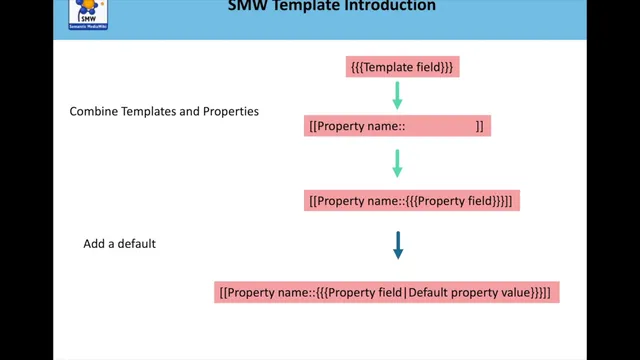
The tutorial builds on earlier template-variable mechanics: templates accept parameters via double curly braces, and the parameter values flow into the template’s internal logic. The key upgrade is inserting a semantic property “inside” the template. A property name is placed where the template variable would be, and the template parameter becomes the property value. In the example, the template is designed to set a property called “has page warning property,” whose allowed values are constrained to three options: inaccurate, incomplete, or draft. That value constraint matters because it keeps the wiki’s data consistent and makes later searches reliable.
To make this work smoothly, the template also needs a default property value. When no parameter is provided, the template should still emit a valid property assignment. The tutorial demonstrates setting the default to inaccurate, so pages using the template without an explicit parameter automatically become “inaccurate.” It then shows how the template output is converted into a semantic property assignment by using Semantic MediaWiki syntax: the template emits something equivalent to “has page warning property:: <value>”.
Once the property is created and its allowed values are limited (via Special:Create property), the tutorial demonstrates the practical payoff. Several pages are edited to use the template with different parameter values—one set to inaccurate, another to draft, and another to draft and then changed to inaccurate. After each change, the pages’ “Browse properties” section updates accordingly, confirming that template parameters are driving the semantic property values.
The final step shows why this matters: queries become effortless. A separate page (“inaccurate”) is used to collect all pages whose “has page warning property” equals inaccurate. When a page’s template parameter changes from draft to inaccurate, the query results update after a refresh, and the page list grows to include the newly updated page. The workflow scales beyond a single property: with more properties and more templates, a wiki can maintain structured status fields (accuracy, completeness, review state, recency, view counts) and generate dynamic lists of pages that match those criteria.
The takeaway is straightforward: combine templates, parameterized variables, property constraints, and defaults so semantic properties stay synchronized with page content. That sets up the next phase—building larger templates and using forms (often via infobox-style UI patterns) to fill these templates quickly and consistently across many pages.
Cornell Notes
Semantic MediaWiki can use templates not just for display, but to assign semantic properties to pages automatically. By passing a template parameter into a property assignment, pages using the same template can be marked with different values—here, “has page warning property” limited to inaccurate, incomplete, or draft. Adding a default value (inaccurate) ensures pages still get a valid property when no parameter is supplied. After creating and constraining the property, editing pages to change the template parameter updates the property shown under “Browse properties.” With those properties in place, query pages can dynamically list all pages matching a value, such as all pages marked inaccurate.
How does a template parameter become a semantic property value in Semantic MediaWiki?
Why set a default property value inside the template?
What role does limiting allowed values for a property play?
How do template-driven property changes show up on individual pages?
How do queries benefit from template-assigned properties?
Review Questions
- What changes are needed in a template to ensure it assigns a semantic property with a constrained set of values?
- How does a default value in a template affect query completeness when some pages omit the template parameter?
- Describe the chain from editing a template parameter on a page to seeing that page appear in a query results list.
Key Points
- 1
Semantic MediaWiki templates can emit semantic property assignments, not just page content.
- 2
Template parameters can be wired into property syntax so different pages get different property values automatically.
- 3
Creating a property with limited allowed values (inaccurate, incomplete, draft) keeps the wiki’s structured data consistent.
- 4
A template default (set to inaccurate) ensures pages still receive a valid property when no parameter is provided.
- 5
Editing a page’s template parameter updates the page’s “Browse properties” immediately after refresh.
- 6
Query pages can dynamically list all pages matching a property value, and those lists update when template-driven property values change.