Setting up a daily reflection in your notes
Based on Reflect Notes's video on YouTube. If you like this content, support the original creators by watching, liking and subscribing to their content.
Create a “Daily Reflection” template in Reflect so each entry starts from a ready-made structure rather than a blank page.
Briefing
A daily reflection habit sticks best when it’s built into a repeatable template—so the work each morning or evening is filling in prompts, not starting from a blank page. The approach centers on creating a “Daily Reflection” template inside Reflect, then calling it up instantly with a slash command. That small reduction in friction matters because it prevents the habit from collapsing under the effort of typing everything from scratch every day.
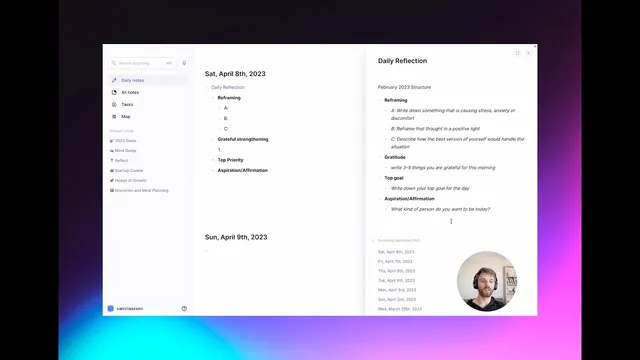
The template itself follows a four-part structure designed to move from emotional processing to positive focus and then into forward-looking intention. First comes “Reframing,” where the user writes down something causing stress, anxiety, or discomfort, then rewrites it in a more constructive, positive light. Next is “Gratitude,” with a prompt to list three to five things the person is thankful for each morning. The final sections are “Top goal of the day” and an “affirmation” describing the kind of person they want to be—turning reflection into a concrete intention and identity statement.
To make the system practical, the template is stored in a linked note called “Daily Reflection,” which also documents the structure and when it was adopted (noted as February of 2023 after a shift in the format). Below that structure, the note maintains a running list of past reflections. Each entry can be clicked to view what was written on that specific day, while new days can be generated by opening an empty entry and using the dropdown to see the template-filled format.
Setting it up requires going into Reflect settings: open preferences, find the Templates tab, and create a template named for the reflection type. Once the template is saved in the exact format desired, typing “/daily reflection” (or the chosen template name) in a note triggers the prebuilt structure to appear automatically. The same method can be extended beyond daily journaling: templates can be created for weekly and monthly reflections as well, keeping the same general format while adjusting the time horizon.
An example shows how the prompts work in practice. If someone is nervous about a job interview, they would write the stressor and then reframe it—shifting from uncertainty to confidence and readiness. They would then add gratitude items (like a good night’s sleep or something to look forward to), and finish by stating the day’s top priority and an affirmation such as approaching the interview with confidence and trust in the outcome. The core takeaway is straightforward: once the template is in place, daily reflection becomes faster, more consistent, and easier to look forward to.
Cornell Notes
A daily reflection habit becomes sustainable when it’s powered by a template that can be summoned instantly in Reflect. The recommended “Daily Reflection” structure starts with Reframing (write a stressor, then rewrite it positively), moves to Gratitude (list 3–5 thankful items), and ends with a Top Goal for the day plus an affirmation about the kind of person to be. The template is stored in a linked note and past entries are kept in a list for quick access. Weekly and monthly templates can use the same format, making it easy to switch reflection frequency without rebuilding the workflow each time.
Why does using a template matter for building a daily journaling habit?
What are the four sections of the “Daily Reflection” template, and what does each ask for?
How does the linked “Daily Reflection” note help with consistency and review?
How is the template set up inside Reflect?
How can the same system support weekly and monthly reflections?
Review Questions
- What specific prompts does the template require in order, and how do they guide a person from emotion to action?
- How does the slash-command template workflow reduce the effort needed to maintain a daily reflection habit?
- What changes would you make to the template to better fit your own goals while keeping the same structure?
Key Points
- 1
Create a “Daily Reflection” template in Reflect so each entry starts from a ready-made structure rather than a blank page.
- 2
Use a slash command (e.g., “/daily reflection”) to insert the template instantly in a new note.
- 3
Follow the template’s four-part flow: Reframing, Gratitude (3–5 items), Top Goal of the day, and an identity-based Affirmation.
- 4
Store the template in a linked note and keep a running list of past reflections for easy review and continuity.
- 5
Extend the same approach with weekly and monthly templates so the habit adapts to different time horizons without rebuilding the workflow.
- 6
Use concrete examples (like reframing interview anxiety into confidence) to see how each prompt translates into actionable wording.