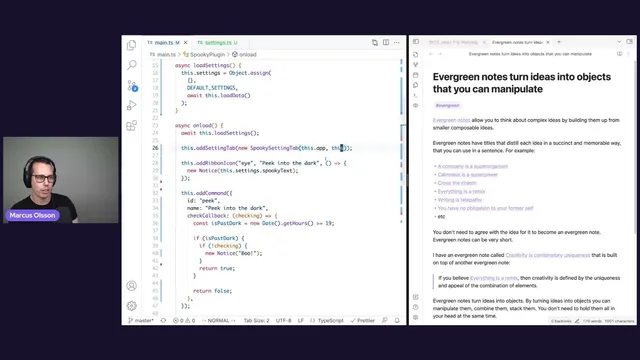
Setting up plugin settings with Marcus Olsson
Based on Obsidian's video on YouTube. If you like this content, support the original creators by watching, liking and subscribing to their content.
Define a settings schema (e.g., a string “spooky text”) and create a default settings object so first-run behavior never breaks.
Briefing
Obsidian plugin settings can be made persistent by wiring three pieces together: a typed settings model with defaults, runtime load/save using Obsidian’s data.json storage, and a Settings Tab UI that edits those values. The payoff is straightforward—users can customize behavior (like the “boo” text in a Halloween plugin) and have the change survive restarts instead of being hard-coded.
The tutorial starts with a concrete problem: the “peek into the dark” command and ribbon action currently display a fixed, hard-coded scare message. To let users choose their own scare text, the plugin needs a configurable property and a way to remember it. The first step is defining what’s configurable by creating a settings interface (for example, a single string property such as “spooky text”) and pairing it with defaults. Defaults are handled using a “partial” type so missing fields won’t crash the plugin, and the initial value can safely fall back to something like “boo.”
Next comes the runtime plumbing. Obsidian provides APIs to move settings between disk and memory: load data from the plugin directory’s data.json into the plugin at startup, and save data back when users change values. The tutorial recommends extracting loading into an async loadSettings function that reads from disk, then merging loaded values over the defaults using Object.assign. That merge step matters because it avoids a common mistake: directly assigning defaults by reference can cause updates in the live settings to mutate the default object itself.
Once settings are loaded, the plugin must actually use them. The scare notice is updated to read from settings.spookyText (or the equivalent property), but nothing changes until loadSettings is called during plugin initialization. After that, the command reflects the stored value.
The final—and most user-facing—piece is the Settings Tab. Obsidian’s SettingsTab mechanism lets plugins register a new section under the app’s settings UI. A custom SpookySettingsTab class extends the built-in PluginSettingTab, implements a display method, and receives the plugin and app context via its constructor so it can access the current settings. Inside display, the tab builds UI using HTML container elements and Obsidian’s Setting components, including a text input bound to the current setting value.
To persist edits, the text input’s onChange handler updates the plugin’s in-memory settings and calls a saveSettings method. That method uses Obsidian’s saveData API to write the updated settings object back to data.json. The tutorial closes by showing the resulting data.json structure in the vault (where user-editable settings live), and suggests extending the same pattern with additional setting types and UI controls. Theme development is teased as the next topic after settings.
Cornell Notes
The core workflow for persistent Obsidian plugin settings is: define a settings schema with defaults, load saved values from the plugin’s data.json into runtime on startup, and provide a Settings Tab UI that edits those values. The tutorial uses Object.assign to merge loaded settings over default values safely, avoiding reference bugs where defaults get mutated. A custom SettingsTab class extends PluginSettingTab and renders a text input bound to the current setting. When the user changes the input, the plugin updates its in-memory settings and calls saveData so the new value is written back to data.json and reappears after restart.
Why define defaults and merge them with loaded settings instead of relying on whatever is in data.json?
What does “load settings” actually do in an Obsidian plugin?
How does the plugin make the Settings Tab appear under Obsidian’s settings UI?
How does a text input in the Settings Tab stay synchronized with the stored setting value?
What ensures changes persist after restarting Obsidian?
Where can developers inspect the persisted settings on disk?
Review Questions
- What problem does Object.assign({}, defaultSettings, loadedSettings) solve when implementing plugin settings defaults?
- Which two lifecycle moments are required for settings to work end-to-end (loading and saving), and what APIs are used at each moment?
- How does the Settings Tab UI connect user input to persistence (name the callback and the persistence call)?
Key Points
- 1
Define a settings schema (e.g., a string “spooky text”) and create a default settings object so first-run behavior never breaks.
- 2
Load settings asynchronously from the plugin’s data.json into runtime on plugin initialization so commands immediately reflect stored values.
- 3
Merge loaded settings over defaults using Object.assign to avoid reference bugs where defaults get mutated.
- 4
Render a custom Settings Tab by extending PluginSettingTab, implementing display(), and registering it with the plugin.
- 5
Bind UI controls (like a text input) to the current settings value and update in-memory settings on every change.
- 6
Persist edits by calling saveData with the updated settings object so changes survive restarts.
- 7
Inspect the resulting data.json in the vault’s .obsidian/plugins/<plugin-name>/ folder to verify what gets stored.