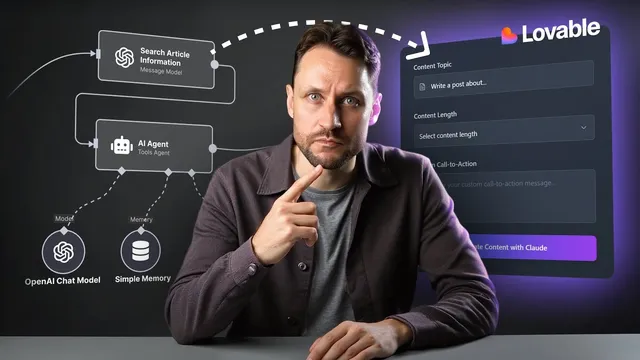
Someone Will Get Really Rich Doing This
Based on Simon Høiberg's video on YouTube. If you like this content, support the original creators by watching, liking and subscribing to their content.
Non-technical users struggle with Nad’s complexity, so simplified, form-based UIs on top of proven workflows can capture demand.
Briefing
AI-powered “Nad” workflows are spreading across social media, but many non-technical users find the underlying tools too complex—especially the intimidating UI. That gap creates a clear business opportunity: take powerful, real-world workflows that already exist (often free to download) and wrap them in simpler, user-friendly experiences so ordinary people can get results with minimal effort. The central play is to sit between the workflow and the average user, then package access in a way that feels like a form and a button rather than a technical setup.
The first and easiest path is building a streamlined interface on top of a single high-value workflow. The workflow discovery step is practical: search YouTube for Nad workflows, then look for ones that seem valuable but where comments show people struggling to make them work. After downloading a workflow and running it in a Nad account, the scalable version is to self-host the workflow so it can run unlimited times. Nad can trigger workflows via incoming webhooks (an API endpoint), which means a developer can build a simple UI that asks only for the essential inputs—such as Google login for workflows that require authentication or file uploads for workflows that need documents—while stripping away everything else.
Monetization then follows the AI usage model. If the workflow uses OpenAI, the operator pays for tokens through their own account. Instead of forcing users to manage API keys (which adds friction), the operator can charge for AI credits and add a margin. Subscription pricing can also work by bundling a fixed number of workflow runs per month. The workflow-to-UI build process can be accelerated with tools like Lovable, which helps translate a use case into the right interface.
A second, more ambitious approach scales from one workflow to a collection. Rather than selling a single app, the idea is to curate multiple valuable Nad workflows into a library (for example, an “easyN” umbrella) and provide one simple UI per workflow while requiring only a single account for the whole collection. That enables subscription plans that cover all apps under the umbrella, again with optional AI-credit billing and profit margins. The transcript points to Run Comfy as a real-world parallel: it takes an open-source Comfy UI workflow ecosystem, then offers one-click cloud runs with simplified interfaces that hide complexity in the background.
The hardest route—yet with the biggest upside—is turning the underlying problem into a full SaaS product. Instead of shipping the workflow as-is, the operator identifies what users actually achieve, then builds a SaaS that covers that outcome, potentially expanding beyond the original workflow. The workflow becomes an entry point: use it to kick off the idea, then replace Nad steps with custom API endpoints and a backend the operator controls (with infrastructure on AWS). The result is a dedicated product with its own UI and infrastructure, using the workflow only as inspiration and starting scaffolding.
Cornell Notes
The transcript argues that AI workflow marketplaces are growing, but non-technical users struggle with complex Nad interfaces. A business opportunity exists in wrapping proven Nad workflows in simpler, form-based UIs that require only the key inputs (like Google login or file uploads). The easiest path is one workflow: self-host it, trigger it via incoming webhooks, and monetize through AI token costs (e.g., OpenAI) plus a margin or monthly run limits. A bigger play is a workflow collection sold under one subscription umbrella, similar to how Run Comfy simplifies Comfy UI workflows. The highest-upside approach is to convert the workflow’s underlying problem into a full SaaS, replacing Nad steps with custom APIs and AWS-backed infrastructure.
Why do Nad workflows create a monetizable opportunity for non-technical users?
How does the “single workflow + simple UI” approach work in practice?
What monetization model fits workflows that use OpenAI?
How does the “workflow collection” strategy scale revenue and reduce user friction?
What makes the “turn it into SaaS” approach the hardest—and potentially most valuable?
Review Questions
- Which workflow characteristics (as inferred from comments and complexity) make the “single workflow + UI” approach most likely to succeed?
- How do incoming webhooks change what a simplified UI can do on top of Nad workflows?
- Compare the tradeoffs between selling one workflow versus a subscription library of many workflows. What changes for pricing and user onboarding?
Key Points
- 1
Non-technical users struggle with Nad’s complexity, so simplified, form-based UIs on top of proven workflows can capture demand.
- 2
Self-hosting Nad workflows enables unlimited workflow runs, which supports scalable product delivery.
- 3
Incoming webhooks let a custom UI trigger Nad workflows through a controlled API endpoint.
- 4
Monetize AI-heavy workflows by paying token costs (e.g., OpenAI) and charging users via AI credits plus a margin or monthly run limits.
- 5
Building a workflow collection enables one-account onboarding and subscription plans that cover multiple apps.
- 6
The highest-upside path is converting a workflow’s underlying problem into a full SaaS by replacing workflow steps with custom APIs and AWS-backed infrastructure.