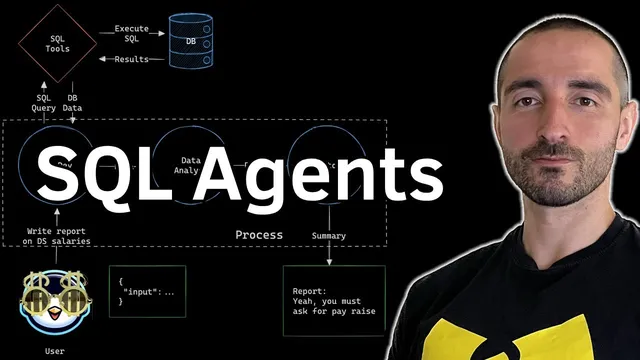
SQL AI Agents: Analyze Relational Databases with Natural Language using Llama 3 (LLM) and CrewAI
Based on Venelin Valkov's video on YouTube. If you like this content, support the original creators by watching, liking and subscribing to their content.
Use a multi-agent pipeline where one agent generates/validates SQL, another interprets results, and a third produces an executive summary.
Briefing
AI agents can turn natural-language questions into SQL queries, pull results from a relational database, and then generate a readable analysis and executive summary—using Llama 3 (via Groq) plus CrewAI. The core payoff is practical: companies already store valuable information in SQL tables, so an agent team can query that “private” data directly instead of relying on static documents or manual dashboards.
The workflow starts with a database developer agent that’s equipped with SQL-specific tools. Those tools let the agent (1) list available tables, (2) fetch table schemas and sample rows, (3) run arbitrary SQL queries against the database, and (4) repair malformed SQL using an LLM-powered query checker. Because the SQL execution tool can be risky in production, the setup emphasizes caution—especially around limiting query types to avoid harmful operations.
Once the database developer produces a correct SQL query and retrieves data, the results feed a data analyst agent. The analyst’s job is to interpret the returned rows in the context of the user’s question and write a longer “report” (the transcript notes a markdown report that can be quite detailed). A third agent—the senior report editor—then compresses that analysis into a short executive summary (kept under 100 words in the example), focusing on the most important findings.
Implementation-wise, the demo uses a Google Colab notebook. It installs LangChain components (including Groq integration) and CrewAI, sets a Groq API key, and loads a CSV dataset from Hugging Face (“demos series”). The CSV contains 376 salary examples across fields like experience level, employment type, job title, company location, remote ratio, and salary in USD. The data is converted into a SQLite database using SQLAlchemy, creating a table named salaries.
For the LLM layer, the setup initializes a Groq chat model using Llama 3 with a 1.370 billion parameter configuration (as written in the transcript). A callback handler is also configured to capture start/end events for visibility into what’s happening during agent runs.
The crew runs sequentially (no memory) and answers two example questions. For “effects on salary in USD based on company location size and employee experience,” the database developer generates a query that computes averages and groups results by relevant dimensions. The analyst then produces a detailed report concluding that the United States tends to have the highest average salaries, large companies and executive experience correlate with higher pay, and entry-level roles and small companies trend lower. For “how is the machine learning engineer salary in USD affected by remote positions,” the system generates a simpler query filtered to job title = machine learning engineer, then compares salary in USD across remote vs non-remote categories. The analyst reports that remote roles show higher average salaries and mentions a moderate positive correlation.
Overall, the approach demonstrates a repeatable pattern: natural-language → SQL generation/validation → database retrieval → analysis → executive summary, all orchestrated by a small, purpose-built CrewAI team tied directly to relational data.
Cornell Notes
A CrewAI team can answer natural-language questions by querying a relational SQL database and then producing both an analysis report and an executive summary. The database developer agent uses LangChain-wrapped SQL tools to list tables, inspect schemas, run SQL, and fix invalid queries with an LLM-based query checker. Retrieved results feed a data analyst agent, which writes a detailed markdown report tied to the user question. A senior report editor then condenses that report into a short summary (under 100 words in the demo). This matters because it connects LLM reasoning directly to private, structured data stored in SQL rather than relying on prewritten text or manual analysis.
How does the system translate a user’s natural-language question into a working SQL query?
Why is a query checker tool important in an agent-driven SQL workflow?
What role does the data analyst agent play after SQL results are returned?
How does the senior report editor change the output format and length?
What dataset and database setup does the demo use to make the SQL queries concrete?
What safety concern is raised about letting agents execute arbitrary SQL?
Review Questions
- What specific tools does the database developer agent use, and how do they work together to produce valid SQL results?
- How do the analyst and report editor roles differ in output content and length?
- What kinds of salary factors does the demo test in its first example question, and how are those factors reflected in the SQL query logic?
Key Points
- 1
Use a multi-agent pipeline where one agent generates/validates SQL, another interprets results, and a third produces an executive summary.
- 2
Wrap SQL capabilities into agent-friendly tools: table listing, schema inspection, SQL execution, and LLM-based query correction.
- 3
Connect LLMs to SQL through a relational database layer (the demo uses SQLite via SQLAlchemy) so agents can query structured data directly.
- 4
Treat unrestricted SQL execution as a production risk; add guardrails to limit query types and scope.
- 5
Feed SQL results into a dedicated analysis agent to produce a detailed markdown report grounded in the retrieved rows.
- 6
Compress long analyses with a separate summarization agent to produce short, decision-ready outputs.
- 7
Run the crew sequentially for predictable data flow: SQL → analysis → summary.