Storage (4) - Data Management - Full Stack Deep Learning
Based on The Full Stack's video on YouTube. If you like this content, support the original creators by watching, liking and subscribing to their content.
Use file systems for traditional file-based workflows, but expect limited parallelism when data sits on a single physical disk.
Briefing
Storage choices determine how data moves, how fast it can be read, and how safely it can be reused across training and production. The core takeaway is a practical division of labor: file systems handle foundational “files,” object storage wraps files as addressable objects with API-style operations and built-in versioning/redundancy, databases store structured records for fast querying, and data lakes aggregate semi-structured or log-like data for later transformation.
At the base layer, file systems treat the fundamental unit as a file—text or binary—typically not versioned at the file-system level and easy to overwrite or delete. They work well when access patterns are simple, such as reading a whole dataset from a single disk (which can be fast but limits parallelism because the data must pass through one physical location). Network file systems extend this by letting multiple machines share the same file namespace, and distributed file systems (including Hadoop-style setups) allow many machines to access files without needing to know where the bytes physically live.
Object storage changes the performance and management model by presenting an API over storage rather than a traditional filesystem. Instead of thinking in terms of “where the file is,” the system treats the fundamental unit as an object—often binary, but sometimes text—and can add features like versioning (new writes create additional versions rather than overwriting) and redundancy (replicating across multiple disks). That redundancy enables parallel reads: many “get” requests can be served from different disks at once. The tradeoff is that the extra abstraction layer can make object storage slower than raw local disk access, and it must handle concurrent readers. Amazon S3 is the canonical example, with similar patterns available via other cloud providers.
Databases sit on top of this with a different mental model: data is treated as if it lives in RAM for speed, while the database engine ensures durability by persisting changes to disk so nothing is lost on shutdown or power failure. The fundamental unit is a row with a unique identifier, columns for values, and references to other rows (including across tables). Databases are meant for structured, query-heavy data—not binary blobs. A common pattern is to store images or other binaries in object storage and keep metadata in the database: labels, dimensions, uploader identity, and the object path/ID. Logs are treated differently: they’re often stored for later investigation or metric computation, not as the primary operational dataset.
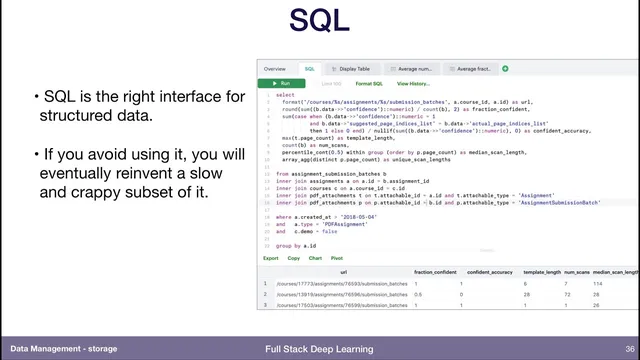
For the database layer, PostgreSQL is presented as a pragmatic default because it supports both SQL and JSON documents, letting teams handle “schema on read” needs without abandoning structured querying. SQL is framed as the right interface for structured data, and avoiding it risks reinventing query logic poorly.
Data lakes aggregate data from multiple sources—often logs and event streams—using “schema on read.” Raw data lands in the lake, then downstream processes impose structure later, transforming it into databases, packaged training files, or other artifacts. When training time arrives, minimizing distance between data and GPUs matters: the needed subset is copied to local or network storage near the compute so training doesn’t stall on slow transfers.
Finally, “what goes where” is summarized as: binaries to object storage (for versioning and parallel access), metadata/labels to databases, and raw event/log data to data lakes, with feature extraction or aggregation steps producing the training-ready datasets. For deeper study, the discussion points to Designing Data-Intensive Applications as a first-principles guide to databases, logs, and related tradeoffs.
Cornell Notes
Storage architecture works best when each system type owns a different job. File systems manage traditional files and shared mounts, but parallelism is constrained by physical placement. Object storage wraps binaries as addressable objects with API operations, enabling versioning and redundancy and often supporting parallel reads, at the cost of some latency. Databases store structured records (rows) for fast querying and durability, while binary data typically lives in object storage with only metadata/labels stored in the database. Data lakes aggregate multi-source data like logs using schema-on-read, then transform and package only what training or analytics needs—often copying the final training subset close to the GPUs to reduce data transfer distance.
Why do access patterns matter when choosing between file systems and object storage?
What’s the practical rule for storing binaries versus metadata?
How does schema-on-read in a data lake differ from schema in a database?
Why is SQL emphasized even for teams that think in JSON or NoSQL terms?
When should training data be moved near GPUs?
How do feature stores relate to data lakes and raw data pipelines?
Review Questions
- Which storage layer best fits binary blobs, and what should be stored alongside them for efficient querying?
- Explain how schema-on-read in a data lake changes when and where structure is imposed compared with a database.
- What performance tradeoffs arise from file systems versus object storage when many machines read data concurrently?
Key Points
- 1
Use file systems for traditional file-based workflows, but expect limited parallelism when data sits on a single physical disk.
- 2
Store binaries in object storage to gain versioning and redundancy, and to enable parallel reads across disks.
- 3
Keep structured metadata and labels in a database as rows so joins and queries remain fast and durable.
- 4
Use data lakes for multi-source raw data such as logs, relying on schema-on-read and later transformation into training-ready datasets.
- 5
Prefer PostgreSQL as a default because it supports both SQL and JSON documents, covering structured and semi-structured needs.
- 6
When training begins, copy only the required data subset close to the GPUs to reduce transfer latency and keep compute fed.
- 7
Treat feature stores as a pipeline decision: either compute features early and reuse them, or recompute from raw data to avoid feature-definition drift.