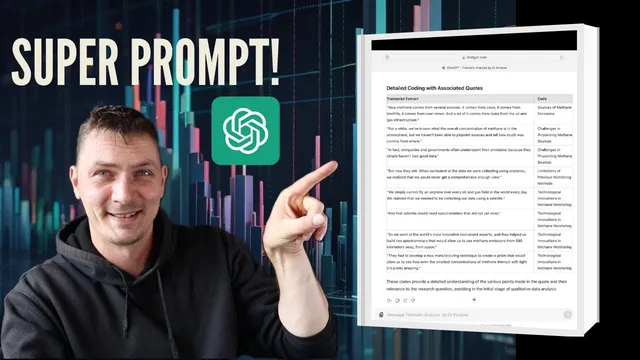
Struggling to code qualitative data? Use this prompt!
Based on Qualitative Researcher Dr Kriukow's video on YouTube. If you like this content, support the original creators by watching, liking and subscribing to their content.
Use a structured prompt that asks for quote-by-quote plain-language summaries before any coding suggestions are generated.
Briefing
A practical ChatGPT prompt can turn hard-to-interpret qualitative interview excerpts into usable coding outputs—summaries, relevance to the research question, and concrete coding suggestions formatted as a clear “codes table.” That matters because qualitative coding often stalls when a passage is dense, jargon-heavy, or unclear how it connects to the study’s aims. Instead of wrestling with the text alone, the workflow feeds each difficult quote into ChatGPT with instructions to (1) summarize it in simple terms, (2) explain why it is relevant to the specific research question, and (3) propose how to code the extract.
The approach is demonstrated using transcripts from TED Talks about methane emissions and how to monitor, manage, and reduce them. The process begins by setting context: the prompt includes a short description of the study and the exact research question. Then, for each expert quote, ChatGPT is asked to produce a plain-language summary of what the expert is saying, identify how that content links back to the research question, and generate coding suggestions that can be used directly in qualitative analysis software (or adapted into the researcher’s own code system).
A key detail is the prompt’s structure. Rather than asking for “coding” immediately, it first forces comprehension. The model is instructed to summarize the quote, then explicitly connect the quote to the research question, and only then suggest codes. In the methane example, the output identifies themes such as sources of methane emissions (including references like cows), historical challenges, and technological innovations—categories that align with the study’s focus on monitoring, managing, and reducing emissions. The result is not just interpretive help; it also provides actionable starting points for coding.
The workflow also highlights a formatting upgrade: ChatGPT sometimes returns an “exact table” mapping text to codes (with text on the left and codes on the right). The creator notes that this table-style output is not always typical, but it appears when the custom instructions are set up to encourage that structure. Consistency is treated as a double-edged sword—often limiting in suggested code variety, but useful when it produces stable, repeatable outputs.
Finally, the method is presented as flexible. The prompt can be used with a custom GPT focused on thematic analysis (or with standard ChatGPT), and it can be applied either as a “help while coding” tool during analysis in software like Microsoft Word or Excel, or as part of a broader workflow from scratch. The core takeaway is that a well-designed prompt can convert confusing qualitative text into a structured coding pipeline—summary, relevance, and coding—so analysis can move forward instead of getting stuck on interpretation.
Cornell Notes
A targeted ChatGPT prompt can rescue qualitative coding when interview excerpts are confusing or hard to connect to the research question. The workflow feeds ChatGPT the study description and research question, then pastes each difficult quote with instructions to (1) summarize it in simple terms, (2) explain why it matters for the research question, and (3) suggest qualitative codes for the extract. In a methane-emissions example, the model links passages about emission sources, historical challenges, and technological innovations to the study’s focus on monitoring, managing, and reducing methane. A notable bonus is that the prompt can elicit a table format mapping quote text to codes, making it easier to transfer into coding software and continue analysis.
How does the prompt prevent ChatGPT from jumping straight to codes without understanding the excerpt?
What information should be included before pasting quotes for coding?
What does “relevance to the research question” look like in practice?
How can the coding suggestions be used in real qualitative analysis work?
Why does the transcript emphasize a table format mapping text to codes?
What are the tradeoffs of using ChatGPT for code generation?
Review Questions
- When using this prompt, what is the required order of tasks (summary, relevance, coding), and why does that order matter?
- How would you adapt the prompt if your research question is narrower than “monitor/manage/reduce methane emissions”?
- What advantages does a “text-left, codes-right” table format provide for traceability during thematic analysis?
Key Points
- 1
Use a structured prompt that asks for quote-by-quote plain-language summaries before any coding suggestions are generated.
- 2
Include the study description and the exact research question in the prompt so relevance can be judged consistently.
- 3
For each difficult excerpt, require three outputs: simple summary, explicit relevance to the research question, and qualitative coding suggestions.
- 4
Transfer suggested codes into your coding workflow by selecting the corresponding quote segments in your analysis software and refining codes as needed.
- 5
Encourage table-style output (text mapped to codes) to make the results easier to apply and audit.
- 6
Apply the method either during active coding in tools like Microsoft Word or Excel or as part of a broader analysis workflow from scratch.
- 7
Expect consistent but sometimes limited code variety; counterbalance by relying on the summary and relevance steps to deepen interpretation.