Take Smart Notes in Obsidian a Daily Workflow
Based on Joshua Duffney's video on YouTube. If you like this content, support the original creators by watching, liking and subscribing to their content.
Start with a daily note as a low-friction scratchpad for meeting takeaways, reading snippets, and random ideas, then review at day’s end.
Briefing
Smart Notes in Obsidian is built around a simple daily-to-permanent workflow: capture ideas instantly in a low-friction “scratch” space, then convert only the worthwhile items into durable notes that link into a growing knowledge structure. The payoff is less about collecting more information and more about making past knowledge retrievable—by turning scattered thoughts, meeting takeaways, and reading insights into connected artifacts rather than a cluttered stack of tagged fragments.
The process starts with a daily note used as a scratchpad and planner. During meetings, virtual coffees, one-on-ones, or while reading for work, the system keeps note-taking friction near zero: ideas get written down immediately as quick bullet lists or short snippets. The daily note acts as a catch-all for “random ideas” that might later become podcast episodes, blog posts, or future research threads. At day’s end, tasks are carried forward, while captured notes are reviewed. Some entries are left alone if they don’t prove useful; others become candidates for permanent storage.
Conversion into a permanent note is where the method shifts from dumping to organizing—without forcing structure too early. The workflow treats the scratch space as temporary memory, then asks where the idea belongs in a “tree of knowledge.” In Obsidian, this is done by linking: the note is moved into the slip box (digital folder structure) and linked to a higher-level topic such as Psychology or Productivity. The linking approach replaces heavy folder management and avoids creating a massive, all-seeing index. Instead, the system keeps top-level categories manageable, then relies on navigation within each branch.
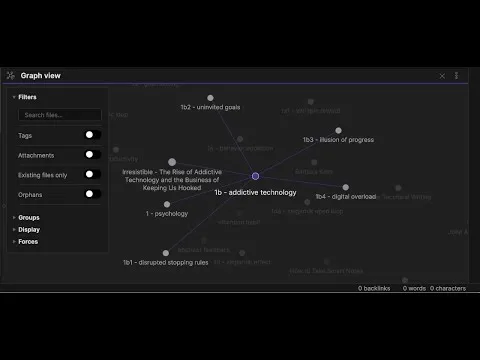
A key mechanism is Obsidian’s back-linking and graph-style connections, which make relationships visible over time. Rather than tagging everything into generalized buckets (a practice the interviewee finds tends to become clutter), the system uses links to create context. The result is a knowledge base that behaves more like a library: broad sections (e.g., Psychology) contain smaller genres and subtopics, and each new note is placed by reasoning about its best fit.
Reading-based knowledge gets handled through “reference notes.” When learning from books or articles, the goal isn’t copying quotes word-for-word. Instead, literature notes compress key lessons into concise, synthesized language in the user’s own words. Over time, those chapter-level insights can be merged into a larger permanent note that summarizes a theme—such as “removing redundancies” in technical writing—so the system becomes a searchable distillation of what mattered.
The method also supports both professional and personal use inside a single Obsidian vault. Meeting notes, research for a book, and personal behavior concepts can coexist, and cross-pollination often strengthens the work. One example: “stopping rules” from a book about behavior and temptation becomes directly applicable to work habits and online shopping, and even personal constraints like not owning a smartphone are framed as practical stopping rules. The overarching message is that not everything needs to be permanent—ephemeral notes belong in scratch space, while durable notes earn their place through linking, synthesis, and relevance.
Cornell Notes
Smart Notes in Obsidian uses a two-stage flow: capture quickly in a daily “scratch space,” then promote only the most useful items into permanent notes inside a linked knowledge structure. The scratchpad is intentionally low-friction—ideas from meetings, reading, or random inspiration get written down immediately without deciding where they belong. At review time, tasks roll forward, while notes that matter are moved into the slip box and linked to a higher-level topic (e.g., Psychology or Productivity), building a “tree of knowledge.” Instead of relying on many tags, connections come from Obsidian links and back-links, and reading insights are compressed into literature notes that can later be merged into larger summaries.
Why does the workflow start with a daily “scratch space” instead of organizing immediately?
How does a note get promoted from fleeting to permanent in this system?
What role do links and back-links play compared with tags?
What makes a “literature note” different from copying from a book?
How does the system handle organization without creating too many folders or an overwhelming index?
Can the same Obsidian workflow support both work and personal learning?
Review Questions
- What specific end-of-day decisions determine whether a scratch note stays ephemeral or becomes a permanent note?
- How does linking to top-level topics (e.g., Psychology, Productivity) function as an organizing principle in place of tags and folders?
- What distinguishes a literature note from a direct quote, and how can multiple literature notes combine into a larger permanent summary?
Key Points
- 1
Start with a daily note as a low-friction scratchpad for meeting takeaways, reading snippets, and random ideas, then review at day’s end.
- 2
Treat scratch notes as temporary memory; promote only the useful ones into permanent notes after deciding where they fit in the knowledge structure.
- 3
Use Obsidian links and back-links to create context between notes, rather than relying on many generalized tags.
- 4
Build organization as a “tree of knowledge” by linking new permanent notes to appropriate top-level topics like Psychology or Productivity.
- 5
Create literature notes by compressing and synthesizing key lessons from books or articles in your own words, not by copying quotes.
- 6
Keep the vault unified so professional and personal learning can cross-pollinate and strengthen future work.
- 7
Use sparingly tags or reminders only for review needs; let the main navigation come from linking instead of folder sprawl.