Team Knowledge Base in Tana
Based on CortexFutura Tools's video on YouTube. If you like this content, support the original creators by watching, liking and subscribing to their content.
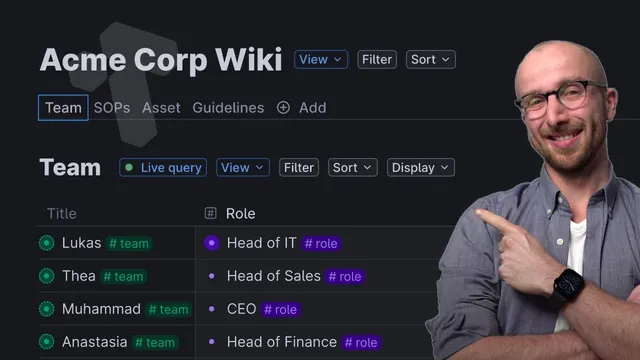
Create a “team” live search node keyed to a team hashtag so new people appear instantly in the dashboard.
Briefing
A team wiki in Tana can be built around live, hashtag-driven searches that automatically assemble people, roles, standard operating procedures (SOPs), assets, and guidelines into one navigable dashboard. The core move is creating a “team” search node tied to a team hashtag, then using Tana’s super tags and live search behavior so new entries (people, SOPs, tasks, and related records) appear instantly and stay organized as the organization grows.
The setup starts with a team list for Acme Corp. A new search node labeled “team” is configured to pull in items tagged with the team hashtag. Once people are added, Tana creates each team member entry directly in the relevant “today” node for that view, and the dashboard can render the results as a table. Each person record includes an email field for tidy contact info and a role field implemented as an instance of a Roll super tag. Because it’s an instance field, entering a role prompts tagging immediately—turning each person’s responsibilities into structured data rather than free text.
Roles then connect to SOPs. A dedicated “S Ops” tab is created as another search node that pulls in all items tagged as SOP. Each SOP is maintained by a specific person, represented as an instance of the team member. For example, IT maintains “set up new user accounts,” head of Finance handles “send out invoice,” head of Sales owns “sales proposal,” Muhammad runs “weekly stand up,” and Ranjit is responsible for “running SWOT analyzes.” This structure makes responsibility discoverable both ways: expanding the SOP list shows who maintains what, and opening a person’s profile shows everything they maintain across SOPs.
Inside each SOP, tasks are broken into actionable steps using a SOP task super tag. Tasks can be templated from fields—such as building a task title from the selected fields—so “create email address” and “activate MFA” can be generated consistently. A key productivity feature is cloning references: from a task like “set up new user account,” a user can clone the reference to create a new task instance, then rename it (e.g., “set up account for James”). That enables task dashboards that distinguish multiple instances of the same SOP step. Adding a done time to tasks also supports quick status checks, letting completed work surface in overviews.
Assets follow the same pattern. An “asset” search node gathers records such as websites or social media accounts, with associated information stored in custom fields (e.g., an “admin panel URL”). Assets can also be assigned to departments via an options field, enabling filters like “only assets for the IT department.” Guidelines are the final piece: a “guideline” search node collects items such as a vacation policy, maintained by an assigned person (e.g., Muhammad as CEO). The practical payoff is that all these sections work through live searches, so dashboards stay current no matter where records are created in the workspace—making it easy for anyone to find who to ask and what to update.
Cornell Notes
The team wiki design in Tana organizes an organization into four linked knowledge types—people/roles, SOPs, assets, and guidelines—using live search nodes and super tag instances. A “team” search node pulls in all people tagged with a team hashtag, while SOP and asset sections use their own live searches to automatically aggregate records. SOPs are maintained by specific team members, and SOP tasks can be templated from fields, cloned into new task instances, and marked with completion times. Assets can store associated details (like admin panel URLs) and be filtered by department. Because dashboards rely on live searches, updates remain consistent regardless of where entries are created in the workspace.
How does the “team” dashboard automatically stay up to date in Tana?
Why use a role field as an instance of a Roll super tag?
What makes SOPs more actionable than a simple document list?
How do assets support both detail and filtering?
How do guidelines fit into the same knowledge system?
Review Questions
- If a new SOP task needs to be repeated for different people, how would cloning a reference help avoid rebuilding the task from scratch?
- What fields would you add to an asset record to support both operational details (like URLs) and organizational filtering (like department)?
- How does using live search nodes change the maintenance burden of a team wiki as records are added in different parts of the workspace?
Key Points
- 1
Create a “team” live search node keyed to a team hashtag so new people appear instantly in the dashboard.
- 2
Use super tag instance fields (like Roll for roles) to enforce consistent tagging and make responsibilities structured.
- 3
Build SOPs as a dedicated live search section where each SOP is maintained by a specific team member instance.
- 4
Represent SOPs as task lists using a SOP task super tag, including templated titles built from fields and optional done times.
- 5
Use “clone reference” on SOP tasks to generate new task instances (e.g., “set up account for James”) while keeping the original SOP structure.
- 6
Model assets with associated-information fields (e.g., admin panel URL) and add department options to enable filtering.
- 7
Rely on live searches so dashboards remain accurate regardless of where SOPs, assets, or guidelines are created in the workspace.